

The Business Central manufacturing module plans, runs and costs production for small and mid-sized manufacturers. It uses production BOMs, routings, work centers and production orders, plus an MRP engine and standard costing. However, it plans with infinite capacity by default and doesn’t include detailed shop-floor scheduling.
Key takeaways about the Business Central manufacturing module
- It needs Premium. Manufacturing features appear only with the Premium experience, so factor that into licensing early.
- Planning assumes infinite capacity. Capacity limits apply only to work or machine centers you set up as capacity constrained, and even then as a rough-cut schedule.
- There are six flushing methods. The mix you choose sets how much consumption posts automatically and whether scrap gets recorded.
- Costing is built around standard cost. Variances only settle when a production order is finished and costs are adjusted.
- The module changed a lot in 2025 and 2026. You can now reopen finished orders, and quality management and subcontracting arrived as Microsoft-published apps.
This guide explains how BOMs, routings, production orders, planning, capacity and costing work together in Business Central. It also covers the limitations Microsoft documents and includes two worked examples. It’s written for operations, IT and finance leads at discrete manufacturers who need to react quickly to changing demand without losing control of cost.
What is the Business Central manufacturing module?
The Business Central manufacturing module is the part of Dynamics 365 Business Central that turns materials into finished goods. According to Microsoft’s manufacturing overview, production BOMs define components, routings define operations, and work and machine centers model capacity and cost. Production orders then tie these together, from planned demand through to finished output.
In practice, the module works with five other areas of Business Central: supply planning, inventory, warehousing, costing and analytics. As a result, posting consumption and output updates inventory and work in process, and those values flow through to the general ledger.
If you’re still deciding whether Business Central suits a discrete operation at all, start with our guide to Business Central for discrete manufacturing. This article goes deeper into how the module behaves once you’ve chosen it.
Built-in features and separately installed apps
Some capabilities are Microsoft-published apps that you add from Extension Management.
| Capability | How you get it |
|---|---|
| Production BOMs, routings, work and machine centers, production orders | Built in |
| MPS and MRP through the planning worksheet | Built in |
| Capacity-constrained resources (finite loading) | Built in |
| Standard cost roll-up and variance posting | Built in |
| Assembly orders for kitting | Built in (also in Essentials) |
| Basic subcontracting through vendor work centers | Built in |
| Subcontracting worksheet, subcontractor prices and component transfers | Subcontracting app from Microsoft |
| Inspections, pass/fail templates and lot blocking | Quality Management app from Microsoft |
| Manufacturing KPIs and dashboards | Power BI Manufacturing app |
License requirements
Manufacturing is available only with the Premium experience. Since November 1, 2025, Premium lists at $110 per user per month, against $80 for Essentials.
Because Premium is licensed per user, confirm with your partner which of your users need it before you set a budget. Team Member licenses can cover light users who mainly view or approve. For a full cost comparison, see our manufacturing ERP buyer’s guide.
What master data does the Business Central manufacturing module use?
The module uses four kinds of master data. The item card says whether an item is produced, the production BOM says what goes into it, the routing says how it’s made, and work and machine centers say where, and at what cost. When you refresh a production order, Business Central copies the BOM and routing into it. Errors in this data therefore carry into every plan, schedule and cost.
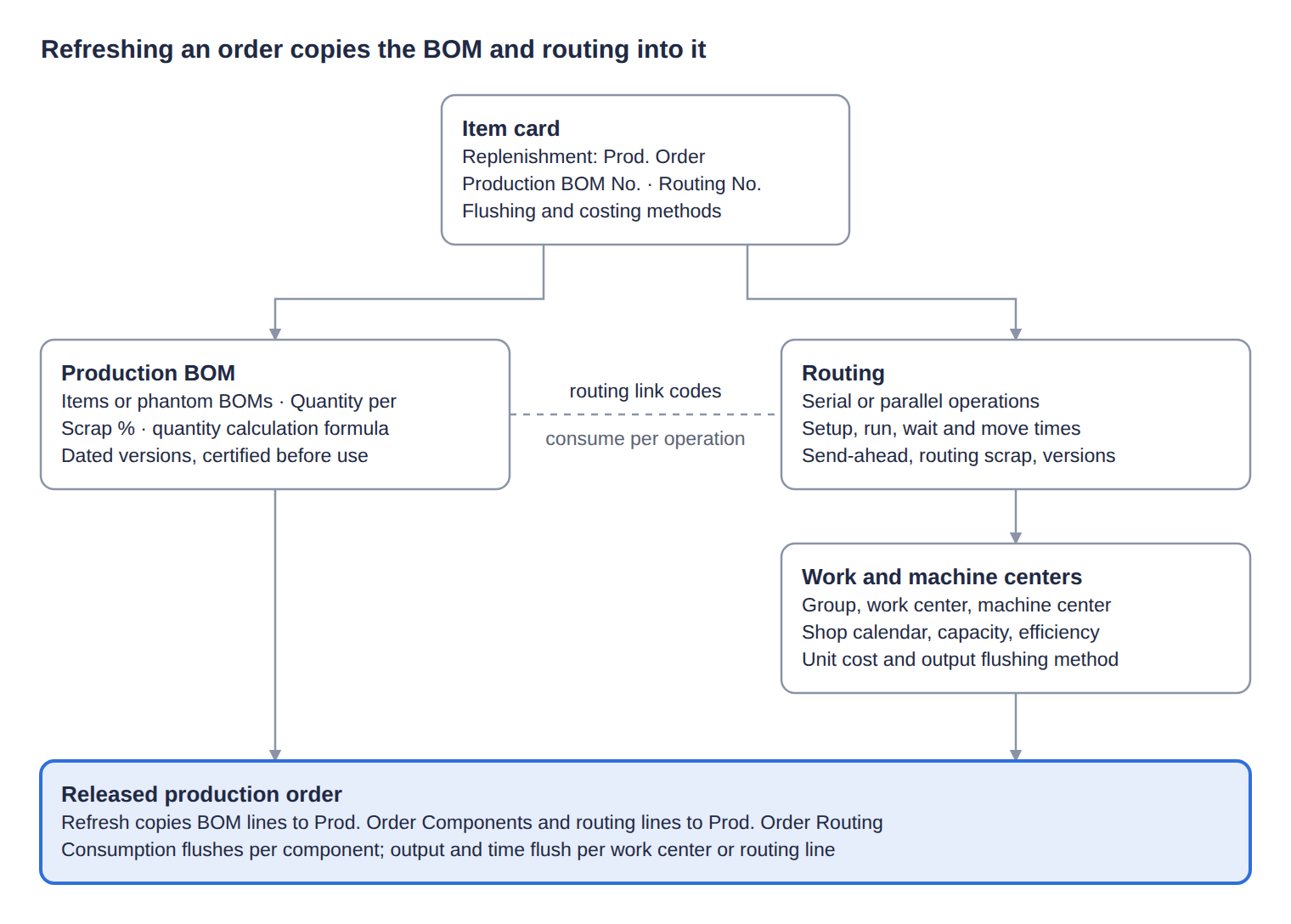
A production BOM lists components and their quantity per parent. Key settings:
- Phantom BOMs group components without creating a separate production order or inventory transaction. Instead, their components explode straight onto the parent order.
- Versions carry a starting date, and each stays valid until the next one starts. A comparison page shows quantities across versions side by side.
- Certification is required before a BOM can be used in production or planning.
- Scrap % adds expected component waste. It’s different from routing scrap, which covers scrapped output.
- Calculation formulas can multiply quantities by length, width, depth or weight. Meanwhile, Fixed Quantity consumes the same amount regardless of lot size.
For light kitting without routings, assembly BOMs are the simpler option. Our guide to sub-assembly setup covers how multi-level structures behave.
Routings
A routing is the sequence of operations, each assigned to a work or machine center.
- Serial or parallel. Parallel routings branch with a Next Operation No. such as 20|30, so the longest branch sets the lead time.
- Four time fields. Setup time applies per order and run time per unit. By contrast, wait and move times extend lead time but don’t consume capacity.
- Send-ahead quantity lets the next operation start on a partial lot, which shortens lead time.
- Routing link codes tie a component to the operation that uses it, so it’s consumed when that operation runs. Never reuse a code across operations, or the component is consumed twice.
Work centers and machine centers
Work and machine centers sit in a three-level hierarchy: work center group, work center, then machine center. Each needs a shop calendar, or it shows no available capacity.
Two formulas apply. First, an operation’s duration equals run time divided by efficiency and capacity. Second, unit cost equals direct unit cost, plus that cost times the indirect cost %, plus the overhead rate. Note also that the Alternate Work Center field is for information only, so planning never uses it.
How do production orders work in Business Central?
A production order moves through five statuses, and each one controls what you can do with it. The table below summarizes Microsoft’s guidance on production orders.
| Status | What it’s for | What people often get wrong |
|---|---|---|
| Simulated | Quotes and cost estimates | Planning ignores it, and it disappears when its status changes |
| Planned | Planning’s best estimate of future load | Planning deletes and recreates planned orders every run, so creating them by hand is wasted effort |
| Firm Planned | A committed slot for future production | Later planning runs leave it alone |
| Released | Execution: recording consumption, output and time | Automatic flushing happens only here, and “released” doesn’t mean materials are picked |
| Finished | Closing the cost cycle; traceability | It can’t be edited, but it can be reopened once to fix missing consumption or tracking |
You change status with the Change Status action, or for many orders at once from the Change Production Order Status page. In addition, only orders created from the planning worksheet, order planning, sales order planning or the Replan action are automatically reserved and tracked to their demand.
Flushing methods
Flushing decides when component consumption is recorded. You set it on the item or stockkeeping unit, and it copies to the production order when you refresh it. Microsoft offers six methods:
| Method | When consumption posts | Typical use |
|---|---|---|
| Manual | Only when you post a journal | Variable quantities, substitutions, tracked components |
| Forward | At release, for the expected quantity; with routing link codes, when the linked operation starts | Low-defect work where most material is used early |
| Backward | At finish, based on actual output; with routing link codes, when each operation finishes | Accurate consumption without manual entry |
| Pick + Forward | Like Forward, but only after a warehouse pick | Locations with bins or directed picking |
| Pick + Backward | Like Backward, but only after a warehouse pick | Same |
| Pick + Manual | Manual posting that requires a pick | Warehouse-controlled locations |
Most plants mix methods by component. However, Microsoft warns that automatic flushing means you “might not accurately record, or even be aware of, scrap.” For high-value or scrap-prone parts, manual or backward flushing by operation is usually safer. Output is flushed separately, too: work and machine centers carry their own Manual, Forward or Backward setting, which you can override per routing line.
Posting, scrap and corrections
- Production journal. Opened from a released order line, it shows components under their operations with actuals to date. It’s the easiest way to post consumption and output together.
- Batch journals. Consumption and output journals process many orders at once. For example, you can post output first with Explode Routing and then consumption based on what was actually produced.
- Scrap is posted per operation as scrap rather than finished output.
- Corrections. Since April 2025, you can reopen a finished order once and reverse consumption, output, capacity and subcontracting entries, including cancelling orders that already have consumption.
If you want shop-floor data captured at the machine rather than in journals, our operations manager’s guide covers the options.
How does planning work in the Business Central manufacturing module?
Planning in the Business Central manufacturing module runs through the planning worksheet. It nets demand against supply and then suggests what to make, buy, move or cancel. It plans materials with infinite capacity, so a plan can overload a work center without any warning.
MPS, MRP and planning calculation options
MPS and MRP use the same algorithm. MPS covers end items with sales orders or forecasts, while MRP covers their dependent components. Most companies run both together.
- Calculate Regenerative Plan deletes all planned supply and replans every item. Microsoft calls it the most common process.
- Calculate Net Change Plan replans only items whose demand, supply or planning settings changed.
- Get Action Messages gives a quick view of recent changes between full runs.
In every case, Microsoft notes that the worksheet assumes infinite capacity and ignores work and machine center limits.
Action messages
The plan is expressed as action messages, generated one BOM level at a time so changes ripple correctly through multi-level products.
| Action message | When it appears |
|---|---|
| New | Existing supply can’t cover the demand |
| Change Qty. | A tracked demand’s quantity changed |
| Reschedule | A date change unbalanced supply and demand |
| Resch. & Chg. Qty. | Both the date and the quantity changed |
| Cancel | The demand disappeared, or the supply is no longer needed |
When you carry out the messages, Business Central creates planned or firm planned production orders, along with purchase, assembly and transfer orders. From version 29, expected in early October 2026, you can also create released production orders directly from the worksheet.
Reordering policies
The reordering policy on each item decides how planning sizes supply. An item without one is left out of planning altogether. Microsoft’s best-practice guidance maps the four policies to ABC classes:
| Policy | Best fit in manufacturing | Watch out for |
|---|---|---|
| Order | A items; make-to-order; top-level items and expensive subassemblies | It reserves supply to specific demand automatically |
| Lot-for-Lot | B items; components used in many BOMs; the safe default | It groups demand within the time bucket |
| Fixed Reorder Qty. | C items and lowest-level components, with a reorder point | Don’t combine it with forecasts or reservations |
| Maximum Qty. | C items with storage limits or high carrying cost | The order quantity changes each time |
Microsoft’s design notes on reordering describe four behaviors behind many planning suggestions:
- Time buckets group demand into one order, which avoids a cascade of reschedules.
- Overflow warnings suggest reducing supply when projected stock would exceed the maximum.
- Emergency orders cover a projected shortfall with the exact quantity, ignoring minimum, maximum and multiple order settings.
- Calendars move supply that falls on a non-working day to the nearest working day.
How does Business Central handle capacity and scheduling?
Business Central schedules operations with infinite capacity by default. In other words, it uses lead times and routing order, and it lets work centers become overloaded. Finite loading only applies to the resources you choose to constrain.
Capacity-constrained resources
For bottlenecks, you add a work or machine center to the Capacity Constrained Resources page, according to Microsoft’s work center setup guide. Two settings then control how it’s loaded:
- Critical Load % caps how full the resource can get. For example, 90 leaves a 10% buffer.
- Dampener % lets the scheduler exceed that cap slightly to avoid splitting an operation.
When a time slot is too small, Business Central splits the operation across the nearest free slots and assigns setup time only once. Also, constrained resources with a capacity above one are planned in sequence, not in parallel.
Scheduling limitations in the Business Central manufacturing module
In Microsoft’s words, “Business Central doesn’t support detailed shop floor control.” Instead, it produces a rough-cut schedule rather than one built on priorities or optimization rules. Consequently, plants with several bottlenecks, sequence-dependent setups or daily drag-and-drop rescheduling usually add a visual scheduling extension. We cover the options later in this guide.
To see the load a plan creates, use the work center and machine center load views. Checking them after each planning run is the simplest way to catch overloads that the planning worksheet won’t flag.
Worked example: calculating lead time from routing times
Take a simplified order for 100 steel brackets with a two-step routing. It ignores wait, move and queue time to keep the numbers clear, and it applies Microsoft’s formulas for duration and send-ahead.
| Operation 10: Cutting | Operation 20: Welding | |
|---|---|---|
| Setup time | 30 min | 20 min |
| Run time | 2 min per unit | 3 min per unit |
| Work center efficiency | 80% | 100% |
| Setup duration (setup ÷ efficiency) | 37.5 min | 20 min |
| Run duration (run × 100 ÷ efficiency) | 250 min | 300 min |
| Total duration | 287.5 min | 320 min |
Notice that cutting books 200 minutes of run time against the work center, but the operation lasts 250 minutes. That’s because efficiency stretches duration, not the capacity Business Central allocates.
Without send-ahead, welding waits for all 100 brackets to be cut. As a result, the order takes 287.5 + 320 = 607.5 minutes, or just over 10 hours.
With a send-ahead quantity of 25 on cutting, welding can start once the first 25 brackets are cut. That point comes after 37.5 + (25 × 2 ÷ 0.8) = 100 minutes. Welding then runs its full 320 minutes and finishes at 420 minutes, or 7 hours. Because welding is the slower step, it never runs out of parts. The send-ahead quantity reduces the order’s lead time by about three hours, or 31%.
How does manufacturing costing work in Business Central?
The module is built around standard cost. Produced items enter inventory at a predetermined cost, and any gap to actual cost posts as a variance, split by cost type, when the order is finished and costs are adjusted, as Microsoft’s production posting design notes explain. FIFO and average costing also work. However, most of the costing tools assume Standard.
Cost elements of a produced item
According to Microsoft’s guide to calculating standard cost, a produced item’s cost is built from these elements:
| Cost element | Where it comes from |
|---|---|
| Material | Components on the BOM, at one level or rolled up through subassemblies, plus expected scrap |
| Non-inventory material | Consumables and services on the BOM, but only if you turn on Include Non-Inventory Items to Produced Items |
| Capacity | Work and machine center rates multiplied by routing times. Setup time is spread over the item’s lot size |
| Subcontracted | Outside operations, costed on the work center that represents the subcontractor |
| Capacity overhead | Indirect cost % and overhead rate on work and machine centers |
| Manufacturing overhead | Indirect cost % and overhead rate on the produced item |
Updating standard costs
For one item, Calc. Production Std. Cost rolls costs up either one level or through every level of the BOM. For many items, the Standard Cost Worksheet is the better tool:
- Purchasing suggests new component costs.
- Production suggests new work and machine center rates.
- Finance rolls the changes up, reviews the impact and implements them on a chosen date.
- Business Central then creates revaluation lines for the stock you already hold.
How WIP and variances are posted
Consumption and capacity post into work in process (WIP), and output leaves WIP at standard cost. The two rarely match exactly. Therefore, the Adjust Cost – Item Entries job reconciles them, and it only considers orders with status Finished. Unfinished orders leave WIP and variances unsettled at month-end.
Variances then post by cost component: material, capacity, subcontracted, capacity overhead, manufacturing overhead and non-inventory material. Since April 2026, capacity and overhead also post to the WIP account of the production location, which fixes a long-standing problem for multi-site costing.
Worked example: calculating production variances
Staying with the 100 brackets, assume a simple standard cost with no overhead. Each bracket uses one steel plate at $12, and the routing’s standard time is 6 minutes per bracket at a work center rate of $60 per hour.
| Standard for 100 brackets | Actually posted | Variance | |
|---|---|---|---|
| Material | 100 plates × $12 = $1,200 | 104 plates × $12 = $1,248 | $48 |
| Capacity | 10 hours × $60 = $600 | 11 hours × $60 = $660 | $60 |
| Total | $1,800 | $1,908 | $108 |
Here’s how that flows through Business Central:
- Consumption of 104 plates and 11 hours of capacity post $1,908 into WIP.
- Output of 100 brackets leaves WIP at the standard $1,800, so $108 stays behind.
- Once the order is set to Finished, Adjust Cost – Item Entries posts the $108 as a $48 material variance and a $60 capacity variance.
- If the order is left as Released at month-end, however, the $108 simply sits in WIP. Nobody sees the extra scrap or the slow hour until someone finishes the order.
Finish production orders promptly so that variances post in the right period.
For a step-by-step costing setup, see our Business Central manufacturing configuration guide.
Which apps extend the Business Central manufacturing module?
Quality management and advanced subcontracting are Microsoft-published apps, while the other connected features below are built in.
Quality Management
The Quality Management app has been available since April 1, 2026. It creates inspections at receipt, production, assembly and warehouse points, and it uses templates with measurements and pass/fail criteria. In addition, it can block non-compliant lots automatically and trigger workflows from results. New environments install it automatically; existing ones add it from Extension Management. If you pay for a third-party inspection add-on today, compare it with the native app before your next renewal.
Subcontracting
Basic subcontracting has always been built in. You link a work center to a vendor and use it on routing operations, costed per hour or per unit. The Subcontracting app, available since July 8, 2026, goes much further:
- A subcontracting worksheet, plus purchase orders created straight from released order routings.
- Subcontractor price lists.
- Component supply methods: the vendor buys them, they’re stocked at the vendor, or you transfer them.
- Item charges such as freight on subcontract receipts.
- Automatic location and transfer-order handling.
Other connected capabilities
- Item tracking. Lot and serial numbers carry through production. Since April 2026, exploding a routing creates one output line per serial number.
- Warehouse integration. Pick-based flushing and default bins on work and machine centers keep components and output in the right places.
- Power BI Manufacturing app. Manufacturing KPIs, updated in 2025 and extended with subcontracting analysis in April 2026.
- Sustainability. Scope 3 emissions now flow through manufacturing, available since December 2025.
- AI agents. The Sales Order Agent turns emailed customer orders into quotes and orders, and the Payables Agent handles vendor invoices. Both have been available since November 2025 and use Copilot credits.
Not sure which of these to switch on? Talk to our Business Central manufacturing team about what fits your plant.
What changed in the Business Central manufacturing module in 2025 and 2026?
The table lists the main manufacturing changes since April 2025, newest first, from Microsoft’s release plans for 2025 wave 1, 2025 wave 2 and 2026 wave 1, plus the version 29 preview notes.
| When | Version | What changed |
|---|---|---|
| Early Oct 2026 (expected) | 29 | Released production orders created straight from the planning worksheet; capacity calendar monitoring; subcontracting instructions on purchase orders; basic warehouse picks for subcontracting; quality results filled in automatically |
| Jul 8, 2026 | 28 | Subcontracting app released |
| Apr 1, 2026 | 28 | Quality Management app released; location-specific WIP posting; one output line per serial number; approvals for requisition worksheets and item journals |
| Nov–Dec 2025 | 27 | Sales Order and Payables agents released; Scope 3 emissions in manufacturing |
| Oct 1, 2025 | 27 | Updated Power BI Manufacturing app and modernized manufacturing reports |
| Apr 1, 2025 | 26 | Reopen finished production orders; cancel orders that have consumption; skip warehouse picks for manual flushing; overpicking; block items or variants from output; output through warehouse put-aways; barcodes and attachments on production orders |
Microsoft also changed how it publishes updates. From September 2026, Microsoft publishes new capabilities on its continuous AI at Work roadmap instead of twice-yearly release plans. Version numbers continue, but features now arrive continuously.
What limitations does the Business Central manufacturing module have?
Microsoft documents these limitations itself:
| Gap | What Microsoft says or does |
|---|---|
| Detailed scheduling | Microsoft states that “Business Central doesn’t support detailed shop floor control”; the schedule is rough-cut |
| Capacity in planning | The planning worksheet assumes infinite capacity |
| By-products and co-products | No dedicated feature; Microsoft suggests posting a by-product as negative consumption |
| Alternate work centers | For information only; planning never uses them |
| Scrap with automatic flushing | You “might not accurately record, or even be aware of, scrap” |
| Shop-floor terminals | No native operator terminal; consumption and output are recorded in journals |
Add-ons for these limitations
Extensions on Microsoft Marketplace address each of these limitations. Examples include:
| Gap | Example add-ons |
|---|---|
| Visual and finite scheduling | NETRONIC’s Visual Production Scheduler adds a drag-and-drop planning board, while its Visual Advanced Production Scheduler adds full finite scheduling and simulations |
| Process manufacturing | Vicinity adds formulas, batch traceability and quality control for food and chemical producers |
| CAD and PLM to BOM | CADTALK automates BOM transfer from CAD systems |
| Shop-floor data collection | Several vendors offer terminal and time-tracking apps; see our shop-floor data collection guide |
When to consider Dynamics 365 Supply Chain Management
Dynamics 365 Supply Chain Management is the better fit if you need mixed-mode production (formula batches alongside kanban lines), a native shop-floor execution interface, IoT-driven maintenance or large multi-site planning. Our manufacturing ERP buyer’s guide compares the two in detail.
Setup Recommendations for the Business Central Manufacturing Module
These recommendations cover the Business Central manufacturing module settings that most affect planning and costing accuracy.
- Choose flushing per component, not per company. Use backward flushing for high-volume parts where actual output drives consumption. By contrast, keep manual flushing for expensive, tracked or scrap-prone parts so waste stays visible.
- Set reordering policies by ABC class. Start with Microsoft’s mapping: Order for A items and top-level products, Lot-for-Lot for most B items and shared components, and a reorder point for low-value C items. Then set Reserve to Never on reorder-point items, because reservations distort that planning.
- Decide on standard costing before go-live. Standard cost gives the clearest variances, but only if costs are rolled up before the first order finishes. Otherwise, every finished order posts its full cost as a variance.
- Constrain only your true bottlenecks. Constraining every work center adds operation splits and upkeep for little benefit. Instead, constrain the two or three resources that actually limit output, and review load views after each planning run.
- Treat certification and versions as a process. Uncertified BOMs and routings can’t be used, and a version with the wrong starting date puts the wrong structure on new orders. As a result, engineering changes need an owner, a starting date and a certification step.
For the full step-by-step setup, including a go-live checklist, see our Business Central manufacturing configuration guide.
Get Help with the Business Central Manufacturing Module
The Business Central manufacturing module is a capable, well-integrated way to run discrete production for small and mid-sized manufacturers. Its strengths are the connected master data, a dependable MRP engine and clear standard costing. Its main limitations are infinite-capacity planning, rough-cut scheduling and no native by-products.
Case in point. Folio3 helped All Together Enterprises, a cloth diaper manufacturer in Utah, move its operations onto Business Central, with variant-level BOMs for bundled products and integrated Shopify, Amazon and 3PL workflows. The result was 80% less manual reconciliation and more than 40% faster warehouse processing.
Folio3 Dynamics implements Business Central for discrete, process and mixed-mode manufacturers. We can review your setup, from flushing and planning parameters to costing, and show where the 2025–2026 features could save time.
Talk to a Business Central manufacturing expert or explore our Business Central for manufacturing services.
Frequently Asked Questions
Does the Business Central manufacturing module require a Premium license?
Yes. Manufacturing is available only with the Premium experience, which lists at $110 per user per month. By comparison, Essentials lists at $80 and doesn’t include manufacturing.
What’s the difference between assembly BOMs and production BOMs?
Assembly BOMs handle simple kitting with resources but no routings or work centers, and they’re available in Essentials. Production BOMs work with routings, work centers and production orders, and they need Premium.
Which flushing method should I use?
It depends on the component. Backward flushing suits high-volume parts where actual output should drive consumption. Forward flushing suits low-defect work that uses most material early. Meanwhile, manual flushing is safest for expensive, tracked or scrap-prone parts.
Can the Business Central manufacturing module do finite scheduling?
Partly. You can apply finite loading to work or machine centers set up as capacity-constrained resources. However, planning itself assumes infinite capacity, and Microsoft describes the result as a rough-cut schedule. For detailed finite scheduling, most plants add a scheduling extension.
Can Business Central handle process manufacturing or by-products?
Only in a limited way. There’s no dedicated by-product feature, although Microsoft documents a workaround using negative consumption. For formulas, batches and co-products, process manufacturers usually add an industry extension.
How are production costs and variances calculated?
Produced items usually use standard cost, rolled up from materials, capacity, subcontracting and overhead. When an order is finished, the Adjust Cost – Item Entries job compares actual and standard cost and posts the variances by cost type.
Does Business Central have quality management for manufacturing?
Yes. Microsoft’s Quality Management app has been available since April 1, 2026. It adds inspections, pass/fail templates, automatic lot blocking and workflows for purchasing, production, assembly and warehouse processes.
Last updated September 29, 2026. Feature details come from Microsoft Learn and Microsoft’s Business Central release plans, and may change.