Discrete manufacturers, those who build distinct, countable units like machinery, electronics, automotive components, medical devices, or industrial equipment, face a uniquely brutal set of operating pressures. Multi-level BOMs change every quarter. Engineering revisions break production schedules. Customers demand make-to-order configurations on standard lead times. And the spreadsheets your shop floor still runs on can’t keep up.
If you’re evaluating Business Central for manufacturing, this guide will walk through exactly how Microsoft’s mid-market ERP handles discrete production, what’s natively supported, where it shines, where it needs extension, and what to expect during a real implementation. By the end, you’ll know whether Dynamics 365 Business Central manufacturing is the right fit for your operation, or whether you’d be better served by a heavier platform.
The Real Pain Points Discrete Manufacturers Are Trying to Solve
Before we talk features, let’s name the problems. Most manufacturers we speak with at Folio3 Dynamics aren’t shopping for ERP because they want new software, they’re shopping because something is breaking.
The most common pain points we see:
- Fragmented data across engineering, production, and procurement. BOMs live in CAD, schedules live in Excel, and inventory lives in an aging accounting system. No one trusts any single source.
- Engineering change orders that wreck production. A revision drops, but Friday’s released order still consumes the old part. Rework, scrap, and missed ship dates follow.
- No real capacity visibility. Sales promises a delivery date that the shop floor can’t actually hit, because nobody can see machine availability across orders.
- Costing that’s always wrong. The standard cost was set last year. Actual material, labor, and overhead have drifted. Margins look fine until quarter-end.
Disconnected supply planning. MRP runs in one system, demand forecasts in another, and purchasing manually reconciles the two.
Industry research backs this up. Reports indicate that fragmented data, complex multi-level BOMs, and supply chain volatility are the most cited operational hurdles for discrete manufacturers, with up to 46% of discrete manufacturers reporting challenges deploying ERP across legacy systems and outdated infrastructure (Market Growth Reports, Discrete Manufacturing ERP Market Report). The good news: these are precisely the problems business central manufacturing functionality is built to address, provided you implement it correctly.
What Discrete Manufacturing Means Inside Business Central
In Business Central terminology, discrete manufacturing refers to the production of distinct, countable items assembled from a defined list of components. Think serial-numbered machines, individually packaged electronics, made-to-order metal parts. Each finished unit can be traced back to its specific BOM, routing, and production order.
This contrasts with process manufacturing, chemicals, food, and pharmaceuticals, where output is produced in batches based on formulas and ratios rather than discrete units. Business Central manufacturing is built natively for discrete and light/repetitive production. According to Microsoft Learn’s official manufacturing documentation, Business Central natively supports discrete manufacturing, including production orders, routings, bills of materials, and lot tracking. Process manufacturing typically requires an ISV extension that adds formula and recipe management on top.
For most mid-size manufacturers building physical products in distinct units, the native discrete capabilities cover the core operational footprint without customization. That’s the starting point most evaluations should anchor on.
The Five Core Pillars of Business Central Manufacturing
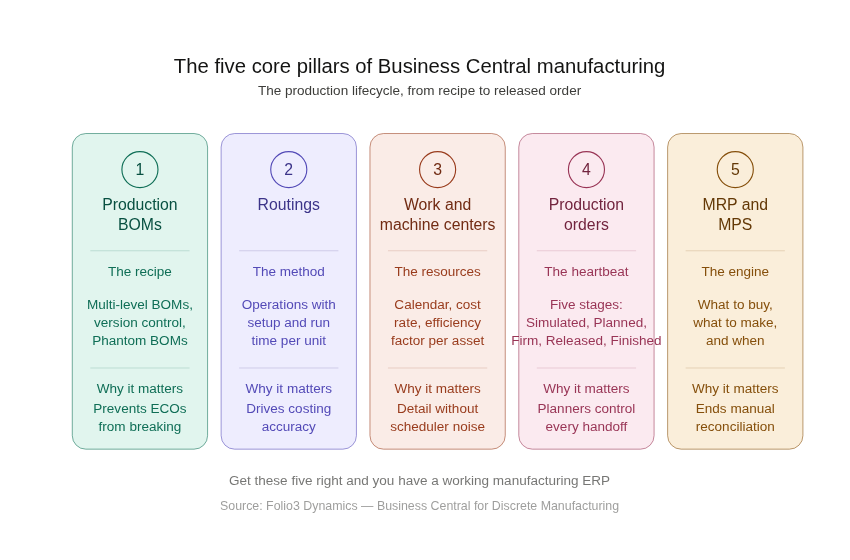
Rather than walk through every menu, it’s more useful to organize dynamics 365 business central for manufacturing into the five pillars that define the production lifecycle. Get these five right and you have a working manufacturing ERP.
1. Production BOMs
The Bill of Materials is the recipe, every component, sub-assembly, and raw material needed to produce a finished item, with quantities and units of measure. Dynamics 365 business central for manufacturing supports multi-level BOMs, version control with effectivity dates, and Phantom BOMs (sub-assemblies treated as part of the parent order rather than spawning separate production orders).
Version control matters more than people think. When engineering pushes a revision, you need to control which version applies to in-flight orders versus new ones. Business Central handles this through BOM versions tied to certification status and date ranges; without it, every ECO becomes a fire drill.
2. Routings
Where the BOM defines what to build, the routing defines how. Each routing is a sequence of operations: cut, weld, paint, assemble, test, assigned to specific work centers or machine centers, with setup time and run time per unit. A routing specifies a sequence of steps or operations that are required to produce a product.
Routings are where most of your costing accuracy comes from. If your run times are wrong, your standard costs are wrong, your capacity plan is wrong, and your quotes are wrong. Getting routings cleaned up during implementation is non-negotiable for any manufacturer serious about margin visibility.
3. Work Centers and Machine Centers
These represent the physical resources executing operations, a CNC machine, a paint booth, a labor pool, or a subcontractor. Each carries a calendar (shift hours, holidays, planned downtime), a cost rate, and an efficiency factor.
Work Centers can be modeled as groupings of Machine Centers, allowing you to plan at either level depending on how granular your scheduling needs to be. For most mid-market discrete manufacturers, two-level modeling (work center → machine center) gives the right balance of detail without burying schedulers in noise.
4. Production Orders
Production Orders are the operational heartbeat. They tie BOM, routing, components, capacity, and costs into a single executable record. Business Central supports several order types: Simulated orders used to test scenarios without affecting inventory, Planned orders automatically created by MRP based on demand forecasts, Firm planned orders converted from planned orders for execution, Released orders sent to the shop floor for active production, and Finished orders marked complete once goods are produced and inventory updated.
This five-stage lifecycle is what gives planners control. You can simulate a “what if we accept this rush order” scenario without touching real inventory. You can convert MRP suggestions into firm plans only when you’re ready to commit. You can release to the floor knowing your materials and capacity are aligned. Few mid-market ERPs handle this lifecycle as cleanly out of the box.
5. MRP and MPS
The planning engine. Material Requirements Planning (MRP) explodes demand against BOMs to tell you what to buy and what to make, while Master Production Scheduling (MPS) aligns top-level production volumes against forecasts and capacity. Together they replace the manual reconciliation that eats half your purchasing manager’s week.
Business Central’s MRP engine reads sales orders, forecasts, safety stocks, and existing supply, then proposes planned purchase orders and planned production orders, which planners can review, modify, and convert into firm orders. It’s not as deep as enterprise APS suites, but for most mid-market discrete manufacturers, it covers the essential planning loop.
How Production Orders Actually Flow Through Business Central
Here’s the typical real-world sequence for a discrete order:
- Demand enters the system. A sales order is created, or a forecast is loaded. Inventory falls below reorder point. Something signals demand.
- MRP runs and proposes supply. The Planning Worksheet calculates what needs to be made or bought, considering existing inventory, open POs, safety stock, and lead times. Planned production orders appear as suggestions.
- Planner converts to firm planned order. After review, adjusting dates, splitting batches, reassigning capacity, the planner converts proposals into firm planned orders. Materials are now committed.
- Order is released to the shop floor. The order moves to Released status. Components can be picked, work centers begin operations, and consumption posting starts.
- Consumption and output are posted. As materials are issued and operations completed, transactions hit the production order. Material consumption is automatically posted along with output when the production order changes to finished if backward flushing is configured, which is the most common setup for small to mid-size operations.
- Order is finished and costed. Once output equals demand and operations are complete, the order is set to Finished. Variances between standard and actual cost are calculated, and the cost lifecycle closes. Finishing the production order is an important task in completing the costing lifecycle of the produced item.
This flow is the same across every discrete manufacturer using business central manufacturing module, the difference is in the configuration of flushing methods, costing models, and capacity rules.
Capacity Planning: Finite vs Infinite
Business Central supports both finite and infinite capacity scheduling. Infinite scheduling assumes work centers can absorb any load, useful for rough-cut planning. Finite scheduling respects work center capacity limits and pushes operations forward when resources are saturated.
For most mid-market discrete shops, native finite scheduling is sufficient for daily planning. Manufacturers running highly constrained operations, multi-stage bottlenecks, complex sequencing rules, alternative resources, often layer in an APS extension from AppSource for more sophisticated optimization. The native engine isn’t a limitation; it’s a starting point most shops grow into rather than out of.
Manufacturing Costing in Business Central
Business central manufacturing costing is one of the most underrated capabilities of the platform.It supports Standard, FIFO, Average, and Specific costing methods, with LIFO support depending on localization and accounting requirements.
For each finished item, costs roll up from:
Material cost: actual or standard from the BOM
Capacity cost: work center / machine center rates × time consumed
Subcontractor cost: purchase orders against routing operations
Overhead: applied via overhead rates on items, work centers, or both
When a production order finishes, Business Central calculates variances, material, capacity, and overhead, and posts them to the GL. This is what gives finance real visibility into where margin is leaking. Most manufacturers running on legacy accounting software simply don’t have this level of cost truth, and discovering it during implementation is often the single biggest “aha” moment of the project.
Where Business Central Fits, and Where It Doesn’t
Let’s be honest about scope. Business central for manufacturing is engineered for small-to-mid-market discrete and light manufacturing operations. It is not a replacement for tier-one APS, MES, or PLM systems running in large complex enterprises.
Business Central is a strong fit for:
- Discrete manufacturers in the $10M–$500M revenue range
- Make-to-stock, make-to-order, and assemble-to-order operations
- Single-site or moderate multi-site deployments
- Shops needing tight integration with finance, sales, inventory, and warehouse in one system
You may need extensions or a heavier platform if you have:
- Highly complex shop-floor data collection requirements (MES territory)
- Advanced finite scheduling with optimization across hundreds of constraints
- Process manufacturing with formula management as the core need
- Quality management with deep ISO-driven workflows
The good news: the AppSource ecosystem is mature. Most gaps, advanced WMS, EDI, shop-floor data collection, advanced quality, advanced planning, are filled by certified ISV extensions that install cleanly and stay upgrade-safe. For larger or multi-site operations that exceed Business Central’s footprint, Dynamics 365 Supply Chain Management is the next step up within the same Microsoft stack. Choosing a knowledgeable business central manufacturing partner to map your actual workflow against the native + extension stack is what separates a smooth go-live from an 18-month rescue project.
What to Expect During Implementation
A typical midet microsoft dynamics 365 business central manufacturing-mark implementation runs for a single-site discrete deployment, depending on data volume, integration complexity, and how clean your master data is going in. The phases of a Dynamics 365 implementation generally look like:
- Discovery & process design: map current state, design future state, document gaps
- Configuration & data preparation: build the system, cleanse and import master data (items, BOMs, routings, work centers)
- Integration & extensions: connect to CRM, eCommerce, EDI, MES as needed
- UAT & training: test with real scenarios, train end users by role
- Go-live & hypercare: cutover, stabilize, optimize
The biggest single predictor of project success isn’t the software; it’s master data quality. Manufacturers who invest in cleaning BOMs, routings, and item master data before configuration consistently go live faster and with fewer issues than those who try to clean it inside the new system.
Conclusion:
Choosing the right ERP isn’t just about the software, it’s about the partner who implements it. Folio3 Dynamics has been building business central manufacturing solutions for over 20 years, with 200+ certified Microsoft Dynamics professionals across 7 global regions and recognition as ERP Software Blog’s Top Member 2025. Whether you’re moving off legacy accounting systems like QuickBooks, evaluating Business Central for the first time, or scaling an existing deployment, our manufacturing specialists can help you map the gap between where you are and where Business Central can take you.
Talk to a Dynamics 365 Expert → https://dynamics.folio3.com/contact/
Frequently Asked Questions
Is Microsoft Dynamics 365 good for manufacturing?
Yes, particularly for small-to-mid-market manufacturers. Dynamics 365 manufacturing capabilities span Business Central (mid-market) and Dynamics 365 Supply Chain Management / F&O (enterprise). Business Central covers discrete, assembly, and light manufacturing well; Supply Chain Management handles complex multi-site, lean, and process manufacturing at enterprise scale.
What are the types of manufacturing in D365?
The Dynamics 365 ecosystem supports four manufacturing modes: discrete (distinct units, BOM-driven), process (batch/formula-based), lean (kanban/pull-based), and project-based (engineer-to-order, project-driven). Business Central natively supports discrete and light assembly; the others are typically handled in Supply Chain Management or with ISV extensions on Business Central.
Which is better, SAP or Dynamics 365 for manufacturing?
It depends on scale. SAP S/4HANA is built for global enterprise complexity and brings deep functionality at significant cost, implementations typically run in months and total cost of ownership is high . Dynamics 365 Business Central Manufacturing is built for mid-market simplicity, faster deployment, and a far lower TCO. For most manufacturers under $500M revenue, Business Central or Dynamics365 Supply Chain Management offers a better fit-to-need ratio than S/4HANA.
Is Dynamics 365 good for discrete manufacturing?
Yes. Dynamics 365 discrete manufacturing is a first-class use case across the product line. Business Central handles native discrete with BOMs, routings, production orders, MRP, MPS, capacity planning, and finite/infinite scheduling. Supply Chain Management extends this with advanced shop-floor control, configurable products, and multi-site coordination.
What is discrete vs process manufacturing in Business Central?
Discrete produces distinct, countable units (a machine, a circuit board) using BOMs and routings, natively supported in business central manufacturing. Process produces batches based on formulas and ratios (a chemical, a beverage), supported via ISV extensions that add formula management on top of Business Central’s core. Most manufacturers fit cleanly into one bucket; some run mixed-mode and need careful design.
How does Business Central handle production orders?
Production orders move through five stages, Simulated, Planned, Firm Planned, Released, and Finished, giving planners control at each handoff. Each order ties together BOM, routing, components, capacity, and costs, supports automatic or manual material consumption and output posting, and closes with full variance analysis on completion. The lifecycle is one of the cleaner implementations in the mid-market ERP space.
Can Business Central replace a dedicated manufacturing ERP?
For small-to-mid-market discrete and light manufacturers, yes, in most cases. The combination of native functionality, the AppSource extension ecosystem, deep Microsoft 365 integration, and the maturity of partners like Folio3 Dynamics means most mid-market manufacturers can run their entire operation on Business Central without a separate dedicated MES or APS system. For large enterprise complexity, Dynamics 365 Supply Chain Management is the better path within the Microsoft stack.