

Dynamics 365 Field Service Implementation, Connected to Your ERP From Day One
Dynamics 365 Field Service is Microsoft's Dynamics 365 CRM app for on-site service work: work orders, scheduling and dispatch, a technician mobile app, asset history and parts inventory. We implement it and connect it to Business Central or Finance and Operations, so a closed work order updates stock and lands on the invoice without anyone rekeying it. Dispatchers, technicians and finance all work from the same records.


Proud Solution Partners




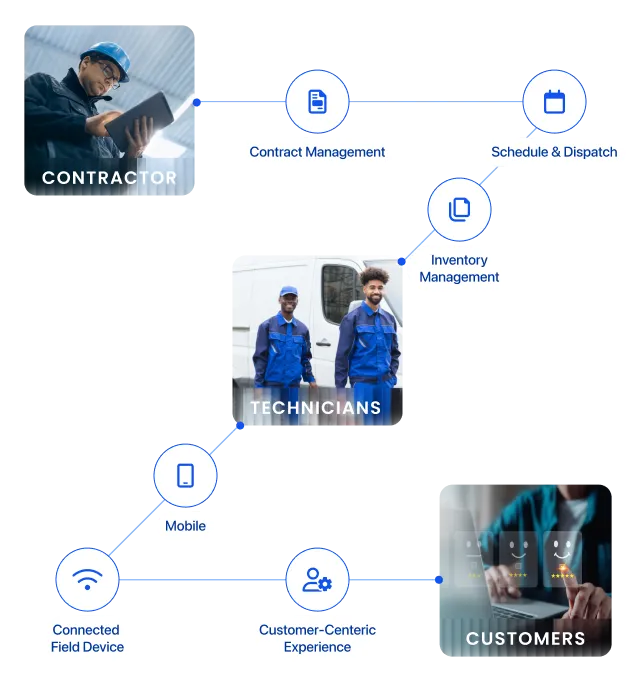
Field Service Overview
What Is Dynamics 365 Field Service?
Dynamics 365 Field Service is Microsoft's application for managing work done at customer sites. It turns a service request into a scheduled work order, sends a technician with the right skills and parts, records the visit on a mobile app and passes the result to inventory and billing. Service companies, equipment manufacturers, utilities and public agencies use it to run dispatch, field crews and maintenance contracts from one system.
Plan and Dispatch the Work
Work orders come from customer requests, service agreements or Dynamics 365 Customer Service cases. Dispatchers match each job to a technician by skill, availability and location on the schedule board.
Complete the Job On Site
Technicians see the job, asset history, parts and checklists in the Field Service mobile app, capture photos and signatures, and keep working offline when there is no signal.
Close the Loop With Finance
Parts used and hours worked flow to Business Central or Finance and Operations, so stock counts and invoices update as soon as the job closes.
Why do you need Dynamics 365 Field Service?
Field Service Challenges We Fix for SMBs and Enterprises
Most service teams we meet are still juggling spreadsheets, phone calls and paper job sheets. These are the four problems that cost them the most, and how Dynamics 365 Field Service fixes each one.
Higher Demand, Lower Personalization
Customers expect faster, more personal visits, but technicians arrive without the account or equipment history.
The fix: every work order carries the customer, asset and service history, so the visit starts informed.
Low First-Time Fix Rates
Repeat visits eat technician hours and customer patience.
The fix: incident types attach the required skills, parts and tasks to the work order before the technician leaves.
Scheduling Conflicts
Overlapping jobs, double-booking and last-minute changes leave dispatchers firefighting all day.
The fix: the schedule board shows every technician's availability, and the Scheduling Operations Agent proposes reassignments for dispatchers to approve.
Wrong Technician for the Job
Without visibility into skills and certifications, jobs go to whoever is free rather than whoever can fix them.
The fix: resource matching assigns work by skill, availability and location.
Features and Benefits
What Dynamics 365 Field Service Handles for Your Team
Here's what your dispatchers, technicians and back office do differently once Field Service runs the way your crews work.
Fix it on the first visit.
Send technicians out with the incident type, required skills, parts, tasks and asset history already on the work order.
Approve every scheduling change.
Match jobs to technicians by skill, availability and location on the schedule board, and review each change the Scheduling Operations Agent proposes before it applies.
Keep working without signal.
Pull up schedules, checklists, photos and signatures offline with the Field Service mobile app, or run a custom offline app like the one we built for SightLine.
Track every part in one stock count.
Deduct every part a technician uses from the same count your buyers rely on by connecting Field Service to Business Central or Finance and Operations.
Invoice as soon as the job closes.
Send completed work orders straight to ERP invoicing in Business Central or Finance and Operations with labor, parts and agreement pricing attached, and stop chasing paperwork at month end.
Sell maintenance contracts without adding admin.
Book recurring maintenance visits automatically by setting up each service agreement once.
Catch up on any job in seconds.
Skip reading every note with Copilot summaries of work orders and service accounts.
Field Service + ERP
Dynamics 365 Field Service Connected to Business Central or Finance and Operations
Field Service runs the job. Your ERP holds the stock and the money. Because we implement both sides, we connect them during the Field Service project, so nobody rekeys a work order into finance.
One stock count
Parts a technician uses on a job come off the same Business Central or Finance and Operations warehouse your buyers plan from.
Closed jobs become invoices
When a work order closes, labor, parts and agreement pricing go straight to ERP invoicing. No paper job sheets, no month-end chase.
Records mapped once
We map work orders, products, warehouses and customer accounts between both systems, so dispatchers, technicians and finance see the same data.
Running systems outside Microsoft? We connect them to Field Service through Burq iPaaS, our own integration platform.
Let's Find Out How Dynamics 365 Field Service Will Transform Your Business
pricing & licensing
Dynamics 365 Field Service Pricing & Licensing
Microsoft licenses Dynamics 365 Field Service per user, per month, in two editions. Dynamics 365 Field Service covers the full toolset for your own technicians, including work orders, scheduling, the Field Service mobile app, agreements, inventory and Copilot. Dynamics 365 Field Service Contractor gives external, non-employee technicians the essential work order tools. Microsoft sets list prices and they vary by region, so check our Dynamics 365 pricing and licensing guide for the full breakdown.
| Dynamics 365 Field Service Contractor | Dynamics 365 Field Service | |
|---|---|---|
| Base user price/month | $50 | $105 |
| App Access | Unlimited |  |
| Vendor and Contractor management | Unlimited | |
| Scheduling and resource dispatching | Unlimited | |
| Planned maintenance agreements |  |
|
| Returns processing | |
|
| AI assistance from Copilot in Dynamics 365 Field Service | |
|
| Technician performance analysis | |
|
services
Folio3 Dynamics 365 Field Service Offerings
Implementation
With two decades of Microsoft experience, we deliver end-to-end Dynamics 365 Field Service implementation, with the ERP connection designed in from the start.
Support & Maintenance
Keep Field Service running smoothly after go-live with our named Field Service support team, who know your configuration and fix issues before they reach your technicians.
Consulting
Not sure how Field Service will fit your operations? Our consultants map your service workflows and show where Field Service and your ERP should connect.
Migration
Whether you are transitioning from legacy systems or migrating from other platforms to Dynamics 365 Field Service, we are here to make the process hassle free.
Integration
Leverage our proprietary integration platform, Burq iPaaS, to integrate Dynamics 365 Field Service with any third-party application or system outside Microsoft.
Customization
No matter how simple or complex your business operations are, we can customize Dynamics 365 Field Service according to your business needs.
Why partner with Folio3
Partner With Folio3 for Field Service and ERP Delivery
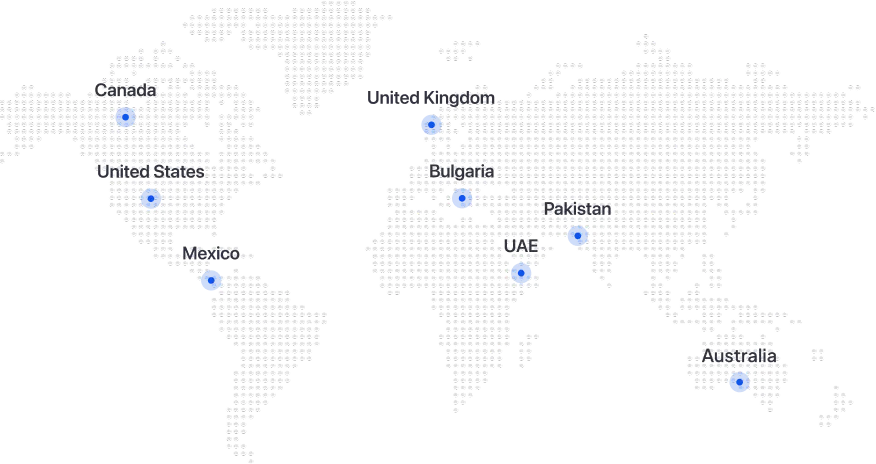
Most Field Service partners stop at the CRM side. Folio3 implements Dynamics 365 Field Service, Business Central and Finance and Operations, so one team designs the work order, inventory and invoicing flow end to end. We're a Microsoft Solutions Partner with four Solutions Partner designations and more than 20 years of Microsoft delivery across North America, Australia and the United Kingdom.
One Team for CRM and ERP
The same team configures Field Service and your ERP, so work orders, products, warehouses and customer accounts are mapped once and stay in sync. There is no hand-off between a CRM partner and an ERP partner.
Deep Microsoft Expertise
Certified consultants across Dynamics 365 Sales, Customer Service, Field Service, Business Central and Finance and Operations, backed by four Microsoft Solutions Partner designations.
Custom Mobile and Integration Work
When the standard mobile app isn't enough, we build custom offline apps and connect systems outside Microsoft through our own Burq iPaaS platform.
Support After Go-Live
A named support team that already knows your configuration handles fixes, updates and new requirements once you're live.


Customer Story
How SightLine Took Caseworker Visits Off Paper With Dynamics 365 Field Service
The challenge
SightLine, a field operations intelligence platform, needed a product for an agency that serves a government organization dedicated to child care, child welfare and youth support. The agency's caseworkers tracked visits on paper, so managers couldn't see how much time went to direct client work, how long sessions ran, how often clients were seen again or which services were in demand.
What we built
We implemented Dynamics 365 Field Service and built a custom Android app with offline support and multilingual options, so caseworkers can log visits wherever they are and sync when they reconnect. The app runs on Google Firebase and exchanges data with Dynamics 365 through Burq iPaaS, Folio3's integration platform. Folio3 handled the full technical implementation.
The outcome
Paper tracking is gone. Visit data is captured accurately in the field, and management gets real-time reporting on how caseworker time is spent, which it uses to make faster, better-informed decisions.
- Client
- SightLine, USA
- Sector
- Public sector and social services
- Product
- Dynamics 365 Field Service
- Built
- Custom offline Android app for caseworker visits
- Integration
- Google Firebase to Dynamics 365 through Burq iPaaS
Frequently Asked Questions About Microsoft Dynamics 365 Field Service
What is Microsoft Dynamics 365 Field Service?
What does Dynamics 365 Field Service do for dispatchers and technicians?
Does the Field Service mobile app work offline?
What is the Scheduling Operations Agent?
How much does Microsoft Dynamics 365 Field Service cost?
What is the difference between Dynamics 365 Field Service and Dynamics 365 Field Service Contractor?
What happens to Remote Assist and Guides?
How is Dynamics 365 Field Service different from Dynamics 365 Customer Service?
Which industries use Dynamics 365 Field Service?
What Dynamics 365 Field Service services does Folio3 Dynamics provide?
How long does a Field Service implementation take?
Can Dynamics 365 Field Service integrate with our other business systems?
How does Field Service connect to Business Central or Finance and Operations?
Is Folio3 Dynamics a Microsoft partner?
Related CRM Apps
Explore the Rest of Dynamics 365 CRM
Let's Talk About Your Microsoft Dynamics 365 Project