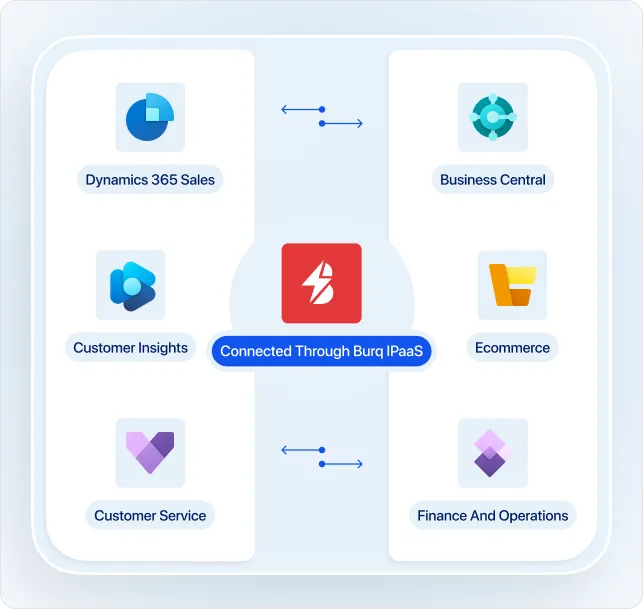
Folio3 Dynamics implements, integrates, and supports every Microsoft Dynamics 365 CRM app: Sales, Customer Service, Customer Insights, Field Service, Project Operations, and Contact Center. Twenty years on the Dynamics ERP side means the CRM we deliver talks to Business Central, Finance and Operations, or your ecommerce platform from day one.


The software is rarely the problem. Most struggling Dynamics 365 CRM projects still go live. The system works, and nobody uses it, because it lacks the information people need to do their jobs. The same four patterns show up again and again.
Sales reps still open a second window to check inventory, order status, or credit limits. Service agents can't see shipments or invoices. The data lives in the ERP, the CRM has no clean path to it, and the integration got cut from scope.
Specialist CRM shops build a tidy Sales deployment and hand you a Visio diagram for the ERP connection. Specialist ERP shops do the opposite. Nobody owns the handshake between the two, and that handshake is where lead-to-cash lives.
The pipeline stages, forms, and automations look reasonable in a demo and have nothing to do with how your reps and agents actually work. Adoption stalls, and leadership blames Dynamics.
The implementation partner moves on, Microsoft wave updates land every six months, your admin leaves, and small issues pile up until the team quietly abandons the system.
Dynamics AX, then NAV, then Business Central and Finance and Operations. We added the CRM apps when Microsoft brought them under Dynamics 365, and we built the integration layer that makes both halves work together.
That's the practical difference. When a Sales rep opens an account, the open invoices from Business Central are already on the record. When Customer Service needs shipment status, the Field Service to warehouse link is already live. When marketing wants journeys built on real purchase history, Customer Insights already pulls from your order data.
The ERP consultants and the CRM consultants sit in the same office and work the same project. The post-go-live support team has been on your deployment since kickoff. One team, one accountable partner, and no vendor handoffs for you to manage.
Microsoft Dynamics 365 CRM is a family of apps, licensed and configured one by one. Pick the apps your team needs, add the agents and integrations, and pay for what you use.
Lead and opportunity management, pipeline forecasting, LinkedIn Sales Navigator, and quote-to-order.
Omnichannel case management, knowledge base, SLA tracking, and a self-service portal.
Two products under one license.
Technician scheduling, work orders, mobile dispatch, IoT alerts, and inventory on the truck.
Takes a project from sale to delivery to invoice.
Microsoft's standalone AI-powered contact center.
Copilot comes with every CRM app at the Enterprise tier and above.
Microsoft prices the CRM apps per user per month, paid annually. Customer Insights prices per tenant. Current US list prices, October 2026:
| App | Edition | List Price |
|---|---|---|
|
|
✓ Professional |
$65 per user / month
|
|
|
✓ Enterprise |
$105 per user / month
|
|
|
✓ Premium |
$150 per user / month
|
|
|
✓ Professional |
$50 per user / month
|
|
|
✓ Enterprise |
$105 per user / month
|
|
|
✓ Premium |
$195 per user / month
|
|
|
✓ Standard |
$105 per user / month
|
|
|
✓ Contractor |
$50 per user / month
|
|
|
✓ Standalone |
$1,700 per tenant / month
|
|
|
✓ Attach |
$1,000 per tenant / month
|
|
|
✓ Standard |
$135 per user / month
|
|
|
✓ Standalone |
$110 per user / month
|
Starting figures, not quotes. Your real number depends on edition mix, user count, Copilot credit top-ups, and whether you take Contact Center as an add-on or standalone. We walk through the licensing with you on the free consultation.
The questions that come up most often from CIOs, controllers, and IT directors scoping an AX 2012 migration.
No. Mainstream support for Dynamics AX 2012 and AX 2012 R2 ended October 9, 2018. Extended support for those versions ended April 12, 2022. AX 2012 R3 mainstream support ended October 12, 2021, with extended support ending January 10, 2023. Organizations still running any AX 2012 version today are unsupported by Microsoft. Non-security hotfixes and regulatory updates are no longer provided.
The system keeps working. What stops working is the safety net around it: security patches, regulatory updates, hotfixes, and Microsoft assistance for critical issues. Third-party providers like Rimini Street and Support at Ease offer paid extended support that maintains stability, but they cannot deliver new capability, and the cost curve is unfavorable over multi-year horizons. Every quarter, the functional gap between AX 2012 and current D365 F&O widens.
Dynamics 365 Finance and Supply Chain Management (commonly called F&O) is Microsoft's cloud-native ERP for enterprise finance, supply chain, and manufacturing. It is the direct successor to AX 2012 but built on a different technical foundation: continuously updated by Microsoft, deployed on Azure, extensible through the Power Platform and Dataverse rather than through X++ overlayering, and integrated with Copilot for AI-assisted workflows. Reporting moves from SSRS to Power BI. The functional core is recognizable to AX 2012 users; the deployment and extensibility model is not.
Realistic ranges: 9 to 15 months for a single-entity mid-size operation with moderate customization; 12 to 24 months for multi-entity, multi-country deployments with heavy integrations and X++ customizations to re-evaluate. Phased approaches, where finance goes first and supply chain or manufacturing follow, are common and de-risk the project. Folio3's Discovery phase produces a specific timeline for your operation before any commitment.
Master data and open transactions migrate. Historical transactions are typically migrated selectively: trial balance and recent detail rather than a full historical rebuild. X++ customizations do not lift and shift: API breaking changes in D365 F&O require every customization to be re-evaluated. Many AX 2012 customizations are now delivered as standard functionality in D365, so re-evaluation typically reduces the customization footprint substantially. Custom C# or Visual Basic scripts and AIF integrations must be rewritten on modern APIs. See the Data Migration Scope table above for the full inventory.
It is a re-implementation, not an upgrade. This is the single most important reality for AX 2012 buyers to understand. Microsoft provides tooling to assist with data upgrade and code analysis, but the deployment model, extensibility architecture, and many functional modules have changed materially since AX 2012. Planning the project as a re-implementation, with process discovery, customization decisions, and testing appropriate to a new system. That is the only approach that consistently succeeds.
Total cost has two components: Microsoft's D365 licensing (per-user, per-month, published list pricing available from Microsoft) and Folio3's implementation services (scoped per deployment). Implementation cost depends on the number of legal entities, sites, integrations, customizations to re-evaluate, data migration complexity, and industry vertical. See our Dynamics 365 F&O pricing page for licensing detail. Book a Folio3 assessment for a services scope and quote for your specific setup.