By the Folio3 Dynamics Team | Microsoft Dynamics 365 implementation partner
Key takeaways
- HubSpot is built for marketing-led teams that want fast self-service setup; Dynamics 365 Sales is a configurable CRM that syncs natively with Business Central through Dataverse.
- Dynamics 365 Sales includes business process flows and up to 15 custom tables from its $65 Professional plan. HubSpot adds workflows on Professional and custom objects only on Enterprise.
- On like-for-like plans, Dynamics 365 Sales Enterprise at $105 costs less than HubSpot Sales Hub Enterprise at $150 plus a $3,500 onboarding fee.
- Manufacturers and distributors that quote from ERP prices and stock usually fit Dynamics 365; marketing-led SMBs with simple pipelines usually fit HubSpot.
- Model three years at your expected headcount, and add partner implementation services for Dynamics 365, before you compare.
If your finance team re-keys every closed deal into the ERP, your CRM is costing more than its licence. That gap decides most Dynamics 365 Sales vs HubSpot evaluations: HubSpot reaches accounting through apps and connectors, while Dynamics 365 Sales shares customers, prices, and orders with Business Central natively.
Stay with HubSpot if you’re a marketing-led team with a simple pipeline and no ERP to connect. Move to Dynamics 365 Sales if reps quote from ERP stock and prices or follow approval-heavy processes. This guide compares Dynamics 365 vs HubSpot on integration, customization, automation costs, and three-year pricing.
Dynamics 365 Sales vs HubSpot at a glance
Prices are US list prices per user per month, checked in November 2026.
| Criteria | Dynamics 365 Sales | HubSpot Sales Hub |
| What it is | CRM on Microsoft Dataverse, part of the Dynamics 365 family | Sales module of HubSpot’s customer platform, alongside Marketing, Service, Content, Data, and Revenue Hubs |
| Plans and list price | Professional $65, Enterprise $105, Premium $150 (paid yearly) | Free; Starter $20; Professional $100 monthly or $90 on annual billing; Enterprise $150 (annual only) |
| One-time fees | None from Microsoft; partner implementation quoted separately | $1,500 onboarding on Professional, $3,500 on Enterprise |
| Automation | Business process flows and workflows on every plan (capped on Professional); Power Automate | Workflows and sequences from Professional upward |
| Custom data model | Up to 15 custom tables per app on Professional; no cap on Enterprise | Custom objects on Enterprise only |
| ERP and accounting | Native sync with Business Central through Dataverse; connectors for other ERPs | HubSpot-built apps for QuickBooks Online, Xero and NetSuite; other ERPs through third-party apps |
| Marketing | Separate app (Dynamics 365 Customer Insights) | Marketing Hub on the same platform, HubSpot’s strongest area |
| Microsoft 365 | Works inside Outlook, Teams, and Excel; Copilot on Enterprise and Premium | Outlook and Teams integrations; Breeze AI with HubSpot Credits |
| Ease of setup | Needs an admin or partner for anything beyond standard configuration | Business users can set up most features themselves |
CRM that connects to your ERP and accounting
To choose a CRM replacement that works with your accounting software, start from the accounting system and check how deep the connection goes: which records sync, in which direction, how often, and who fixes a failed sync. If you run Business Central, Dynamics 365 Sales connects natively through Dataverse; HubSpot connects through its own apps for QuickBooks Online, Xero, and NetSuite, and through third-party connectors for everything else.
Standalone CRM vs an all-in-one customer platform
A standalone CRM manages leads, accounts, opportunities, and forecasts, then hands closed deals to other systems for billing and fulfillment. An all-in-one customer management platform puts marketing, sales, service, and sometimes billing on one database, so a contact’s emails, deals, and tickets sit on one record.
The difference that matters to finance is how far that single record reaches:
| Model | What shares one record | Example | Where data still crosses a sync |
| Standalone CRM | Leads, deals, forecasts | A sales-only CRM | Marketing, service, billing, and ERP |
| All-in-one front office | Marketing, sales, service, payments | HubSpot | ERP stock, pricing, and fulfillment |
| CRM and ERP on one platform | Front office plus customers, items, prices, and orders | Dynamics 365 Sales with Business Central | Only systems outside Microsoft |
Key note: Dynamics 365 Sales, Customer Service, and Customer Insights all run on Dataverse, and Business Central links to them through an integration Microsoft builds. Hence, the “all-in-one” view runs from the first marketing email to the posted invoice and the stock on the shelf.
How Dynamics 365 Sales connects to Business Central
Business Central and Dynamics 365 Sales link records through couplings, which Microsoft explains in its guide to integrating Business Central with Dynamics 365 Sales. Each coupling ties a Business Central record to a Sales record:
| Business Central | Dynamics 365 Sales | What the rep gets |
| Customer | Account | One customer master, no duplicate entry |
| Item and unit of measure | Product and unit group | Quotes built on real item numbers |
| Customer price group | Price list | Customer-specific prices on every quote |
| Item availability | Availability on products and quote lines | Stock visible before the rep commits |
| Sales order | Order | Orders flow to fulfillment and back |
How a quote moves in practice:
- The salesperson builds a quote in Sales using Business Central’s price list.
- They check item availability before committing to a delivery date.
- They submit the order, which syncs to Business Central for fulfillment.
- Any changes Business Central makes to prices, tax amounts, or shipment dates flow back to the order in Sales.
Watch for: Item availability refreshes through a job queue that runs every 30 minutes by default, so it isn’t live to the second. Step 4 only works with bidirectional order sync turned on, and that option can’t run alongside the legacy sales order integration.
The result: Finance stops re-keying deals, and sales stops promising stock the warehouse does not have. Our article on the benefits of Business Central CRM integration covers the setup steps, and our Business Central services page shows how we set up the ERP side.
How HubSpot connects to accounting software
HubSpot’s integration options depend on which accounting system you run:
- QuickBooks Online and Xero: HubSpot-built apps sync contacts, products, invoices, and payments.
- NetSuite: HubSpot also builds and maintains its own app.
- Other accounting tools: its marketplace lists more than 90 accounting apps beyond those.
- Business Central and other mid-market ERPs: a third-party connector or an iPaaS tool, which adds a subscription, a vendor, and a sync to monitor.
Makes sense when: HubSpot only needs to show invoice status on a deal.
Where it gets harder: Reps need live stock levels, customer-specific prices, or credit limits from the ERP before they quote.
What to check before you connect any CRM to accounting:
- Which system owns the customer, item, and price records?
- Does an order post as one record or as a batch summary?
- When a sync fails, who is alerted, and how is the record retried?
- Can reps see stock, credit limit, and invoice status before they quote?
Customization and complex sales processes
To find a CRM replacement with customizable sales workflows, check what the entry plans let you change, then price the plan where the workflows you need become available. Dynamics 365 Sales includes business process flows and custom tables from its $65 Professional plan, while HubSpot reserves workflows for Professional and custom objects for Enterprise.
Dynamics 365 Sales
Dynamics 365 Sales models a sales process as a business process flow: a bar of stages and required steps across the top of the record. Microsoft’s documentation on business process flows allows up to 30 stages per process and up to five tables in one flow. A single process can therefore run from lead to order:
- Qualify on the lead: budget, authority, need, and timing as required fields
- Develop on the opportunity: stakeholders, competitors, and close date
- Propose on the quote: products from Business Central price lists, with discount approval routed through Power Automate
- Close on the order: credit check and handoff to fulfillment
What you can change:
- Add custom tables, such as equipment, projects, or rebate agreements
- Branch the process by product line
- Trigger Power Automate flows when a stage changes
Plan limits: Professional caps custom tables at 15 per app and limits forms, flows, and installed solutions. Enterprise removes those caps and adds forecasting, territories, sales goals, and Copilot. Teams that want guided selling on top can use the Dynamics 365 Sales Accelerator, which builds work lists and sequences for each seller.
HubSpot
HubSpot customization is easier for a business user to set up and is narrower in what it can model. Each tier opens up more of it:
| HubSpot tier | Deal pipelines | Automation | Custom objects |
| Starter | Up to 15 | Simple stage-based tasks | No |
| Professional | Up to 100 | Workflows and sequences | No |
| Enterprise | Up to 350 | Workflows on custom objects and their pipelines | Yes |
Replacing a CRM to manage a complex sales process
Before you replace your CRM, write down the process: the approval rules, the records it touches, and where pricing comes from. Then check it against both platforms:
| Process requirement | Dynamics 365 Sales Enterprise | HubSpot |
| Parent and child accounts | Included | Included |
| Multi-level discount approvals | Business process flow plus Power Automate | Workflows on Professional or Enterprise |
| Quotes from ERP price lists | Native with Business Central | Needs a connector |
| Order handed to fulfillment | Native with Business Central | Needs a connector |
| Custom records, such as equipment | Custom tables | Enterprise only |
Bottom line: This process fits inside Dynamics 365 Sales Enterprise. In HubSpot, it needs Enterprise for custom objects plus a connector for the ERP data.
Pricing and the real cost as you grow
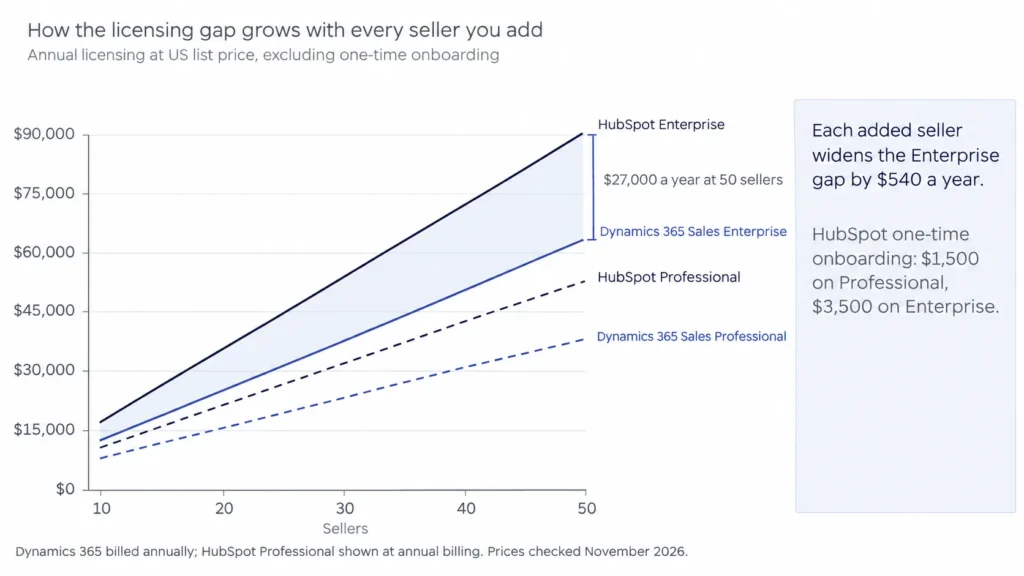
To replace an increasingly expensive CRM, model three years of cost at the team size you expect, including the plan tier your processes actually require. A cheap entry plan that forces an upgrade for one feature, or prices every seat at your highest tier, often costs more by year three than a dearer plan with that feature built in.
Dynamics 365 Sales licensing
Microsoft lists Dynamics 365 Sales pricing as follows, paid yearly:
| Plan | Price per user per month | What it adds |
| Sales Professional | $65 | Core sales force automation, Microsoft 365 integration, reporting |
| Sales Enterprise | $105 | Full customization, forecasting, territories, Copilot |
| Sales Premium | $150 | 1,000 Copilot Credits per user per month, Sales Insights, AI recommended actions, data enrichment |
Business Central users, take note: Microsoft’s licensing guide lets a user whose base licence is Business Central Premium add Sales Enterprise at a $20 per user per month add-on price. Our comparison of Sales Professional vs Enterprise vs Premium goes through each plan.
HubSpot Sales Hub licensing
| Plan | Price per seat per month | Onboarding fee |
| Starter | $20, with limited-time discounts for new customers | None |
| Professional | $100 monthly, or $90 on annual billing | $1,500 one-time |
| Enterprise | $150, annual billing only | $3,500 one-time |
Watch for: When you mix tiers across Hubs, HubSpot prices all Core Seats at your highest tier. Adding Sales Hub Enterprise therefore raises the price of seats used by the rest of the company, including marketing and service staff.
What automation costs at each plan level
When you replace a CRM because automation got expensive, look at the cheapest plan that runs every automation you rely on today. Here is the plan where each kind of automation first appears:
| Plan level | HubSpot Sales Hub | Dynamics 365 Sales |
| Entry | Starter ($20): tasks and notifications when a deal changes stage | Professional ($65): business process flows, workflows and up to 15 custom tables, with caps |
| Middle | Professional ($90 to $100, plus $1,500 onboarding): workflows and sequences | Enterprise ($105): no customization caps; forecasting, territories, Copilot |
| Top | Enterprise ($150, plus $3,500 onboarding): custom objects and automation on them | Premium ($150): 1,000 Copilot Credits for agents, Sales Insights |
AI is metered on both sides. HubSpot’s Breeze features draw on HubSpot Credits included by tier, and Dynamics 365 agents run on Copilot Credits, included only on Premium.
A worked example: 20 sellers growing to 40
Take a distributor with 20 sellers in year one, 30 in year two and 40 in year three: 90 seat-years in total. It needs a custom object for equipment installed at customer sites, which puts HubSpot on Enterprise.
| Licensing only, list price | Year 1 (20) | Year 2 (30) | Year 3 (40) | Three-year total |
| HubSpot Sales Hub Enterprise ($150 + $3,500 onboarding) | $39,500 | $54,000 | $72,000 | $165,500 |
| Dynamics 365 Sales Enterprise ($105) | $25,200 | $37,800 | $50,400 | $113,400 |
| HubSpot Sales Hub Professional, annual ($90 + $1,500 onboarding) | $23,100 | $32,400 | $43,200 | $98,700 |
| Dynamics 365 Sales Professional ($65) | $15,600 | $23,400 | $31,200 | $70,200 |
On like-for-like plans, Dynamics 365 Sales Enterprise costs $52,100 less than HubSpot Enterprise over three years. If the distributor needs no custom objects, HubSpot Professional costs $14,700 less than Dynamics 365 Sales Enterprise over the same period.
Licensing is half the picture. A Dynamics 365 project usually needs a partner to configure processes, migrate data, and set up the Business Central sync, and that service cost is normally higher than HubSpot’s onboarding fee. Ask for a fixed-scope quote and add it to the table above before you compare.
One order, two stacks: following a quote from CRM to cash
Feature lists hide where the work happens. Here is one order traced through each setup in a Microsoft Dynamics 365 vs HubSpot stack, for a company running Business Central as its ERP.
| Step | Dynamics 365 Sales + Business Central | HubSpot + Business Central through a connector |
| Rep builds the quote | Products and customer prices come from Business Central’s price lists | Products and prices sync through the connector, if it maps price lists |
| Rep checks stock | Item availability from Business Central shows in Sales | Depends on the connector; often not available on the quote |
| Order is placed | Order syncs to Business Central for fulfillment | Deal or quote is pushed to Business Central as a sales order |
| Order changes in the ERP | Price, tax, and shipment date changes flow back to Sales | Depends on whether the connector syncs in both directions |
| Invoice and payment | Posted invoices sync back to the account | Invoice status syncs back if the connector supports it |
| Who supports the sync | Microsoft-built integration, set up by your partner | Connector vendor, plus your HubSpot and ERP admins |
Run this table against your own order process when you compare Dynamics 365 vs HubSpot in demos. Every row marked “depends” is a question for the connector vendor before you sign.
Who each one is for
Manufacturing and distribution
To find a replacement CRM for a manufacturing sales team, start with the questions your reps get asked every day: can we ship this, at what price, and when? A manufacturing CRM has to quote configured or made-to-order products, show available stock and lead times, respect customer-specific pricing, and pass the order to production without re-entry.
Dynamics 365 Sales with Business Central covers that chain. Business Central Premium adds production orders, routings, and capacity planning, and a Business Central Premium user can add Sales Enterprise at the $20 attach price, which suits inside-sales and customer-service staff who both quote and enter orders. HubSpot fits a manufacturer whose ERP owns orders and pricing, and whose sales team mainly needs pipeline tracking and marketing-sourced leads. Our manufacturing ERP solutions page shows how we configure this for discrete, process and mixed-mode plants.
Marketing-led SMBs, SaaS and services firms
HubSpot is hard to beat here. Its Marketing Hub, landing pages, forms and email share a record with sales, and a small team can run all of it without an admin. If your revenue comes from inbound leads and a short sales cycle, and no ERP needs the deal data, HubSpot is the simpler and usually cheaper system.
Microsoft 365 organizations
If your sellers live in Outlook and Teams, Dynamics 365 Sales opens there: they can track emails and meetings from Outlook, see account details in Teams chats, and edit lists in Excel. Copilot in Sales summarizes records and drafts emails on Enterprise and Premium. HubSpot also offers Outlook and Teams integrations for logging emails and meetings, but it has no equivalent of the Business Central link.
Signs you’ve outgrown HubSpot
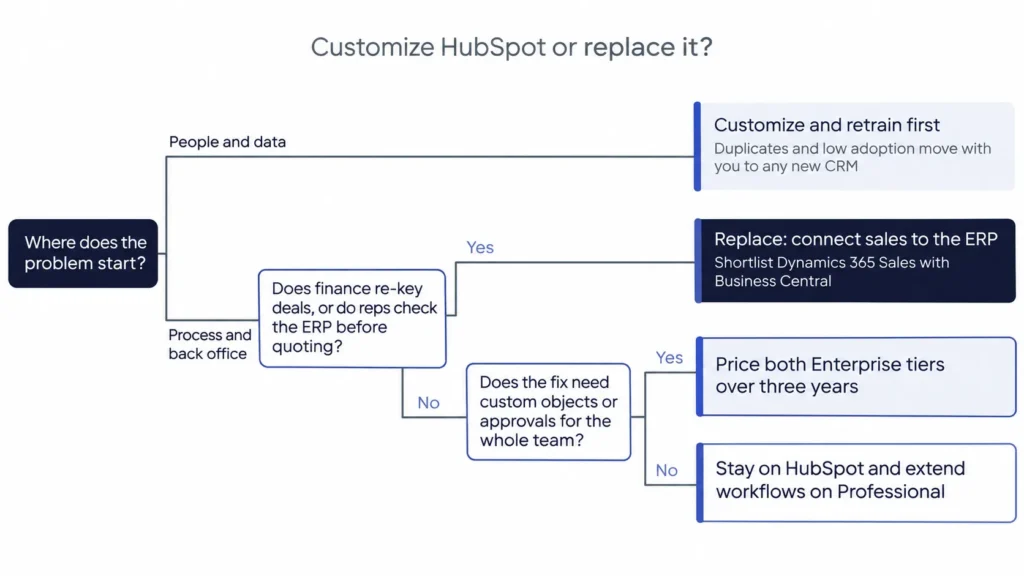
Your CRM needs replacing rather than customizing when the workarounds cost more each year than a move would, or when the fix requires a plan tier you would buy for one feature. If the problems are messy data or low adoption, customize and retrain first; a new CRM will inherit both.
If you are searching for a HubSpot alternative, these signs usually mean a move will pay off:
- Finance re-keys closed deals into the ERP, or reconciles two customer lists every month.
- Reps check stock, prices, or credit limits in another system before they quote.
- You need custom objects, and the only route is Sales Hub Enterprise across the whole team.
- Approval rules, discount limits, and multi-stage quotes live in spreadsheets or Slack threads.
- Mixing Hub tiers has pushed every Core Seat to your highest tier.
- Your IT team already supports Microsoft 365, Power BI and Business Central, and HubSpot is the one system outside that stack.
Our verdict
In the HubSpot vs. Dynamics 365 decision, HubSpot is the better marketing platform and the easier CRM to run without technical staff. For a small team on a tight budget, its free tools or Starter plan will manage customer relationships for far less than any Dynamics 365 licence, and we would not move that team.
Dynamics 365 Sales is the better choice once sales depends on the back office: when reps quote from ERP prices and stock, when the sales process needs custom records and approvals, or when the company runs on Business Central and Microsoft 365. At that point, Dynamics 365 Sales Enterprise also costs less than the HubSpot plan with equivalent customization, and the Business Central sync removes the connector you would otherwise maintain. If you are comparing other options, our Dynamics 365 Sales vs Salesforce guide covers the other common shortlist.
Frequently asked questions
How do I replace my CRM without losing customer history?
Export contacts, companies, deals, notes, emails, and attachments from HubSpot, map each object and property to its Dynamics 365 table, and migrate in stages: reference data first, then accounts and contacts, then open deals and activity history. Run a test migration and check record counts before cutover. Our guide on how to migrate from HubSpot to Dynamics 365 walks through it.
What affordable alternatives should you consider for managing customer relationships?
For a small team, HubSpot’s free tools and Starter plan are the lowest-cost route. Dynamics 365 Sales Professional at $65 per user per month suits a team that wants Microsoft 365 integration and room to grow. Business Central also includes basic contacts and opportunities, which some small companies use before they add a full CRM.
What is the difference between Microsoft Dynamics CRM vs HubSpot?
Microsoft Dynamics CRM is the former name of the product now sold as Dynamics 365 Sales and Dynamics 365 Customer Service. The comparison is the same: Dynamics is a configurable CRM on Microsoft’s data platform, and HubSpot is a marketing-led customer platform built for fast self-service setup.
Can we use HubSpot for marketing and Dynamics 365 Sales for sales?
Yes. Some companies keep HubSpot Marketing Hub for inbound campaigns and sync leads and contacts into Dynamics 365 Sales, where sellers work the pipeline next to Business Central data. Agree on which system owns each record before you connect them, or you will create duplicates.
Is Dynamics 365 harder to use than HubSpot?
For administrators, yes: configuring Dynamics 365 takes more skill, and most companies use a partner. For sellers, the gap is smaller, because much of the daily work happens in Outlook, Teams, and a guided process bar on each record.
If Dynamics 365 Sales looks like the right fit, our team will scope it around your sales process, your ERP, and your data, and give you a written scope, timeline, and cost before any work starts. Start with our Dynamics 365 Sales services.