By the Folio3 Dynamics Team | Microsoft Dynamics 365 implementation partner
Key takeaways
- Sage Intacct is financial management software built around a dimensional general ledger, while Business Central is a full ERP that runs finance and operations on one database.
- Business Central includes inventory, warehousing, and assembly in Essentials at $80 per user per month and adds manufacturing on Premium at $110. Sage Intacct adds inventory and production through separate modules and products.
- Both handle multi-entity consolidation and multi-currency in the cloud, though Intacct’s automation suits groups with dozens of entities or layered ownership.
- Services firms, SaaS companies and nonprofits usually fit Sage Intacct better; manufacturers, distributors and Microsoft 365 teams usually fit Business Central.
- Compare three-year totals (licensing, implementation and add-ons) rather than first-year licence prices.
A distributor that picks the wrong system reconciles two inventory numbers at every month-end close. A 30-entity nonprofit that picks the wrong one consolidates in spreadsheets. That is what’s at stake in Dynamics 365 Business Central vs Sage Intacct.
Sage Intacct is cloud financial management software built for finance teams with many entities, reporting dimensions, and revenue rules. Business Central is a full ERP that runs the general ledger alongside sales, purchasing, inventory, and warehousing, with manufacturing on its Premium plan.
This guide compares Microsoft Business Central vs Sage Intacct on inventory, consolidation, multi-currency, and pricing. It then covers who each one suits, when to leave basic accounting software, a three-year cost example, and a 10-question fit scorecard.
Dynamics 365 Business Central vs Sage Intacct at a glance
This table covers the differences that change a buying decision. Prices are US list prices as of November 2026.
| Criteria | Business Central | Sage Intacct |
| Product type | Full ERP: finance and operations on one database | Cloud financial management, with operations added through modules and connected products |
| Built for | Product-based SMBs and mid-market companies; wholesale and professional services | Finance-led services, SaaS, nonprofit and multi-entity organizations |
| Inventory and warehousing | Native: locations, bins, lot and serial tracking, pick and put-away, landed cost | Inventory Control module: warehouse, bin, lot and serial tracking, replenishment rules |
| Manufacturing | Assembly orders on Essentials; production orders, routings and capacity planning on Premium | Not in core financials; Sage sells Distribution and Manufacturing Operations alongside Intacct |
| Multi-entity consolidation | Native, through business units in a consolidation company | Intacct’s strongest area: all entities in one database, automated eliminations |
| Multi-currency | Native: foreign-currency transactions, exchange rate adjustments, additional reporting currency | Native: Sage cites 200+ transaction currencies and ASC 830 currency translation |
| Recurring billing and revenue | Subscription billing included in Essentials; deferral schedules | Contract and revenue management module for subscription billing and ASC 606 |
| Deployment | Cloud (SaaS), on-premises or partner-hosted | Cloud only |
| Microsoft 365 and AI | Works inside Outlook, Excel, and Teams; Power BI apps; Copilot included in the licence | Excel and Power BI connections; Sage Copilot |
| CRM | Basic contacts and opportunities; Dynamics 365 Sales as an add-on | Commonly paired with Salesforce |
| Pricing | Published: $80 Essentials, $110 Premium, $8 Team Members per user per month, billed annually | Quote-based: modules, entities, users, and transaction volume |
The real difference: full ERP vs financial management software
Quick answer: An all-in-one ERP runs finance and operations on one database, so a shipment, receipt, or production order posts to the general ledger the moment it happens. Standalone accounting software runs only the ledger, payables, receivables, and reporting, and receives operational data from other systems through integrations or imports.
Business Central is the first kind; Sage Intacct is a deep version of the second. Here is how that plays out day to day:
| Situation | Business Central (full ERP) | Sage Intacct (financial management) |
| Stock arrives at the warehouse | Quantity, value, and ledger update in one posting | Inventory module or connected app posts to the ledger |
| A production order finishes | Output and finished-goods cost post natively on Premium | Needs Sage’s operations product or a third-party MRP |
| A new legal entity opens | Added as a new company and consolidation business unit | Added to the same database, inheriting the chart of accounts |
What Business Central covers
Each user’s licence tier decides what they can do:
- Essentials: finance, sales, purchasing, inventory, warehousing, projects, assembly and subscription billing
- Premium: everything in Essentials, plus manufacturing and service order management
- Team Members: read access, approvals and limited edits for occasional users
Microsoft’s own documentation places its core market “mainly within wholesale and professional services.” For a module-by-module view, see our breakdown of core Business Central modules.
Best for: Product-based companies that want finance and operations in one system.
What Sage Intacct covers
Sage Intacct is built around a dimensional general ledger. You tag each transaction by entity, department, location, project, or customer, then report across any combination without adding account codes. Around that core, Sage sells:
- Contract and revenue management for subscription billing and ASC 606 schedules
- Project accounting with time and expense
- Fund accounting for nonprofits
- Inventory Control for stock, bins, lots and serial numbers
- Distribution and Manufacturing Operations, a separate product with work orders, multi-level MRP, and multi-warehouse tracking
Watch for: Many comparisons still say Intacct cannot handle manufacturing, which is out of date. Ask Sage how the operations product is licenced and whether it shares Intacct’s database, because that decides how closely production costs reconcile with the ledger.
Best for: Finance-led organizations whose complexity sits in the ledger.
Inventory: built-in or connected
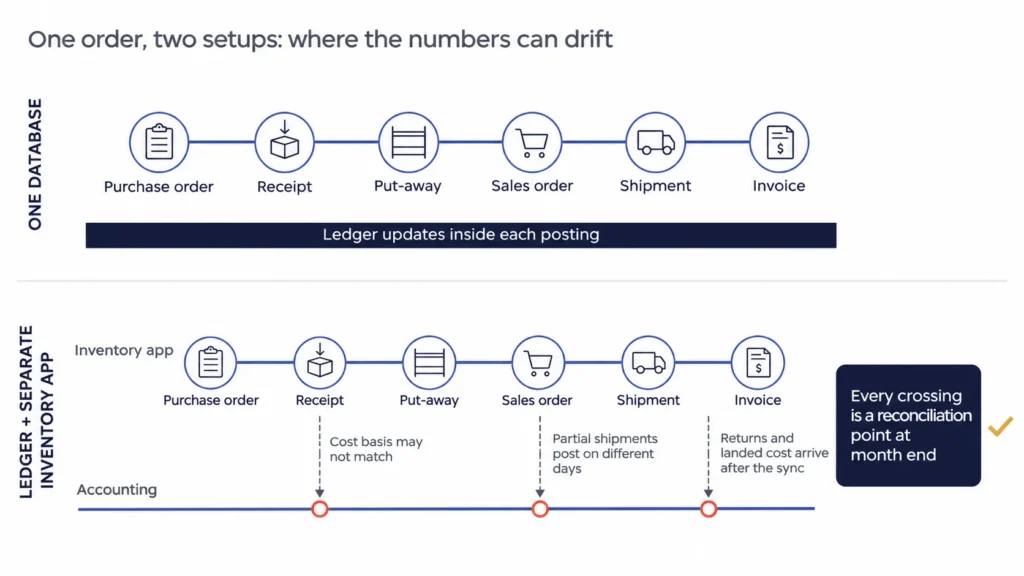
Quick answer: You connect accounting software to inventory management through a native connector, a middleware integration, or a move to an ERP where both share one database. The first two work for simple stock; the third becomes cheaper once you track lots, bins, landed costs, or more than one warehouse.
| Integration route | How it works | Makes sense when |
| Native connector or marketplace app | Prebuilt sync between two products | One warehouse, simple stock, low order volume |
| Middleware integration | A third platform maps and moves data on a schedule | You must keep both systems and need custom rules |
| Inventory-capable ERP | Stock and ledger share one database | You track lots, bins, landed costs, or several warehouses |
How Business Central handles inventory
In Business Central, an item receipt updates quantity, value, and the general ledger in a single posting. There is no sync job to monitor, because there is nothing to sync. Essentials includes:
- Locations, bins, transfer orders, pick and put-away
- Lot and serial tracking, plus physical inventory counts
- Reorder points and a planning worksheet for replenishment
- FIFO, LIFO, average, standard, and specific costing
- Landed cost, such as freight and duty, applied through item charges
How Sage Intacct handles inventory
Sage Intacct Inventory Control tracks stock by warehouse, aisle, row, bin, lot, and serial number. It supports replenishment rules and adds mobile barcode scanning through Inventory Automation, which covers a good share of resale and light distribution.
Where it gets harder: Production, advanced warehouse processes, and demand planning sit in Sage’s separate operations product or in third-party apps, so the integration question comes back.
What to check before you integrate two systems
What to check:
- Does the integration post each transaction to the ledger, or one summary entry per day?
- Which system owns the item master and the costing method?
- When a sync fails, who is alerted, and how is the record retried?
- How are returns, partial shipments, and landed costs handled on both sides?
Example. A daily summary sync is manageable at a few hundred orders a month. At a few hundred orders a day, finance ends up reconciling two versions of inventory value at every close.
Multi-company reporting and consolidation
Quick answer: To combine several companies’ financial reports, choose accounting software with native multi-entity consolidation: automatic intercompany eliminations, currency translation, and a consolidated view that drills back to each entity. Sage Intacct and Business Central both do this in the cloud, with Intacct automating more for large entity counts.
| Capability | Business Central | Sage Intacct |
| Entity structure | Each legal entity is a company; a consolidation company combines them as business units | All entities in one database; new entities inherit settings |
| Partial ownership | Ownership percentage per business unit | Multi-level ownership structures defined by period |
| Currency translation | Translation method set per account | ASC 830 translation with cumulative translation adjustments |
| Intercompany | Intercompany sales, purchases and journals, plus a reconciliation report | Automated inter-entity transactions and eliminations |
| Best fit | A handful of mostly wholly owned entities | Dozens of entities or layered ownership |
Consolidation in Sage Intacct
All entities share one database, consolidation books handle eliminations and ownership by period, and Sage says Intacct transacts in more than 200 currencies.
Makes sense when: You run dozens of entities, own subsidiaries partially at several levels, or report under ASC 830 across many currencies.
Consolidation in Business Central
Business Central handles consolidation through a short, repeatable setup that Microsoft documents in its guide to consolidating financial data from multiple companies:
- Create a consolidation company in your environment
- Add each subsidiary as a business unit
- Choose the accounts to include and the translation method for each
- Set an ownership percentage for any partly owned company
- Reconcile intercompany entries with the Intercompany Transactions report, then run the consolidation
For a handful of wholly owned entities, this runs at month-end with no extra software. Groups that need board-ready packs often add a reporting tool, as we explain in how Business Central accounting solves mid-size company challenges.
Cloud vs desktop accounting for multi-company reporting
Both products here are cloud software, so this comparison matters most if you still run a desktop package:
| Task | Desktop accounting | Cloud (Business Central or Sage Intacct) |
| Where entities live | A separate company file for each | One tenant with a shared chart of accounts |
| Consolidation | Export trial balances to Excel, map accounts, re-key eliminations | Run the consolidated view on demand |
| Remote finance staff | Server maintenance and VPN access | Browser access, no server to maintain |
Who each one is for
Use this as a starting point, then read the detail for your business type.
| Business type | Usually fits | Why |
| Manufacturer | Business Central | Production is native on Premium |
| Wholesale distributor | Business Central | Inventory, pricing, and fulfillment come in Essentials |
| SaaS company | Sage Intacct | Depth in usage-based billing and ASC 606 |
| Nonprofit | Sage Intacct | Fund accounting and dimensional reporting |
| Professional services | Either | Depends on contract complexity and entity count |
| Microsoft 365 organization | Business Central | Works inside Outlook, Excel, and Teams |
Manufacturing
To assess whether a cloud ERP suits a small manufacturer, test it against your own production process rather than a feature list:
- Build a multi-level BOM for a real product
- Run planning against real sales orders
- Release a production order and post consumption and output
- Check that finished-goods cost lands correctly in the ledger
- Confirm shop-floor internet, and decide who needs full licences versus read-and-approve access
Business Central Premium passes this test natively, and Microsoft notes that its manufacturing features require the Premium experience. Simple kitting runs on Essentials with assembly orders, while Sage Intacct needs its operations product or a third-party MRP.
Our guide to the best ERP for a small manufacturing business covers this test in depth. The list of Business Central Premium features shows what the higher tier adds, and our manufacturing ERP solutions page shows how we configure it.
Wholesale and distribution
For wholesale inventory, choose software that ties purchasing, multi-location stock, pricing, and fulfillment to the ledger.
What to check:
- Item-level costing that includes landed cost
- Customer-specific price lists and discounts
- Bin and lot tracking across locations
- Drop shipments and transfer orders
- A direct connection to your ecommerce store
Business Central covers all five in Essentials, including a Shopify connector. Sage Intacct suits a distributor whose business is finance-heavy and whose stock is simple.
Professional services, SaaS and nonprofits
This is Intacct’s home ground. Project accounting, ASC 606 revenue management and nonprofit fund accounting are mature, and the dimensional ledger suits grant and program reporting.
Business Central includes projects and subscription billing in Essentials, so services firms with straightforward contracts run on it comfortably.
Makes sense when (Intacct): Revenue is usage-based, contracts change often, and auditors focus on revenue recognition.
Microsoft 365 organizations
Business Central opens inside the tools your team already uses. Staff acts on records from Outlook, share records in Teams chats, and edit lists in Excel before publishing changes back. Copilot is included in Essentials and Premium licences.
Sage Intacct connects to Excel and Power BI and offers Sage Copilot, but its Microsoft integration does not go as deep.
When to move off basic accounting software
Quick answer: Replace basic accounting software with an inventory-capable ERP when you reconcile inventory between two systems every month, add a second company or currency, or see month-end close stretch as you grow. Plan the move in four steps, with one parallel close before cutover.
Signs you have outgrown it:
- Stock counts and the balance sheet disagree, and nobody knows which is right
- Sales reps check a spreadsheet to see what is available to promise
- A second entity or foreign-currency customers forced a manual workaround
- Purchasing runs from reorder lists kept outside the accounting system
- Auditors ask for an inventory valuation report your team builds by hand
How the move works:
- Map current processes: document how orders, receipts, and closes run today
- Clean master data: fix item, customer, and vendor records before migration
- Migrate what matters: bring opening balances and open transactions, not years of history
- Run a parallel close: close one month in both systems, compare, then cut over
Still running on QuickBooks or a desktop package? Business Central is the natural next step for product businesses, because inventory arrives in the same move. Our Rapid Start puts core finance, purchasing, and inventory live in 60 to 90 days, with up to three legal entities included. Explore Business Central Rapid Start implementation.
Pricing and total cost of ownership
Business Central licensing in 2026
Microsoft publishes Business Central pricing, which makes budgeting straightforward:
| licence | Price per user per month (billed annually) | Who needs it |
| Essentials | $80 | Staff who post finance, sales, purchasing, or inventory transactions |
| Premium | $110 | Users who work in manufacturing or service management |
| Team Members | $8 | People who read data, approve documents, or make limited updates |
Note: These rates took effect on November 1, 2025, up from $70 for Essentials and $100 for Premium.
“The first price increase for Dynamics 365 Business Central in more than five years.”
Microsoft, Business Central pricing announcement
Sage Intacct pricing
Sage does not publish Intacct list prices. Quotes depend on modules, entities, users, and transaction volume, so companies of similar size can receive very different numbers.
What to check:
- Every module itemized, including inventory and revenue management
- Entity count and the price of adding entities later
- User types and counts
- Renewal terms for years two and three
- Pricing for the Distribution and Manufacturing Operations product, if you need it
A worked example: a 25-user distributor
Take a distributor with 15 people who post transactions and 10 who approve or look things up:
| Cost line | Essentials | Premium |
| 15 full users | $14,400 per year | $19,800 per year |
| 10 Team Members | $960 per year | $960 per year |
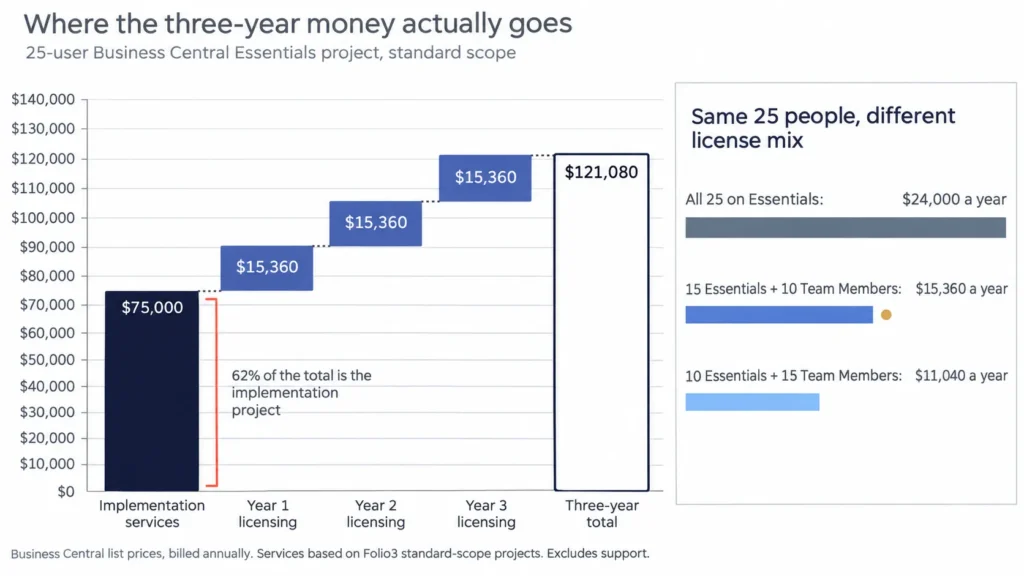
| Annual licensing | $15,360 | $20,760 |
| Three-year licensing | $46,080 | $62,280 |
Services for a 25-user Business Central implementation start at $25,000 with our fixed-price Rapid Start, run about $75,000 for a standard scope and reach around $100,000 with manufacturing or heavy integration (Folio3 project data).
Example. A standard-scope Essentials project comes to roughly $121,000 over three years: $46,080 in licensing plus $75,000 in services, before support. Our breakdown of Dynamics 365 implementation cost shows how those ranges are built.
Cost impact: Build the same three-year total for Intacct, including add-on products and integration upkeep.
Fit scorecard: 10 questions to answer before you book a demo
Vendor demos follow each product’s strengths. Answer these questions first and take the tally into both demos, so each vendor has to show what matters to you.
| # | Question | If yes, this points to |
| 1 | Do you hold physical inventory that you count and value? | Business Central |
| 2 | Do you manufacture, assemble, or kit products? | Business Central |
| 3 | Do you run more than one warehouse, or use bins, lots, or serial numbers? | Business Central |
| 4 | Does your team run on Microsoft 365, with Power BI planned or in use? | Business Central |
| 5 | Do you need an on-premises or private hosting option? | Business Central |
| 6 | Do you consolidate more than ten entities, or own subsidiaries partially at several levels? | Sage Intacct |
| 7 | Is subscription or usage-based revenue under ASC 606 your biggest audit risk? | Sage Intacct |
| 8 | Are you a nonprofit tracking funds, grants, and donor restrictions? | Sage Intacct |
| 9 | Is most of your revenue billable time, with little or no stock? | Sage Intacct |
| 10 | Is Salesforce already your system of record for customers? | Sage Intacct |
How to read your score:
- 6 or more on one side: the choice is made; use the demo to confirm fit
- 5 to 5: you carry real operational and financial complexity, so price Business Central with a reporting add-on against Sage Intacct with its operations product
- Either way: compare three-year totals, not first-year licences
Integrations, AI and deployment
| Area | Business Central | Sage Intacct |
| Microsoft stack | Power BI, Power Automate and Dataverse; works inside Outlook, Excel and Teams | Excel and Power BI connections |
| Apps and APIs | Microsoft AppSource and REST APIs | Open API and Sage Intacct Marketplace |
| CRM | Built-in basics; Dynamics 365 Sales as an add-on | Commonly paired with Salesforce |
| AI | Copilot drafts item text, suggests bank reconciliation matches and finds records through chat | Sage Copilot; machine learning for AP automation and ledger anomaly detection |
| Deployment | Microsoft-hosted SaaS, on-premises or partner-hosted | Multi-tenant cloud only |
Our verdict
Choose Sage Intacct if: you are a services, SaaS, or nonprofit organization with many entities and complex revenue rules.
Choose Business Central if: your margins depend on buying, storing, making, and shipping products, or your team already runs on Microsoft 365.
If you sit in the middle, use the scorecard, then compare three-year costs, including whatever each product needs added. For the product-based SMBs we work with, that comparison usually favors Microsoft Business Central, because inventory and operations come in the base licence.
Frequently asked questions
What kind of ERP software suits multi-currency accounting needs?
Choose an ERP that records foreign-currency transactions, revalues open balances at period end, posts realized and unrealized gains and losses, and translates subsidiaries for consolidation. Both products do this.
Business Central adds reporting currency and online exchange rate updates; Sage Intacct supports more than 200 currencies and ASC 830 translation. Inventory traded across currencies points to Business Central, while many foreign subsidiaries with layered ownership point to Intacct.
Is Sage Intacct a full ERP?
Sage positions Intacct as cloud financial management, with modules for inventory, projects, and revenue. Production and advanced warehousing come from Sage’s separate Distribution and Manufacturing Operations product or from partner apps.
Can Business Central handle multi-entity consolidation?
Yes. Each legal entity is a company in Business Central, and a consolidation company combines them with currency translation, partial ownership, and intercompany reconciliation. Very large or deeply layered groups may prefer Intacct or a dedicated consolidation tool.
Does either product run on-premises?
Business Central does, on your own servers or with a hosting partner. Sage Intacct is cloud-only.
Which one costs less?
Business Central is easier to budget because prices are published. A services firm that needs only financials may get a competitive Intacct quote, while a distributor would add Intacct inventory modules and integrations that Business Central already includes.
Should a QuickBooks user move to Business Central or Sage Intacct?
If you sell physical products, choose Business Central, because it replaces both your accounting and your stock tracking. If you are a services business that mainly needs stronger reporting, multi-entity accounting, or revenue recognition, Sage Intacct is a reasonable step up.
How long does implementation take?
Our Business Central Rapid Start projects go live in 60 to 90 days for core finance, purchasing, and inventory. Multi-entity, manufacturing, and integration-heavy projects take longer. For Sage Intacct, ask for a phased plan in writing, since timelines depend on modules and entity count.
Shortlisting Business Central? We will scope it around your entities, warehouses, and integrations, with a written timeline and cost before work starts. Talk to our Business Central implementation team.