Short answer: Choose Sales Professional ($65/user/month) if you run a simple sales process with a single team. Choose Sales Enterprise ($105) if you need complex processes, deep customization and Copilot. Choose Sales Premium ($150) if you want AI-led selling and forecasting, with Sales Insights and 1,000 Copilot Credits per user each month.
All three plans run on the same Dynamics 365 Sales platform and are billed per user, per month, on an annual commitment. They differ in how far you can customize, how much AI you get, and how much automation sits behind your sellers. This guide compares Professional, Enterprise and Premium side by side, using Microsoft’s Dynamics 365 Sales pricing page and the Dynamics 365 Licensing Guide, so you can match the plan to your team. For the wider picture, see our guide to sales management software.
Dynamics 365 Sales plans and pricing at a glance
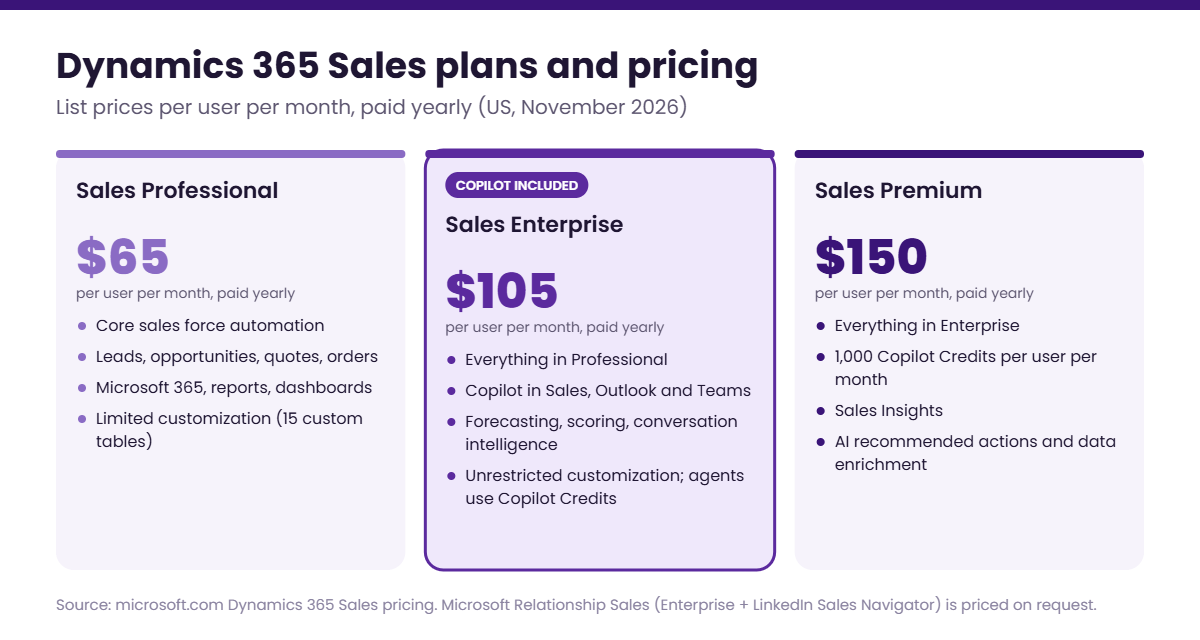
Microsoft lists these US prices per user, per month, paid yearly:
- Sales Professional – $65. Core sales force automation, Microsoft 365 interoperation, reporting and dashboards.
- Sales Enterprise – $105. Everything in Professional plus advanced sales force automation, full customization, Copilot in Dynamics 365 Sales and access to prebuilt agents such as the Sales Close Agent.
- Sales Premium – $150. Everything in Enterprise plus 1,000 Copilot Credits per user per month, Sales Insights, AI-powered recommended actions and AI-powered data enrichment.
- Microsoft Relationship Sales – variable pricing. Sales Enterprise plus LinkedIn Sales Navigator, with a 10-seat minimum.
Prices vary by region and currency. Check the Microsoft pricing page before you buy.
What all three plans share
Every Dynamics 365 Sales plan includes:
- Lead, opportunity, account and contact management, plus products, price lists, quotes, orders and invoices.
- The Dynamics 365 Sales mobile app.
- Interoperation with Microsoft 365, including Outlook, Excel and Teams.
- Standard reporting and dashboards, with export to Excel and analytics in Power BI.
That gives every plan a solid CRM foundation. The decision comes down to customization, intelligence and scale. Our CRM guide for sales leaders covers the core platform in more depth.
Detailed comparison: Professional vs Enterprise vs Premium
| Aspect | Sales Professional | Sales Enterprise | Sales Premium |
|---|---|---|---|
| Price (user/month, paid yearly) | $65 | $105 | $150 |
| Best for | Simple sales processes and a single sales team | Complex processes, multiple teams and custom requirements | AI-led selling, forecasting and seller productivity at scale |
| Core sales force automation, mobile app, Microsoft 365, reporting | Included | Included | Included |
| Customization and automation | Limited (e.g., up to 15 custom tables) | Full | Full |
| Custom apps (Power Apps) | Not included | Included | Included |
| Advanced sales force automation (forecasting, assistant cards, competitors, sales goals, territory management) | Not included | Included | Included |
| Copilot in Dynamics 365 Sales, Outlook and Teams | Not included | Included | Included |
| Prebuilt sales agents (Qualification, Opportunity, Research, Close) | Available only with purchased Copilot Credits | Access included; run on purchased Copilot Credits | Access included; runs on included credits |
| Copilot Credits included | None | None | 1,000 per user/month |
| Conversation intelligence | Not included | Included capacity | Included capacity |
| Sales engagement (sales accelerator, predictive lead and opportunity scoring, relationship analytics) | Not included | Included capacity | Included |
| Advanced sales engagement (Sales Insights: predictive forecasting, who knows whom, notes analysis) | Not included | Not included | Included |
| AI-powered recommended actions and data enrichment | Not included | Not included | Included |
| LinkedIn Sales Navigator | Licensed separately | Licensed separately (bundled in Microsoft Relationship Sales) | Licensed separately |
Source: Microsoft Dynamics 365 Sales pricing and plan comparison.
Dynamics 365 Sales Professional: what you get and where it stops
Sales Professional is the entry-level plan. It suits small and midsize teams that want a CRM they can deploy quickly without much tailoring. It does not include Copilot or any built-in AI; if you want to use Microsoft’s prebuilt sales agents, you must buy Copilot Credits separately.
Sales Professional limits
The Dynamics 365 Licensing Guide sets these restrictions on Professional:
- Custom tables: up to 15 custom tables per app.
- Forms and processes: limited custom forms per table and a capped number of business process flows and workflows.
- Third-party apps: a cap on installed ISV solutions.
- Advanced sales features: no product families, competitor tracking, sales goals, territory management or sales playbooks.
- Custom apps: no custom Power Apps built on the Sales license.
- AI: no Copilot, conversation intelligence, sales accelerator or predictive scoring.
If two or more of these would block your process today, start on Enterprise rather than plan an upgrade six months in.
Dynamics 365 Sales Enterprise: customization plus Copilot
Sales Enterprise is built for organizations with complex sales processes, several teams or regions, and the need to tailor the system. It removes the Professional customization limits and adds:
- Advanced sales force automation: forecasting, assistant cards, competitor tracking, sales goals and territory management.
- Copilot in Dynamics 365 Sales: lead and opportunity summaries, meeting preparation, email summaries and reply drafts, and natural-language chat over your CRM data. Copilot capabilities also extend to Outlook and Teams.
- Prebuilt agents: access to agents such as the Sales Qualification Agent and Sales Close Agent. Agents run on Copilot Credits, which Enterprise does not include.
- Included capacity for conversation intelligence and sales engagement tools such as the sales accelerator and predictive lead and opportunity scoring.
Read more about how Enterprise supports sales forecasting for growing SMBs and enterprises.
Dynamics 365 Sales Premium: AI-led selling and forecasting
Sales Premium includes everything in Enterprise, then adds the intelligence layer:
- 1,000 Copilot Credits per user per month to run prebuilt and custom agents.
- Sales Insights: predictive forecasting, who knows whom, notes analysis and full sales engagement.
- AI-powered recommended actions that tell sellers what to do next.
- AI-powered data enrichment to keep account and contact records complete.
Premium makes sense when AI is central to how your team sells, not an occasional helper.
Copilot in each plan, and when you need Copilot Studio credits
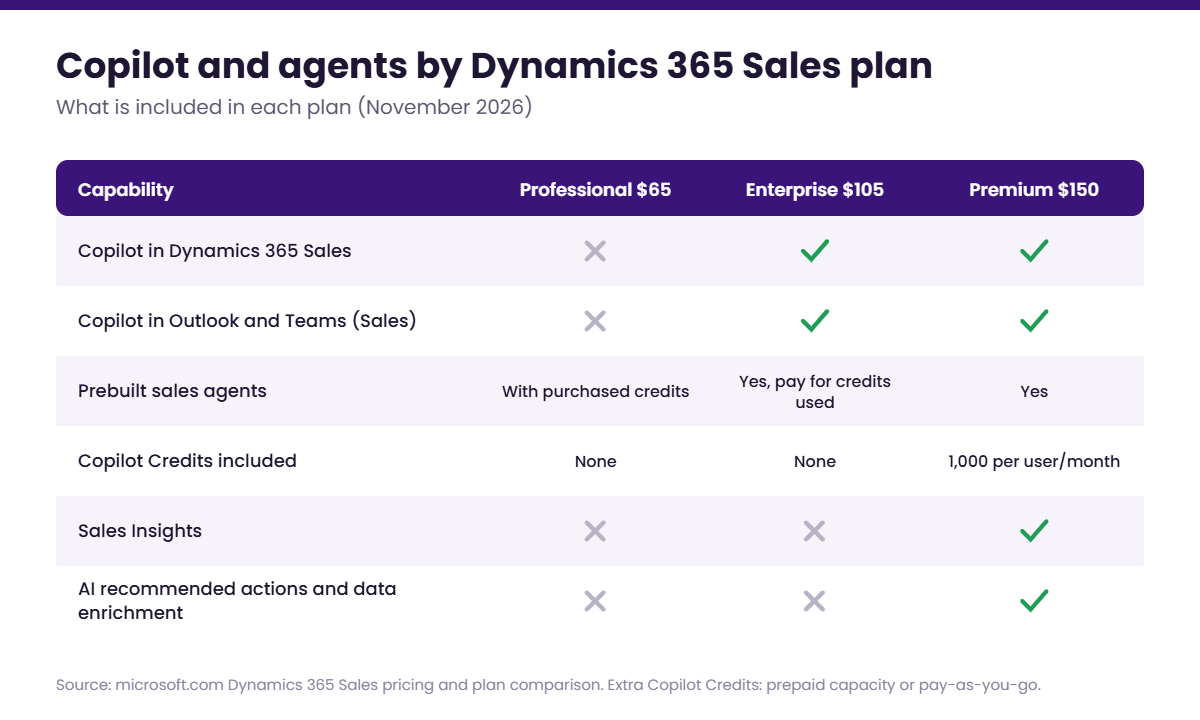
- Professional: no Copilot. Prebuilt agents can only be used with purchased Copilot Credits.
- Enterprise: Copilot in Dynamics 365 Sales, Outlook and Teams is included. Prebuilt agents are available, but you pay for the Copilot Credits they consume.
- Premium: Copilot plus 1,000 Copilot Credits per user per month for agents.
You will need extra Copilot Credits, purchased as prepaid capacity or pay-as-you-go, when you:
- Run prebuilt sales agents on Professional or Enterprise.
- Build custom agents in Microsoft Copilot Studio.
- Use more agent capacity than Premium’s included 1,000 credits per user per month.
See the Copilot Credits FAQ on the Dynamics 365 Sales pricing page for purchase options.
For help choosing licenses and setting up Copilot and agents, see our Copilot for Dynamics 365 services.
Cost example: 20 users for one year
| Plan | Per user/month | 20 users/year |
|---|---|---|
| Sales Professional | $65 | $15,600 |
| Sales Enterprise | $105 | $25,200 |
| Sales Premium | $150 | $36,000 |
You don’t have to license everyone on the same plan. For example, 15 sellers on Professional and 5 sales managers on Premium would cost $20,700 a year. List prices only; implementation, extra storage and Copilot Credits are separate.
How to choose: key considerations
Sales process complexity
- If you have multiple teams, territories, approval stages or product lines, the Professional limits on tables and processes will bite quickly. Start on Enterprise.
Customization and integration
- If you plan to model industry-specific workflows, build custom apps or connect several third-party systems, you need Enterprise’s unrestricted customization.
AI and automation
- Need Copilot summaries and email help? Enterprise. Need predictive forecasting, recommended actions and agents running every day? Premium.
Budget and growth
- Professional is $40 per user per month cheaper than Enterprise, but outgrowing it means a migration project. Weigh the savings against where your team will be in 18 months.
- Mixing plans by role keeps costs down while giving power users what they need.
Practical scenarios: which Dynamics 365 Sales plan fits?
Scenario 1: Small firm needing basic CRM
A startup with a four-person sales team wants to track leads, manage opportunities and run standard reports, with no custom workflows. Sales Professional fits: it is low cost, fast to deploy, and can be upgraded later.
Scenario 2: Midsize business with multiple product lines
A distributor sells several product lines through territory-based teams and needs product hierarchies, territory quotas, competitor tracking and forecasts. Sales Enterprise fits: it covers territory management, product families, competitor tracking and forecasting, plus Copilot to save sellers time.
Scenario 3: Large enterprise driving AI-led selling
A global manufacturer with hundreds of sellers wants AI to prioritize leads, summarize calls, recommend next actions and predict revenue. Sales Premium fits: it adds Sales Insights, predictive forecasting and 1,000 Copilot Credits per user per month to run agents.
How to upgrade from Professional to Enterprise
Microsoft’s upgrade guide sets out four steps, which also apply when moving to Premium:
- Buy the new license in the Microsoft 365 admin center (Billing > Purchase services).
- Assign it to users by replacing their Sales Professional license.
- Install the Sales Hub app in your environment from the Power Platform admin center. See Install Dynamics 365 Sales apps.
- Remove the Sales Professional solution from Advanced Settings > Customization > Solutions.
Your data stays in place because both plans share the same data model. Removing the old solution also removes its app modules, site maps and form preferences, so back up any changes you want to keep first.
The verdict
- Choose Professional if you have one sales team, a simple process and no immediate need for AI.
- Choose Enterprise if you need custom processes, territories, forecasting and Copilot built into daily selling.
- Choose Premium if AI-led selling, predictive forecasting and agents are central to how your team hits its number.
Still choosing a platform? Read our guide comparing Dynamics 365 Sales with Salesforce, including pricing, Copilot vs Agentforce and ERP integration.
Frequently asked questions
Can you mix Professional and Enterprise licenses?
Yes. You can assign different Dynamics 365 Sales licenses to different users in the same tenant, for example Professional for sellers who need core CRM and Enterprise or Premium for managers. Each user only gets the capabilities of their own license, so plan your apps and environments carefully.
Is Copilot included in Sales Professional?
No. Copilot in Dynamics 365 Sales, Outlook and Teams is included in Enterprise and Premium only. Professional customers can use prebuilt sales agents only by purchasing Copilot Credits.
What’s the difference between Enterprise and Premium?
Premium adds Sales Insights (predictive forecasting, who knows whom, notes analysis), AI-powered recommended actions and data enrichment, full sales engagement, and 1,000 Copilot Credits per user per month. It costs $45 more per user per month.
How do you upgrade from Professional to Enterprise?
Buy Enterprise licenses, assign them to users, install the Sales Hub app in the Power Platform admin center, then remove the Sales Professional solution. Microsoft’s upgrade guide covers each step.
Is there a minimum number of users?
Microsoft’s pricing page lists no seat minimum for Sales Professional, Enterprise or Premium. Microsoft Relationship Sales requires a 10-seat minimum.
Does Sales Professional include LinkedIn Sales Navigator?
No. LinkedIn Sales Navigator is not included in Professional, Enterprise or Premium. It is bundled only in Microsoft Relationship Sales; otherwise you license it separately and integrate LinkedIn Sales Navigator with Dynamics 365 Sales.
Can I try Dynamics 365 Sales before buying?
Yes. Microsoft offers a free Dynamics 365 Sales trial from its pricing page.
Not sure which plan? Get a free licensing review
Folio3 Dynamics will review your sales process, team structure and AI plans, then recommend the right mix of Professional, Enterprise and Premium licenses, so you don’t overpay for features you won’t use or outgrow a plan in a year. We also handle implementation, Copilot setup, LinkedIn Sales Navigator integration, data migration and training.