A good discrete manufacturing ERP does five things well: it controls multi-level BOMs and engineering changes, models routings and work centers, plans materials against real capacity, captures what happens on the shop floor, and posts production costs to the ledger as work moves. Which of those matters most depends on how you build, so start there.
If you’re reading this, something is probably forcing the decision: a legacy system reaching end of support, an acquired plant on a different system, a new site, or an audit. Underneath it is usually the same problem. The plant floor, the warehouse and the general ledger don’t agree, so inventory, work in progress and true product cost are estimates, and month-end close drags on for days.
This guide covers the capabilities that fix that, the warning signs of a poor fit, and how to structure the project so it pays back in numbers your leadership team already tracks.
Why discrete manufacturing needs its own kind of ERP
Discrete manufacturers make things you can count: pumps, control panels, furniture, circuit boards, machined parts. A discrete manufacturing ERP is built around that. Every finished unit traces back to a bill of materials, a routing and a production order, and every unit can carry its own serial number.
Process manufacturers work differently. They make batches from formulas and ratios, and output is measured by weight or volume rather than counted. An ERP built for one mode tends to struggle with the other, which is why the distinction matters before you look at any product.
| Discrete | Process | |
|---|---|---|
| Output | Individual, countable units | Batches measured by weight or volume |
| Defined by | Bill of materials and routing | Formula or recipe |
| Can it be taken apart? | Usually, into its components | No |
| Traceability | Serial numbers per unit, lots for components | Lot and batch numbers |
| Typical industries | Industrial equipment, electronics, automotive parts, furniture, medical devices | Food, chemicals, pharmaceuticals, beverages |
If you run both (for example, mixing a compound and then assembling it into a finished product), you’re mixed-mode, and you need an ERP that handles both without separate databases.
Start with how you build
The right discrete manufacturing ERP depends less on your industry than on your production mode. A shop that builds to stock and a shop that engineers every order both count as discrete, but they need very different things from their software.
| Production mode | What it looks like | What the ERP must do well | Costing that usually fits |
|---|---|---|---|
| Make-to-stock | Standard products built to forecast and shipped from inventory | Demand forecasting, master production scheduling, reorder planning | Standard cost |
| Assemble-to-order | Stocked subassemblies combined into finished goods when an order arrives | Assembly orders, available-to-promise dates, subassembly planning | Standard cost |
| Make-to-order | Production starts only when a customer order arrives | Order-driven MRP, capacity-aware due dates, job tracking | Actual job cost |
| Configure-to-order | Customers pick options that change the BOM and routing | A product configurator that generates valid BOMs and routings automatically | Standard or actual, by option |
| Engineer-to-order | Each order is designed or heavily customized | Project costing, engineering change control, milestone billing | Actual project cost |
Most shops are a blend, for example make-to-stock for spare parts and make-to-order for main products. Weight your evaluation toward the mode that drives most of your revenue and most of your problems. 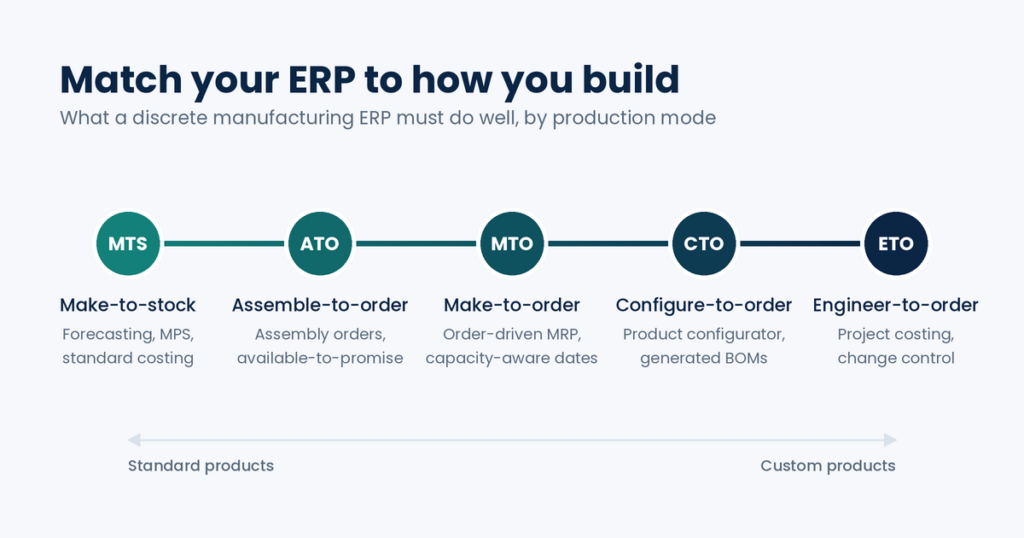
If a deadline is driving the decision
Many ERP projects start with a date on the calendar. These are the ones discrete manufacturers most often face:
| Legacy system | Key date |
|---|---|
| Microsoft Dynamics AX 2012 R3 | Extended support ended January 10, 2023 (Microsoft) |
| Microsoft Dynamics NAV 2018 | Extended support ends January 11, 2028 (Microsoft) |
| SAP ECC 6.0 | Mainstream maintenance ends December 31, 2027; paid extended maintenance runs to December 31, 2030 for enhancement packages 6-8 (SAPinsider) |
| Microsoft Dynamics GP | Product and regulatory updates end December 31, 2029; security patches end April 30, 2031 (Microsoft) |
Other deadlines don’t come from a vendor: a private equity acquisition that has to be integrated, a new plant opening on a fixed date, or a compliance audit that exposed traceability gaps.
A fixed date is a reason to start the evaluation early, not to shorten it. Most schedule risk sits in data cleanup, integrations and migrating years of business logic built into the old system, and none of those compress well. Work back from the date: go-live, then testing and training, then configuration and data migration, then selection.
What to look for in a discrete manufacturing ERP
Every ERP vendor will say yes to every item on a checklist. The difference shows up in how a capability works with your data, so each section below explains what good looks like and ends with one warning sign that a system falls short.
1. Multi-level BOMs and engineering change control
Your ERP should manage BOMs several levels deep and control exactly which version of a BOM applies to which order. This is where discrete manufacturers lose the most money to rework and scrap.
A multi-level BOM lets a finished product contain subassemblies that have their own BOMs, which is how most real products are built. Engineering change control is the harder part. When a revision is released, open orders may need to keep the old version while new orders pick up the new one. Look for BOM versions with effectivity dates, phantom BOMs for subassemblies you never stock, and a clean hand-off from your CAD or PLM system so engineers aren’t retyping parts lists.
Red flag: editing a live BOM silently changes orders already released to the floor.
2. Routings, work centers and machine centers
The ERP should model how each product is made (the sequence of operations, the work centers that perform them, and the setup and run times for each) because your capacity plan, cost rollup and quotes all depend on it.
If the BOM says what goes into a product, the routing says how it’s built: cut, weld, paint, assemble, test. Each operation is tied to a work center or a specific machine, with its own calendar, cost rate and efficiency. Outside operations, like sending parts out for plating or heat treatment, should be part of the routing too, with a purchase order generated automatically.
Red flag: outside processing is handled with a manual purchase order that has no link to the production order.
3. MRP and master production scheduling
MRP should tell purchasing what to buy and the floor what to make, and when, working from real demand across every level of the BOM. Master production scheduling sets the plan for finished goods that MRP then explodes.
Good MRP reads sales orders, forecasts, safety stock, open purchase orders and supplier lead times in one run, then proposes planned orders that a planner reviews and releases. For make-to-order and engineer-to-order shops, it should also be able to peg supply to a specific customer order, so you can see which purchase order feeds which job.
Red flag: planners can’t rerun MRP on demand and have to wait for an overnight batch to see the effect of a rush order.
4. Capacity planning and scheduling
The ERP should show whether you actually have the machine and labor hours to meet the dates you promise, and push work forward when a resource is full. Scheduling is where many mid-market systems are weakest, so test it hard.
Infinite scheduling assumes every work center can absorb any load, which is fine for rough planning but produces dates the floor can’t hit. Finite scheduling respects each resource’s calendar and capacity. Most small and mid-sized shops need finite scheduling for their bottleneck work centers, not necessarily for every machine. Shops with many constraints, complex sequencing or frequent changeovers may need a dedicated advanced planning and scheduling (APS) tool alongside the ERP.
Red flag: anything beyond infinite loading needs a separate scheduling product that isn’t in the price you were quoted.
5. Shop floor data collection
The ERP should capture labor, output and scrap against each production order as it happens, from terminals or tablets on the floor. Without that data, your schedule, inventory and job costs are all estimates.
Operators should be able to clock onto an operation, report quantities completed and scrapped, and flag problems in a few taps. That data should flow straight into the production order, updating work-in-progress inventory and actual cost without anyone re-keying it from paper travelers at the end of the shift.
Red flag: shop floor reporting requires a separate MES product for basic time and quantity capture.
6. Manufacturing costing
The ERP should roll up material, labor, machine time, subcontracting and overhead into the cost of each item or job, and post variances to the general ledger when an order closes. This is what tells you which products and customers actually make money.
The costing method should fit your production mode. Make-to-stock and assemble-to-order shops typically use standard costing, where variances show you where production drifted from plan. Make-to-order and engineer-to-order shops usually need actual job or project costing, since no two jobs are the same. Mixed shops need both in the same system.
Red flag: costs reach the ledger through a manual month-end journal rather than posting as work is reported.
7. Serial and lot traceability, and quality control
The ERP should trace every serial-numbered unit back to the component lots inside it, and forward to the customer who received it. If you sell into aerospace, defense, medical devices or automotive, this is a requirement, not a feature.
Traceability should cover receiving, production, shipping and returns without gaps. Quality control belongs in the same system: inspection plans at receiving and between operations, nonconformance records, and the ability to hold suspect inventory so it can’t be picked. A recall is the real test. You should be able to find every affected unit in minutes, not days.
If you’re audited, check how the system supports the standard you answer to, such as FDA 21 CFR Part 820 for medical devices, IATF 16949 for automotive suppliers or AS9100 for aerospace. Ask to see the audit trail an inspector would review, not just the feature list.
Red flag: traceability works forward or backward, but not both, or only for items set up in a special way.
8. Integrations
The ERP should connect cleanly to the systems around it: CAD or PLM for engineering, CRM for sales, ecommerce and EDI for orders, and MES or machine data if you have them. A discrete manufacturing ERP that can’t exchange data with engineering will end up with a second, manual BOM.
Ask whether each integration is a standard connector, an extension from a marketplace, or custom development. Standard connectors are cheaper to keep running through upgrades. Custom integrations are sometimes necessary, but each one adds cost every time either system changes.
Red flag: every integration on your list is described as “straightforward custom work.”
9. Multiple plants and entities
The ERP should run several plants, warehouses and legal entities in one system, so consolidation happens automatically instead of as a manual project every month. This matters most after an acquisition or when a new site comes online.
Look for inventory and planning across sites, transfer orders between plants, intercompany orders that create the matching sales and purchase documents on both sides, and consolidated reporting across currencies if you operate internationally.
Red flag: each plant runs as a separate database and consolidation happens in spreadsheets.
Measure the outcome, not the features
A new ERP should move numbers your leadership team already watches. Pick two or three, record where they stand today, and make them the success criteria for the project.
| Measure | What a well-run ERP changes | How to baseline it today |
|---|---|---|
| Inventory accuracy | System counts match the shelf because every movement is recorded as it happens | Compare a cycle count against system quantities |
| Days to close the month | Production costs post as work is reported, so fewer manual journals and reconciliations | Days from period end to final statements |
| Planning cycle time | Planners rerun MRP on demand instead of waiting for a batch or rebuilding spreadsheets | Hours from a demand change to an updated plan |
| On-time, in-full delivery | Promise dates reflect real capacity and material | Share of orders shipped complete by the promised date |
| Scrap rate | Scrap is recorded by operation and cause, so it can be traced and reduced | Scrap cost as a share of production cost |
| Unplanned downtime | Downtime is logged against work centers and feeds the schedule | Hours lost per work center per month |
Write the baseline and target for each measure into the statement of work for the first phase. It keeps the project focused on outcomes and gives your CFO a clear way to judge whether it worked.
Warning signs beyond the software
Some of the clearest signals come from how the vendor and partner run the evaluation, not from the product itself.
-
- They won’t work with your data. Sample data hides exactly the complexity you’re buying the system to handle.
-
- Their references aren’t in your production mode. A partner with strong make-to-stock references may still struggle with engineer-to-order projects.
-
- The quote leaves out modules you’ll need. Scheduling, quality, shop floor collection and configurators are common add-ons. Ask for a price that covers your whole process.
-
- The project plan skips data cleanup. BOMs, routings and item records carried over as-is bring their errors with them.
-
- Every gap is “easy to customize.” Some customization is normal. Heavy customization of core manufacturing processes usually means the system is the wrong fit.
-
- Nobody can say who supports you after go-live. Ask for the support model, the named team and the service levels in writing before you sign.
-
- The first phase is “everything.” A big-bang scope with no fixed first phase is the pattern behind most over-budget projects.
How to run the evaluation
-
- Define your production mode, top three problems and baseline numbers. Write down which modes you run, what share of revenue each drives, the three problems costing you the most, and the measures from the table above that reflect them.
-
- Test each system on your own work. Give each vendor one real BOM, one real routing and one real customer order, and have them take it from quote to shipment and cost variance.
-
- Score every vendor on the same weighted scorecard. Weight criteria by what your production mode depends on, and score each vendor as soon as you’ve seen it handle your data.
-
- Check references in your sub-vertical and size band. Ask to speak with two or three manufacturers who build the way you do, at a similar revenue, ideally ones who went live in the last two years. Ask them what happened after go-live.
-
- Ask for a fixed-scope first phase. It should name the delivery team, the milestones and the target numbers it will move. Later phases can add scope once the core is stable.
-
- Price three years, not one. Include licenses, implementation, extensions, integrations, environments and storage, training, and post-go-live support. List prices are rarely the total cost.
A sample scorecard
Here is an example weighting for a make-to-order shop. A make-to-stock shop would shift weight toward forecasting and standard costing; an engineer-to-order shop toward change control and project costing.
| Criterion | Weight |
|---|---|
| BOMs and engineering change control | 20% |
| MRP and capacity scheduling | 20% |
| Shop floor data collection | 15% |
| Costing | 15% |
| Traceability and quality | 10% |
| Integrations | 10% |
| Partner experience and support | 10% |
When an ERP isn’t enough on its own
A mid-market ERP should run production, inventory, purchasing and finance for most discrete manufacturers. A few situations call for a specialist system alongside it:
-
- Advanced planning and scheduling (APS) when you have many interdependent bottlenecks, sequence-dependent changeovers or need to re-optimize the schedule several times a day.
-
- Manufacturing execution system (MES) when you need machine-level data collection, electronic work instructions or detailed operator traceability, often in regulated industries.
-
- Product lifecycle management (PLM) when engineering manages thousands of parts, frequent revisions or formal change approval workflows.
If any of these apply, ask how the ERP integrates with the specialist tool before you choose, because the integration is where these projects usually get expensive.
What to make of Copilot and AI claims
Judge AI features the way you’d judge any other: ask to see them working on a process you’d already pay to improve, measured against a number you already track. In manufacturing, credible uses include chasing suppliers on late purchase orders, sharpening demand forecasts, predicting machine maintenance and spotting quality defects from images.
AI is only as good as the data under it. If the plant floor and the ledger don’t agree today, AI will produce wrong answers faster, which is another reason to get the core right first.
How Dynamics 365 fits
Microsoft offers two ERP options for discrete manufacturing, and the split follows company size and complexity.
Dynamics 365 Business Central suits small and mid-sized discrete manufacturers, especially make-to-stock, assemble-to-order and make-to-order shops. It includes production BOMs with versioning, routings, work and machine centers, MRP, capacity planning, lot and serial tracking, and manufacturing costing, and the 2026 release wave 1 added native quality management. Product configurators and advanced scheduling come from AppSource extensions. For a detailed walkthrough, see how Business Central handles discrete manufacturing.
Dynamics 365 Supply Chain Management fits larger, multi-site or more complex operations. It adds native constraint-based product configuration for configure-to-order businesses, more advanced shop floor control, and mixed-mode discrete, process and lean manufacturing in one environment. See Dynamics 365 Supply Chain Management.
Choosing between them is the most consequential decision in a Dynamics project, and the two expensive mistakes run in opposite directions: heavily customizing Business Central to behave like an enterprise system, or buying Supply Chain Management for an operation that doesn’t need its complexity.
| Signal | Usually points to |
|---|---|
| One site or a few, one or a few legal entities | Business Central Premium |
| Make-to-stock, assemble-to-order or make-to-order production | Business Central Premium |
| Replacing Dynamics GP or NAV | Business Central Premium, in most cases |
| Many plants, entities or countries | Supply Chain Management |
| Configure-to-order at volume, or discrete and process in one operation | Supply Chain Management |
| Advanced shop floor control or lean manufacturing | Supply Chain Management |
| Replacing Dynamics AX 2012 or SAP ECC | Often Supply Chain Management, depending on size and complexity |
Smaller shops comparing Business Central with other vendors can start with our guide to the best ERP for small manufacturing businesses.
Conclusion
The best discrete manufacturing ERP is the one that fits how you build. Decide which production mode drives your business, weight BOM control, scheduling, shop floor tracking and costing accordingly, and make every vendor prove those capabilities on your own data. The system that survives that test, with a partner who has done it in your mode before, is worth far more than the one with the longest feature list.
Folio3 Dynamics has spent 20+ years implementing Microsoft Dynamics for discrete, process and mixed-mode manufacturers. The best first step is an ERP Complexity & Value Assessment. We map your production model and current systems, recommend Business Central or Supply Chain Management, score your data readiness, list the integrations involved, and lay out a phased roadmap with the measures each phase should move. Request an assessment or explore our discrete manufacturing practice.
Frequently asked questions
Features and capabilities
A discrete manufacturing ERP is built around bills of materials, routings and countable units, often with serial numbers. A process manufacturing ERP is built around formulas, batches and output measured by weight or volume. Mixed-mode manufacturers need a system that handles both in one database.
At minimum: multi-level BOMs with engineering change control, routings and work centers, MRP, capacity planning, shop floor data collection, manufacturing costing, and serial and lot traceability. Configure-to-order shops also need a product configurator, and engineer-to-order shops need project costing.
Most discrete manufacturers need finite scheduling at least for their bottleneck work centers, so promised dates reflect real capacity. Infinite scheduling is fine for rough planning. Shops with many interdependent constraints or frequent changeovers may need a dedicated APS tool alongside the ERP.
You need one if customers choose options that change the BOM or routing, which is the definition of configure-to-order. A configurator generates valid BOMs, routings and prices from those choices, preventing orders that can’t be built. Make-to-stock and simple make-to-order shops usually don’t need one.
Choosing and implementing
Yes, some can. Dynamics 365 Supply Chain Management, for example, runs discrete, process and lean production in the same environment with shared inventory and costing. Smaller ERPs often handle one mode natively and the other through extensions, so test your specific mix before you commit.
Business Central Premium fits most single-site or few-site discrete manufacturers running make-to-stock, assemble-to-order or make-to-order production. Supply Chain Management fits multi-plant, multi-entity or international operations, configure-to-order at volume, and mixed discrete and process manufacturing. Avoid heavily customizing Business Central to imitate an enterprise system.
Total cost is more than the license. It includes implementation, integrations, extensions, environments and storage, training and post-go-live support. Price the first three years, ask for a fixed-scope first phase, and tie it to target numbers such as inventory accuracy or days to close so the return can be measured.
A single-site Business Central implementation for a small or mid-sized discrete manufacturer typically takes 3 to 6 months for core modules. Multi-site or Supply Chain Management projects usually take longer. The biggest variable is how clean your BOMs, routings and item data are going in.