
By Solution
By Initiative
By Industry
☰
Solutions
By Solution
By Initiative
By Industry
By Mobility
Training & Support
Dynamics AX Technical Training
Company
Upgrade & Migration
Consulting
Case Studies
Folio3 is a Microsoft Solutions Partner that takes finance and operations teams from QuickBooks, Dynamics GP, NAV, Sage or spreadsheets to a working Business Central system, with your data migrated, your people trained and the same team supporting you after go-live.

20+
Years building software
5,000+
projects delivered
20+
Microsoft ISV’s
200+
Microsoft Certified Experts
Business Central fits companies of 20 to 500 people. If one of these sounds like you, it's time to move.

Inventory, multiple entities or approvals now live in workarounds outside the books.
Moving From QuickBooks »
Microsoft ends GP support on December 31, 2029. Planning the move now avoids a rushed one.
Dynamics GP End Of Support » Business Central is NAV's successor, so your data and processes have a direct path forward.
Upgrading From NAV »
You want finance, inventory and reporting in one Microsoft system instead of add-ons.
Moving Off Sage »
Consolidation, budgets and intercompany work happen in Excel across several entities.
Implementation Packages
Both tracks start with a free assessment, and both end with 30 days of hypercare from
the team that built your system.
Timeline
Timeline
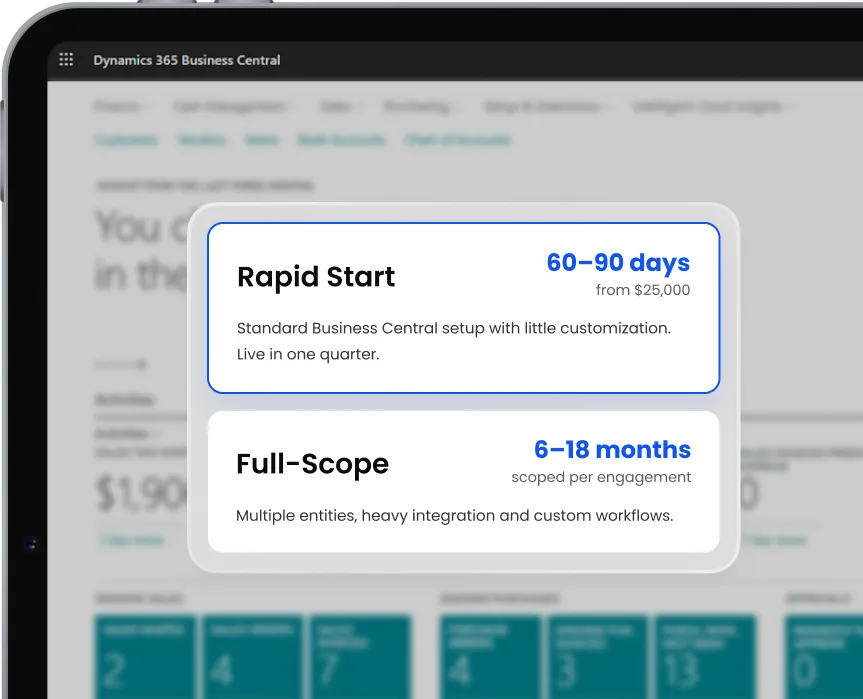
60–90 days
Timeline
6–18 months
Price
Price
From $25,000
Price
Scoped per engagement
Best For
Best For
Standard processes, little customization
Best For
Multi-entity, heavy integration, custom workflows
Customization
Customization
Standard Business Central configuration and Microsoft's default practices
Customization
Custom AL extensions and workflows built to your process
What's Included
What's Included
What's Included
Prices are starting figures, not quotes. The final cost comes from the pre-implementation assessment and is fixed in the statement of work. Microsoft licensing is separate.
What's Included
One team covers each of these, so nothing is handed off between vendors.

Free and done before you sign anything. We map your processes, find the gaps against standard Business Central and give you a fixed cost and timeline.

Chart of accounts, posting groups, dimensions and warehouse setup, plus AL extensions where your process needs more than standard features.

Customers, vendors, items and open balances moved from your old system with Folio3's migration templates, then reconciled before go-live.

Microsoft 365, Power BI, ecommerce stores and marketplaces, payment gateways and the other systems your teams already use.

Role-based sessions for finance and operations users, and train-the-trainer sessions so your key users can onboard new staff.

The team that built your system supports it for 30 days after go-live. After that, managed support runs on a fixed monthly retainer or time and materials.
How We Implement
Phases overlap: design starts before mapping ends, and data is cleansed throughout the build.
Read the full Business Central implementation process.
1
Weeks 1–2
2
Weeks 2–8
3
Weeks 4–12
4
Runs through the build
5
Weeks 10–20
6
30 days of hypercare
Results

Lower project cost than a custom build: under $50,000 against an estimated $250,000+

Agriculture, Indiana

Less manual reconciliation and payment settlement work

Manufacturing and ecommerce, Utah

Less manual effort moving work from sales to projects

Manufacturing, Oregon
"Deploying a rapid, out-of-the-box implementation model kept our total project cost under $50,000. It let us avoid the estimated $250,000 plus we would have spent custom-building a solution or running a heavy enterprise system like SAP, and we scaled transaction volume without adding finance headcount."

Zach Parton, Finance Director, Weaver Popcorn Hybrids




Free Assessment
Find out which track fits and what it will cost before you commit to anything.
We talk through your current system, entities, users and the integrations you need.
You get a recommended track, a fixed cost and a milestone-based timeline.
Or call +1 408 412-3813
Why Folio3

The consultants who scope your project build it, take it live and support it for the first 30 days.

Microsoft-certified functional and technical consultants, backed by Folio3's Microsoft Solutions Partner status.

Distribution, manufacturing, retail and agriculture, including AgriERP, built on Business Central.

If an earlier partner left you half-live, we assess what's salvageable and give you a recovery plan. Recovering a stalled implementation
Pricing
You get a fixed figure from the assessment before you commit. Four things drive it:

Number of users

Integrations

Data volume and history

Customization
For a line-by-line breakdown, see our guide to Business Central implementation cost.
Rapid Start implementation
From $25,000
Full-Scope implementation
Scoped per engagement
Business Central Essentials licence
$80 / user / month
Business Central Premium licence
$110 / user / month
Team Members licence
$8 / user / month
Microsoft licences are billed separately, paid yearly, at US list prices.
FAQ
Rapid Start takes 60 to 90 days. Full-Scope takes 6 to 18 months. The difference comes from the number of entities, integrations and custom workflows, and the free assessment tells you which track fits.
Rapid Start starts at $25,000. Full-Scope is scoped per engagement. Both are starting points, not quotes: the final figure comes from the pre-implementation assessment and is fixed in the statement of work. Microsoft licensing is separate. See the full Business Central implementation cost breakdown.
Rapid Start is a fixed-scope deployment on standard Business Central configuration, live in 60 to 90 days. Full-Scope covers multiple entities, custom AL extensions, several integrations, full data migration and change management, over 6 to 18 months.
The assessment is free and happens before any statement of work. It documents your current processes, runs a gap analysis against standard Business Central, reviews how complex your data migration will be, and recommends a track with a cost and timeline estimate.
Yes. Folio3 migrates master data, open transactions and opening balances from QuickBooks, Dynamics GP, Dynamics NAV, Sage and spreadsheets, and reconciles them before go-live. Dynamics GP support ends on December 31, 2029, so GP users have a fixed deadline to plan around.
You can set up Business Central yourselves. A partner adds the work most teams don't have time or experience for: process mapping, data migration and reconciliation, AL extensions, integrations and structured testing. Folio3 is a Microsoft Solutions Partner and runs all of these with one team.
Microsoft 365, Power BI and Dynamics 365 Sales, ecommerce stores and marketplaces such as Shopify and Amazon, payment gateways, payroll, banking and EDI. Folio3 has also connected Business Central to Oracle Fusion and to in-house lab systems.
Yes. Folio3 can roll Business Central out by module, by entity or by region, and recommends it for multi-company setups. Weaver Popcorn Hybrids went live on core finance and inventory first, then added Power BI dashboards and budgeting.
Every implementation includes 30 days of hypercare from the team that built your system. After that, managed support is available as a fixed monthly retainer or on time and materials. Training is role-based, with train-the-trainer sessions for your key users.
What counts as a scope change is written into the statement of work before the project starts. If one comes up, Folio3 documents it, estimates the cost and timeline impact, and gets your approval before any work begins. Nothing turns up for the first time on an invoice.