A Dynamics 365 Business Central implementation is one of the most consequential decisions a growing business will make. Done well, it replaces disconnected spreadsheets and legacy systems with a single source of truth that connects finance, operations, sales, and supply chain in real time. Done poorly, it stalls, runs over budget, and drives the change management nightmare every leadership team wants to avoid. This guide covers everything you need to know before you start.
Folio3 Dynamics as Your Business Central Implementation Partner
Choosing the right partner is as important as choosing the right software. Microsoft does not implement Business Central directly for customers. Implementation is delivered by a network of certified partners, and the experience, methodology, and post-go-live commitment of that partner determines whether you go live on time and actually get value from the platform.
Folio3 Dynamics is a certified Microsoft Solutions Partner with 20+ years of experience delivering Dynamics 365 implementation services for mid-market businesses across manufacturing, distribution, agriculture, food and beverages, and professional services. Our Business Central practice covers full-cycle delivery from requirements through go-live and managed support, and our team brings both functional depth and technical development expertise to every engagement.
What Is Dynamics 365 Business Central?
Microsoft Dynamics 365 Business Central is a cloud-based, all-in-one ERP platform built for small and mid-sized businesses that have outgrown entry-level accounting software or are on aging on-premises systems. It connects finance, sales, operations, supply chain, and customer service inside a single application, giving every team access to the same real-time data without jumping between disconnected tools.
Business Central works as a standalone ERP while integrating natively with Microsoft 365, Power BI, Power Platform, and thousands of certified AppSource add-ons. It covers the following core modules:
- Financial Management (general ledger, accounts payable, accounts receivable, bank reconciliation)
- Sales and Customer Service (opportunity management, quotes, order processing)
- Supply chain management (purchasing, demand planning, vendor management)
- Inventory and Warehouse Management (lot tracking, bin management, stock transfers)
- Manufacturing (production orders, bills of materials, capacity planning)
- Project Management (job costing, resource planning, project billing)
- Reporting and Analytics (built-in Power BI dashboards, KPI tracking)
Business Central is an excellent fit for companies migrating from QuickBooks to Business Central, or stepping off legacy platforms such as Dynamics NAV and Dynamics GP that are no longer keeping pace with business complexity.
Want to see it in action? Request a free personalized demo from a Folio3 Dynamics Business Central consultant to see exactly how it maps to your processes.
Key Benefits of Dynamics 365 Business Central
Business Central is one of the most widely adopted mid-market ERP platforms for good reason. Here are the ten outcomes organizations most consistently see after a well-executed implementation:
- Unified financial management with real-time visibility across every entity and location
- Faster order-to-cash and procure-to-pay cycles through end-to-end workflow automation
- Tighter inventory control and reduced carrying costs with live stock visibility
- Seamless integration with Microsoft 365, Teams, Outlook, and Power BI
- Automated approval workflows that eliminate manual follow-up
- Role-based dashboards tailored to each department so people see only what they need
- Built-in compliance controls, audit trails, and financial reporting standards
- Cloud-based access from any device, anywhere, with no infrastructure to manage
- Scalable architecture that adds users, entities, and modules without migrating platforms
- Microsoft Copilot AI is built in to assist with drafting, summarizing, and daily task automation
Your Business Central Implementation Options
Most organizations come to Folio3 Dynamics from one of two directions: they are migrating off a legacy Microsoft platform, or they are stepping up from a tool like QuickBooks that can no longer handle their operational complexity. In both cases, we tailor the implementation path to your timeline, budget, and actual requirements.
We offer two primary implementation routes.
Rapid Implementation (via Folio3 Rapid Start Methodology)
Our Folio3 Rapid Start Methodology is a fixed-scope, accelerated deployment designed for businesses with standard processes that are ready to adopt Business Central’s out-of-the-box best practices. Clients on this path go live in 60 to 90 days with minimal customization. It is the fastest, most cost-effective route to a working Business Central environment and the right starting point for most smaller or less complex organizations. Implementation pricing begins at $25,000.
Full-Scope Implementation
A phased, fully configured deployment for businesses with complex workflows, third-party integrations, multi-entity structures, or industry-specific requirements. This path covers deep fit-gap analysis, custom development, comprehensive data migration, and a full change management program. Timelines typically run between six and eighteen months, depending on the scope.
Not sure which path fits your situation? Our pre-implementation assessment defines your current-state gaps, confirms the go-live scope, and recommends the most cost-effective route before any engagement begins.
How Long Does a Business Central Implementation Take?
Implementation timelines depend on the complexity of your business processes, the number of third-party integrations, the volume and quality of data being migrated, and the level of customization required. Here are realistic planning ranges:
- Rapid Implementation: 60 to 90 days for fixed-scope, out-of-the-box deployments with minimal customization
- Full-Scope Implementation: 6 to 18 months for complex, customized engagements with multiple integrations and extensive data migration
The Rapid Implementation path works best for businesses willing to adapt their processes to Business Central’s proven defaults rather than engineering around them. That discipline pays off in speed, lower cost, and fewer post-go-live surprises. The full-scope path is the right choice when your business has specific workflows, legacy integrations, or regulatory requirements that configuration alone cannot address.
Stages of a Business Central Implementation
Every Business Central implementation at Folio3 Dynamics follows a structured, phase-gated process. Here is what each stage covers.
- Project Initiation and Team Mobilization (Weeks 1 to 2): Define the project charter, confirm scope, assemble the project team on both sides, and establish governance, decision-making authority, communication cadence, and escalation paths.
- Business Process Mapping and Fit Gap Analysis (Weeks 2 to 8): Document current workflows, identify where Business Central covers them out of the box, and flag gaps requiring configuration or custom development. This stage produces the approved functional requirements document that drives all downstream work.
- Solution Design and System Configuration (Weeks 4 to 12): Configure the system to match approved requirements, design data migration templates, and begin development of any approved custom extensions. A completely configured sandbox environment is the output of this stage.
- Data Migration and Cleansing (Ongoing throughout build): Extract, clean, and transform data from legacy systems. Run migration validation passes in the Business Central sandbox against defined acceptance criteria before anything touches production.
- Testing and User Acceptance Testing (Weeks 10 to 20): Execute unit, integration, and end-to-end test scenarios. Conduct formal user acceptance testing with key stakeholders and resolve all open issues before sign-off authorizes deployment.
- Go-Live and Deployment (Final 2 to 4 Weeks): Complete end-user training, run cutover rehearsals, confirm production readiness, and execute the live deployment. A 30-day hypercare support window begins immediately after go-live.
Business Central Implementation Cost
Business Central implementation cost varies based on scope, complexity, user count, integrations, and the level of customization your business requires. Here are the pricing ranges for Folio3 Dynamics engagements:
| Implementation Type | Price Range | Best For |
| Rapid Implementation | Starting at $25,000 | Fixed scope, out-of-the-box configuration, 60–90 day go-live |
| Full-Scope Implementation | Up to $250,000 | Custom workflows, multiple integrations, complex data migration, multi-entity |
These figures cover implementation services only and do not include Business Central licensing, which is priced separately through Microsoft. Our team provides a detailed, scoped estimate during the pre-implementation assessment so you have full cost visibility before committing to any engagement.
Want a number for your specific situation? Schedule a 30-minute discovery call with a Folio3 Dynamics consultant. We scope projects around your actual requirements, not generic averages.
Customization and Scalability
Business Central is built to handle the majority of mid-market ERP requirements straight out of the box. Most businesses do not need heavy custom development to go live. Where gaps exist, the platform provides several ways to extend it without putting upgrade cycles at risk.
AL Extensions Custom development in Business Central is delivered through Microsoft’s AL extension model. Extensions are entirely separate from the core application, which means they do not break when Microsoft pushes updates. Folio3 Dynamics builds upgrade-safe, version-controlled extensions that are fully maintainable by our team post-go-live.
Microsoft AppSource AppSource offers thousands of certified add-on solutions built by Microsoft ISV partners for specific industries and use cases. Folio3 Dynamics evaluates and integrates AppSource solutions for industries including manufacturing companies, distribution, food and agriculture, and professional services.
Power Platform Business Central connects natively with Power Apps, Power Automate, and Power BI. Your team can build automated approval workflows, custom dashboards, and lightweight business applications without writing code and without waiting for the next release cycle.
As your business grows, Business Central scales with it. Additional users, new legal entities, expanded currencies, and additional modules can all be activated without migrating to a new platform.
How to Minimize Business Disruption During Implementation
No ERP transition is completely without disruption. The goal is to plan intelligently so that operational impact stays manageable throughout the project. Here is how Folio3 Dynamics keeps the business running while the new system comes online.
Phased Rollout Rather than activating everything at once, we sequence the go-live by module or business unit. This limits exposure and gives each team time to build confidence in the new system before the next phase begins.
Parallel Running Where appropriate, legacy systems run alongside Business Central for a defined period after go-live. This provides a reconciliation safety net and gives users time to build trust in the new platform before the old one is decommissioned.
Early Stakeholder Involvement We bring key users into the project from the requirements stage. People support what they help shape. Early involvement also surfaces process problems before they become system problems, which is always cheaper to address.
Hypercare Support Window In the 30 days immediately after go-live, our team provides dedicated hypercare support to resolve issues quickly, tune configurations, and monitor adoption before transitioning to standard post-go-live support.
Best Practices for a Successful Business Central Implementation
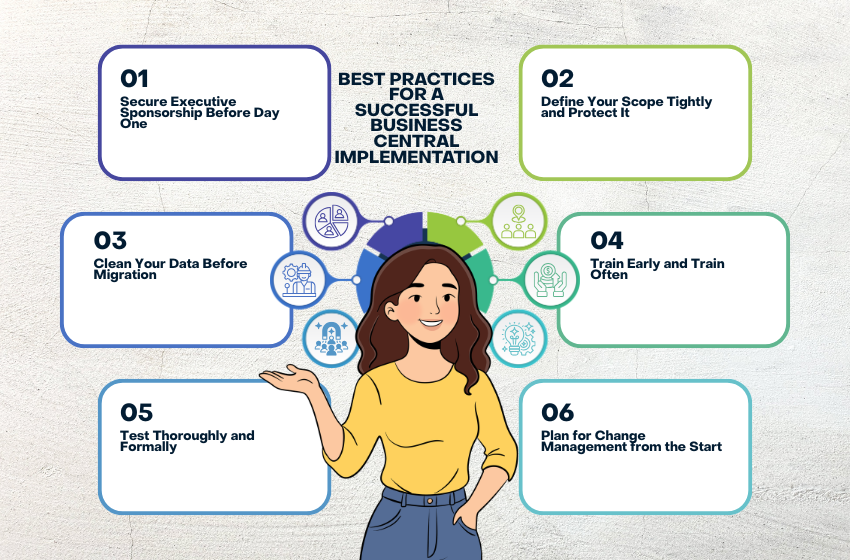
After 20+ years of ERP implementations, these are the practices that consistently separate on-time, on-budget go-lives from the ones that stall.
Secure Executive Sponsorship Before Day One Implementations stall when leadership is not visibly and actively committed. An executive sponsor who attends key milestones, communicates the change to the organization, and resolves escalated decisions quickly is one of the single biggest factors in project success.
Define Your Scope Tightly and Protect It Scope creep is the most common reason Business Central implementation projects run over budget and past deadline. Lock down the minimum viable go-live scope up front. Log everything else as Phase 2 work and enforce a formal change control process from day one.
Clean Your Data Before Migration Migrating dirty data into a clean system is the fastest way to undermine user confidence in the new platform. Invest time in deduplication, normalization, and archiving before migration begins. Data problems found during migration validation are far cheaper to fix than problems found after go-live.
Train Early and Train Often User adoption is the single biggest driver of post-go-live success. Training should not be a two-week sprint at the end of the project. Build a training program that includes sandbox access, role-specific walkthroughs, and formal user acceptance sign-off well before the go-live date.
Test Thoroughly and Formally Build a test plan that covers core business processes, edge cases, and all integration points. Formal user acceptance testing with a signed sign-off document removes ambiguity about go-live readiness and prevents last-minute surprises in production.
Plan for Change Management from the Start A new ERP changes how people work. Resistance to change is a project risk, not an HR problem. Building awareness early, communicating the why clearly, and addressing concerns before go-live reduces friction and accelerates adoption.
Common Business Central Implementation Challenges
Knowing what typically goes wrong is half the battle. These are the challenges we most frequently help clients work through.
- Resistance to change: Teams comfortable with legacy processes often push back on new workflows. Early involvement, leadership communication, and role-specific training address this before it becomes a go-live blocker.
- Over-customization: Building custom solutions for processes Business Central already handles out of the box adds cost, extends timelines, and creates upgrade risk. Configuration should always come before custom development.
- Poor data quality: Inconsistent, duplicate, or incomplete legacy data causes delays at migration and errors at go-live. A structured data cleansing exercise before migration starts prevents most of these issues.
- Insufficient testing time: Compressed timelines lead teams to shortcut testing. Issues found in production are always more expensive and disruptive than issues found during user acceptance testing. Testing cannot be treated as optional.
- Unclear requirements: Vague or shifting requirements cause expensive rework mid-project. A thorough fit-gap analysis in the design phase locks down what the system must do before configuration begins.
- Undocumented integrations: Overlooked integration points surface late and derail go-live timelines. Every third-party integration must be inventoried and scoped during discovery, not discovered during testing.
Already in a difficult situation? Folio3 Dynamics offers an off-track ERP project recovery service to assess, stabilize, and get your implementation back on course.
Why You Should Use a Certified Partner for Your Business Central Implementation
A strong Business Central implementation partner brings four things most organizations cannot source internally.
- Delivery experience from dozens of completed go-lives in your industry, which means they recognize risk patterns early rather than learning on your project
- Technical depth for system configuration, AL custom development, and integration architecture that in-house IT rarely has on hand
- Change management guidance to help leadership communicate the transition and bring teams along without resistance derailing the timeline
- Ongoing support through a managed services arrangement so production issues are resolved quickly and the system keeps improving after launch
When evaluating Business Central implementation partners, look for Microsoft Solutions Partner certification, industry-specific case studies, evidence of long-term client relationships, and whether they offer fixed-price options that protect you from open-ended billing. The partner who hands you off after go-live is not the same as the partner who stays involved through optimization and growth.
User Training and Post-Go-Live Support
Technology only delivers value when people use it confidently. Folio3 Dynamics builds a training and adoption program into every engagement from the start, not as an afterthought in the final two weeks before go-live.
Training formats we deliver as part of every Business Central implementation include:
- Role-based workshops focused on exactly the processes each team will use day to day, not general platform orientation
- Train-the-trainer sessions that equip internal champions to support colleagues and onboard new hires independently after go-live
- Sandbox practice environment where users build confidence before they ever touch production data
- Documentation and quick-reference guides tailored to your specific configuration and available to users after go-live
After the 30-day hypercare window closes, clients can move to one of our Business Central managed support plans covering break-fix, minor enhancements, proactive health checks, and ongoing training as the system evolves with the business.
Folio3’s Business Central Implementation Methodology
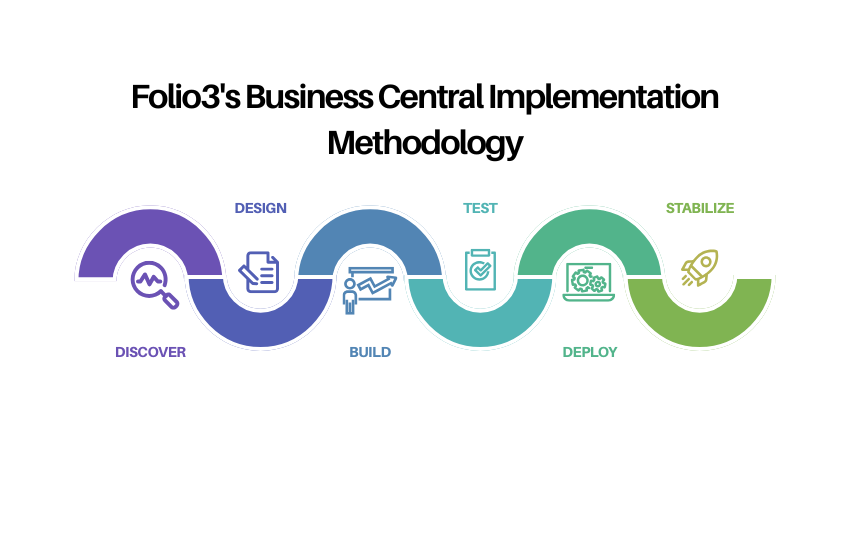
Folio3 Dynamics delivers implementations using a structured, phase-gated methodology informed by Microsoft’s Sure Step framework and refined by our own delivery experience across hundreds of engagements. Every phase has defined deliverables and a formal client sign-off gate before the project proceeds.
- Phase 1 — Discover: Current-state assessment, requirements gathering, fit-gap analysis, and project planning. Output: approved scope document and project plan.
- Phase 2 — Design: Solution design, process documentation, data migration planning, and integration architecture. Output: approved functional design document.
- Phase 3 — Build: System configuration, custom AL extension development, integration build, and data migration scripting. Output: configured sandbox environment ready for testing.
- Phase 4 — Test: Integration testing, performance testing, and formal user acceptance testing. Output: signed UAT approval and resolved issue log.
- Phase 5 — Deploy: End-user training completion, cutover execution, and production go-live. Output: live Business Central environment with hypercare support activated.
- Phase 6 — Stabilize: 30-day hypercare support, issue resolution, adoption monitoring, and transition to managed support. Output: stable, confident production environment.
Ready to Plan Your Business Central Implementation?
Talk to a Folio3 Dynamics consultant. We will scope the project around your actual requirements, walk you through the options, and help you decide whether Rapid Implementation or a full-scope engagement is the right fit. Request a Free Consultation
Frequently Asked Questions
How long does a Dynamics 365 Business Central implementation take?
It depends on your requirements. Folio3 Dynamics’ Rapid Implementation path gets businesses live in 60 to 90 days for fixed-scope, out-of-the-box deployments. Full-scope implementations with custom development, multiple integrations, and complex data migrations typically run between six and eighteen months. The pre-implementation assessment we conduct before any engagement starts gives you a realistic timeline based on your actual situation.
How much does a Business Central implementation cost?
Folio3 Dynamics’ Rapid Implementation starts at $25,000 for accelerated, fixed-scope deployments. Full-scope implementations can range up to $250,000 based on a client’s specific needs.
What is the difference between Rapid Implementation and a full-scope implementation?
Rapid Implementation is a pre-scoped, fixed-cost engagement built for businesses with standard processes ready to adopt Business Central’s out-of-the-box configuration. It targets a 60 to 90 day go-live. A full-scope implementation is a customized engagement that addresses complex workflows, multi-entity structures, third-party integrations, and industry-specific requirements that configuration alone cannot cover.
Can Folio3 Dynamics migrate us from Dynamics GP or Dynamics NAV to Business Central?
Yes. Legacy Dynamics migrations are one of the most common paths we handle. Microsoft provides migration tools for Dynamics GP and Dynamics NAV, and our team supplements those tools with our own migration framework covering data cleansing, chart of accounts mapping, and historical transaction migration. We have completed dozens of GP and NAV migrations and can walk you through exactly what that process looks like for your scenario.
How much customization does Business Central require?
Most businesses do not need heavy customization to go live. Business Central covers the majority of mid-market ERP requirements out of the box, and Microsoft AppSource solutions fill many of the remaining gaps without custom development. When custom extensions are necessary, Folio3 Dynamics builds them using Microsoft’s AL extension model so they remain upgrade-safe and maintainable long-term.
What happens after go-live?
Every Folio3 Dynamics implementation includes a 30-day hypercare window after go-live with dedicated support for issue resolution and configuration tuning. After hypercare, clients transition to one of our Business Central managed support plans covering break-fix, minor enhancements, ongoing training, and proactive system health monitoring.
Is Business Central a good fit for manufacturing companies?
Yes. Business Central includes strong manufacturing functionality covering production orders, bills of materials, capacity planning, shop floor management, and manufacturing reporting. Folio3 Dynamics has deep experience implementing Business Central for discrete and process manufacturers, including operations that require lot tracking, serial number control, and quality inspection workflows.
What should I look for when evaluating Business Central implementation partners?
Look for Microsoft Solutions Partner certification, industry-relevant case studies, a clear delivery methodology, long average client tenure, and a dedicated post-go-live support offering. Be cautious of partners who hand you off after go-live. The implementation itself is the beginning of the engagement, and the value compounds as the system is tuned and extended over time.