By the Folio3 Dynamics Team | Microsoft Dynamics 365 implementation partner
If your finance team spends its week re-keying orders, repairing spreadsheet links, and rebuilding the same reports, you already pay for an ERP. You just don’t own one. Dynamics 365 Business Central ROI is what you get back when those hours, errors, and slow closes stop.
Weaver Popcorn Hybrids, a seed producer, moved onto Microsoft Dynamics 365 Business Central, cutting manual reporting by 80% on a project that cost under $50,000. Results like that hold up in a boardroom only when the hours, the costs, and the payback are counted honestly.
This guide covers where the return comes from, which costs to count, what the Forrester study does and doesn’t prove, how to build and stress-test the business case, and how to tell whether Business Central is worth it for you.
Key takeaways
- Most of the return is time and accuracy: less re-keying, fewer posting errors, and a shorter month-end close make up the gains a CFO can verify.
- Forrester’s 209% ROI is a best case: it models a $50 million composite company, and most of its benefits are “up to” figures.
- Services cost more than licenses early on: a 25-user company pays about $15,360 a year in licenses, while implementation runs from $25,000 with Rapid Start to about $100,000 with manufacturing or heavy integration.
- Payback depends on hours recovered: in our 25-user model, payback ranges from 6 to 31 months depending on how much manual work actually disappears.
- Fit decides the ROI: company size, entity count, inventory, and your current system tell you whether the case is worth building.
Where the return comes from
Business management software improves daily operations in three measurable ways: time saved, because data is entered once; fewer errors, because posted transactions replace re-keying; and a faster month-end close, because the numbers already agree. Together, those make up most of the Business Central benefits a CFO will sign off on.
Weaver Popcorn Hybrids is the proof: 80% less manual reporting, 30% better planning accuracy and around five hours a month back for its CFO at close. Each source of return has a day-to-day change behind it and a number you can track:
| Where the return comes from | What changes day to day | How to measure it, before and after |
| Time saved | Orders, receipts and invoices are entered once and post to the ledger | Hours per week spent re-keying and building reports |
| Fewer errors | No copying between systems; validation and approvals before posting | Credit notes, billing corrections and reconciling items per month |
| Faster close | Subledgers and bank accounts already reconcile to the general ledger | Working days from period end to signed-off statements |
| Retired systems | Legacy servers, add-on tools and maintenance contracts end | Annual spend on old licences, hosting and IT hours |
| Better decisions | Power BI and Excel reports run on one live data set | Forecast accuracy, stock-outs and overdue receivables |
Less manual data entry
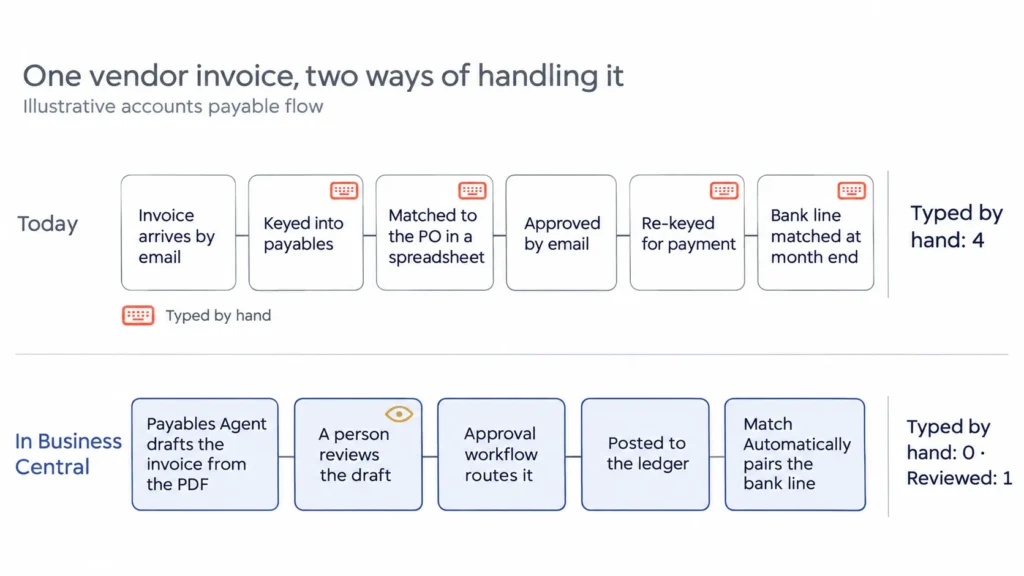
Cutting manual data entry is one of the clearest savings, because it shows up as hours you can count. To reduce it in an existing ERP, list every place a person types what another system already knows. Weaver Popcorn Hybrids cut its manual reporting effort by 80% this way.
Business Central removes most of that typing with standard features:
- The Match Automatically action pairs bank statement lines with open ledger entries, and Copilot can suggest matches for the rest (a preview feature).
- The Payables Agent reads PDF invoices from a monitored mailbox and drafts purchase invoices for a person to review. It never posts on its own.
- Recurring journals and subscription billing post the same entries every period without retyping.
- Power BI and Excel read Business Central data directly, so nobody exports and pastes a trial balance.
- Approval workflows route purchase orders and payments inside the system instead of through email chains.
Watch for: The Payables Agent uses Copilot Credits, billed on consumption, and Microsoft validates it in English only. Price it before you count its savings.
Fewer errors and numbers you can trust
Every re-keyed figure is another chance to post the wrong amount, customer, or account. In Business Central, one transaction updates stock, the subledger and the general ledger together, so there is no second copy to drift out of line.
Example. At Weaver Popcorn Hybrids, automated grower settlements replaced spreadsheet calculations for more than 200 growers. The company says the old method had caused overpayments worth hundreds of thousands of dollars in earlier years, and its financial roll-ups have been fully reliable since it left its AS400 system.
A faster month-end close
Close takes days when finance has to reconcile systems before it can report. In Forrester’s study, monthly close time fell by up to 30% by year three, and time spent on payables, receivables and billing fell by up to 50%.
Weaver’s CFO now saves around five hours a month on close work, because system-generated reports replaced the manual close pack.
What to check: Count the working days from period end to signed-off statements for your last three closes. That number, not a vendor benchmark, is your baseline.
Retired systems and IT costs
Microsoft hosts and updates Business Central online, so servers, backups, and most upgrade work leave your budget. The bigger saving is often the point tools around a legacy ERP: reporting add-ons, budgeting spreadsheets, payment utilities and the IT hours that keep them connected.
In Forrester’s model, the composite company retired systems that cost $40,000 a year in licences and support, plus a quarter of one IT employee’s time.
Better planning and cash flow
Once actuals, budgets and forecasts sit in one system, planning stops being a quarterly spreadsheet exercise. Weaver Popcorn Hybrids now compares actual, budget and revised figures in Power BI, and its planning accuracy has improved by 30%.
Forrester also lists benefits it didn’t put a dollar value on: fewer billing errors, faster invoicing and lower days sales outstanding. Leave these out of the payback maths and present them as upside. A CFO trusts a case more when the soft benefits sit outside the numbers.
Worked example: Weaver Popcorn Hybrids
Weaver Popcorn Hybrids produces and distributes hybrid popcorn seed from New Richmond, Indiana. Before the move, it ran legacy accounting, an AS400 system and offline Excel budgets that caused version conflicts and slow decisions.
We implemented Business Central with our Rapid Start approach: general ledger, payables, receivables, sales, purchasing, inventory, bank reconciliation and assembly. Power BI dashboards and a budget and forecast module followed after go-live.
| Result | Figure | Basis |
| Manual reporting effort | Down 80% | Reported result |
| Planning accuracy | Up 30% | Reported result |
| Total project cost | Under $50,000, against $250,000+ for a custom build | Project cost against an estimate |
| Finance hires avoided | 1 to 2 roles, about $75,000 to $150,000 a year | Company estimate |
| CFO close work | About 5 hours saved a month | Reported result |
| Grower invoicing | 200+ growers invoiced each season automatically | Reported result |
Cost impact: The avoided finance hires alone are worth more each year than the whole project cost, before counting time saved or overpayments prevented. Read the full Weaver Popcorn Hybrids case study.
What the Forrester study shows, and how to read it
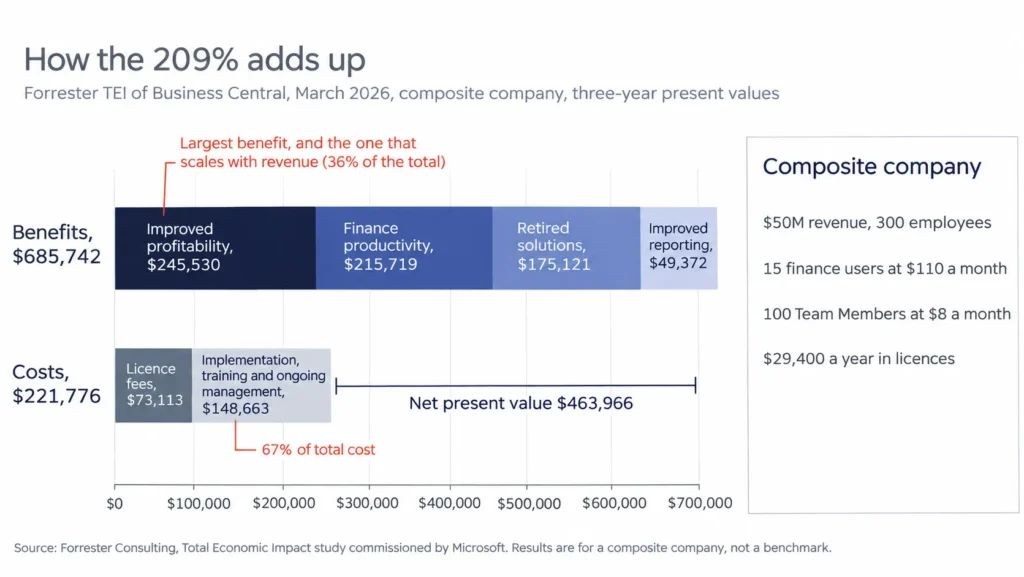
The most quoted Business Central ROI figure comes from Forrester’s Total Economic Impact study, published in March 2026 and commissioned by Microsoft. Forrester interviewed four decision-makers and combined their results into one composite company.
| Measure | Forrester result (three years, risk-adjusted) |
| Return on investment | 209% |
| Net present value | $464,000 |
| Payback | Under six months |
| Benefits, present value | $686,000 |
| Costs, present value | $222,000 |
| Composite company | US-based, $50 million revenue, 300 employees, 15 finance users and 100 light users |
The benefits came from four places:
- Improved profitability: $245,530
- Finance team productivity: $215,719
- Retired systems: $175,121
- Faster reporting and audit preparation: $49,372
Watch for: Three things limit how far the headline travels.
- Most benefits are “up to” figures, so they describe the composite’s best outcome, not an average.
- The largest benefit is a net margin gain of up to 3 percentage points, which scales with revenue. A $10 million company would see a far smaller dollar figure.
- Costs assume $50,000 in partner fees, 15 users at $110 a month, and 100 Team Members at $8.
Example. Forrester’s composite retired $40,000 a year of old systems. If your legacy maintenance and hosting cost $12,000 a year, the retired-systems line in your case is $12,000.
How to use it: Borrow Forrester’s categories, not its totals. Put your own hours, wages, and system costs into each category, then compare your result with the headline.
The costs to count
When you buy business management software, expect four costs: subscription licences, implementation services, your own staff time, and support after go-live. In the first year, partner services usually cost more than the Business Central subscription, so budget for both before you compare.
| Cost | What drives it | Typical range |
| Licences | Number of users and plan | $15,360 a year (15 Essentials, 10 Team Members) to $33,000 (25 Premium) |
| Implementation services | Scope, entities, integrations, and data migration | From $25,000 with Rapid Start; up to about $100,000 for a 25-user project with manufacturing or heavy integration |
| Larger projects | 100 users, several entities or heavy integration | $100,000 to $250,000 in services |
| Support after go-live | Hypercare and ongoing help desk | 15% to 20% of services a year |
| Internal time | Design workshops, testing, data cleanup and training | The cost most budgets leave out |
| AI agents | Copilot Credits used by agents | Consumption-based |
Licences
Microsoft publishes Business Central pricing: Essentials at $80, Premium at $110, and Team Members at $8 per user per month, billed annually, since November 1, 2025. Copilot comes with the licence; agents bill separately.
Premium adds manufacturing and service management. Our guide to Business Central Essentials vs Premium shows which users need which plan.
Implementation and services
Services depend on scope far more than on user count. Our breakdown of the cost to implement Business Central covers each phase, and our Dynamics 365 implementation cost guide gives ranges for 100-user and multi-entity projects.
Internal time
Your finance lead, an operations owner, and a few key users will spend part of each week on workshops, data cleanup, testing, and training for the length of the project. Our 25-user example below prices that at $10,000. Put a real figure on it, because those hours come from the same teams whose time you plan to save.
Costs that catch budgets out
- Data cleanup before migration, which nearly always takes longer than planned
- Report requests that multiply once testing starts
- Integrations discovered after the statement of work is signed
- Customization where standard configuration would do
- Parallel runs that keep going for months
Cost impact: Add a contingency of 10% to 20% of services. Releasing unused contingency is easier than asking the board for more money halfway through.
How to build the ERP business case for your CFO
A CFO approves an ERP business case when it compares two futures in money: keeping the current system, or moving. Build it in five steps, with your own numbers wherever you have them and cautious assumptions where you don’t.
- Price the status quo: licences, hosting, maintenance and IT hours for today’s system, plus upgrades you would otherwise face. Our comparison of Business Central vs legacy ERP lists the running costs older systems hide.
- Turn manual work into hours: ask each team how many hours a week go to re-keying, reconciling and building reports, then multiply by a fully loaded hourly cost.
- Estimate what you recover: apply a recovery rate to those hours, then add retired systems and errors you can show from records.
- Count every cost: licences, services, support, internal time and contingency, over three years.
- Calculate payback and ROI: then test both under weaker assumptions, as the next section shows.
Three formulas carry the case:
- Net annual benefit = annual benefits − annual running costs
- Payback in months = one-time costs ÷ (net annual benefit ÷ 12)
- Three-year ROI = (three-year benefits − three-year costs) ÷ three-year costs
Watch for: If you run Dynamics GP, Microsoft ends its product support on December 31, 2029. A forced move then belongs in the status quo column, so doing nothing is not free.
Where to find the hours
Most teams underestimate manual work because it is spread thinly across many people. Run a two-week time log in each team, using this list as a prompt:
| Team | Where manual hours usually hide |
| Finance | Keying vendor invoices, matching bank lines, building the close pack in Excel |
| Sales admin | Re-keying orders from email, checking stock and prices in another system |
| Purchasing | Reorder lists kept in spreadsheets, chasing approvals by email |
| Warehouse | Paper pick lists, manual counts and stock adjustments |
| Management | Waiting for reports, or rebuilding them to answer one question |
Multiply the weekly total by 50 working weeks and a fully loaded hourly rate. That figure is the starting point for every benefit in the case.
The inputs for a 25-user distributor
Take a distributor with 15 people who post transactions and 10 who approve or look things up. Its finance, purchasing, and sales admin staff spend about 60 hours a week on manual work: 3,000 hours a year, worth $150,000 at a loaded $50 an hour.
| Cost line | Annual | One-time |
| 15 Essentials licences | $14,400 | |
| 10 Team members | $ 960 | |
| Support after go-live | $5,000 | |
| Implementation services | $35,000 | |
| Internal project time | $10,000 | |
| Total | $20,360 | $45,000 |
The $35,000 services figure sits between our $25,000 Rapid Start price and the $75,000 we quote for a standard 25-user scope. Three-year costs come to $106,080.
What to put in front of the board
Keep the board pack to one page, with the detail in an appendix:
- The problem, in hours and dollars, from the status quo
- The investment: one-time and annual costs over three years
- The return: payback and ROI in the three cases below
- The risks, each with a named mitigation, such as fixed scope or a phased go-live
- The decision you need, and by when
Use finance language throughout. Module names and integration diagrams belong in the appendix.
Stress-test the payback: three cases to show your CFO
A single ROI number invites one question from a CFO: what if you’re wrong? Answer it before it’s asked by running the same 25-user model at three recovery rates. Costs stay fixed at $45,000 once and $20,360 a year; only the benefits move.
| Conservative | Expected | Strong | |
| Manual hours recovered | 20% | 35% | 50% |
| Value of time recovered | $30,000 | $52,500 | $75,000 |
| Retired systems | $8,000 | $15,000 | $20,000 |
| Errors and leakage avoided | $0 | $7,500 | $15,000 |
| Annual benefit | $38,000 | $75,000 | $110,000 |
| Net annual benefit | $17,640 | $54,640 | $89,640 |
| Payback from go-live | 31 months | 10 months | 6 months |
| Three-year ROI | 7% | 112% | 211% |
How to read it:
- The conservative case still breaks even. With a 20% recovery and no error savings, the project pays for itself within three years. That floor is what most CFOs want to see.
- The strong case matches Forrester. At 211%, it sits next to Forrester’s 209%, which tells you that the headline assumes roughly half of all manual work disappears.
- Hours drive the result. Every 5 points of recovered time is worth $7,500 a year here, so measure the baseline hours carefully before you present.
Watch for: The model counts three years from go-live and assumes benefits start in the first month. In practice, they build over the first few closes, so treat the conservative case as your floor.
What moves the number:
- Scope that grows after signing raises one-time costs; a fixed-scope project caps them.
- Low adoption cuts the hours you recover, so budget training for every role.
- Custom code adds testing work at every Microsoft update, which wears down the net benefit.
- A long parallel run doubles the workload in the months when benefits should start.
When the return shows up
Payback starts at go-live, so the project timeline matters as much as the savings. Our Dynamics 365 implementation packages put Rapid Start projects live in 60 to 90 days, while full-scope Business Central projects take 6 to 18 months.
| Return | When to first measure it | What to track |
| Data entry and reporting time | First full month after go-live | Hours per week on re-keying and report building |
| Retired systems | As each old contract ends | licence, hosting and maintenance renewals canceled |
| Month-end close | After the second or third close | Working days to signed-off statements |
| Errors and leakage | First quarter | Credit notes, billing corrections and overpayments |
| Planning and margin | Six to twelve months | Forecast accuracy, stock-outs and gross margin |
Best for: A 90-day review with your CFO that uses the same measures as the business case, so the results compare like-for-like.
Is Business Central worth it for your business?
To assess whether cloud ERP is right for you, check four things: company size, number of entities, inventory needs, and the system you run today. If two or more point to Business Central, the ROI case is worth building; if none do, a lighter tool will probably pay back sooner.
| Check | Points to Business Central | Points to a lighter tool, or waiting |
| Company size | Growing finance and operations teams, from a handful of users up to a few hundred | A few users with simple bookkeeping |
| Number of entities | Two or more legal entities, currencies or intercompany transactions | One company in one currency |
| Inventory | Stock across locations, lot or serial tracking, assembly or production | Services only, with no stock to value |
| Current system | Outgrown QuickBooks, spreadsheets, AS400, Dynamics NAV or Dynamics GP | A recent cloud ERP that fits your processes |
Makes sense when: Hundreds of users work across several countries with complex supply chains. At that size, compare Business Central with Dynamics 365 Finance and Supply Chain Management before you build the case.
Not worth it yet: A small services firm on QuickBooks with one entity and no inventory. Licences and services would outrun the hours saved, and we would tell that firm to wait.
Ready to test the numbers? Our Business Central Rapid Start is a fixed-price implementation from $25,000 that goes live in 60 to 90 days, so the cost side of your business case is settled before you sign. Explore Business Central Rapid Start implementation.
Frequently asked questions
Is Business Central worth it for a small business?
Usually yes, if the business holds stock, runs more than one entity, or sits on a system near the end of support. For a few users with simple bookkeeping and no inventory, entry-level accounting software costs less and pays back sooner.
What is a good ROI for an ERP project?
There is no standard benchmark. Forrester’s composite reached 209% over three years, and our 25-user expected case reaches 112%. Most CFOs care more about the conservative case: if it breaks even within three years, the downside is limited.
How long does Business Central take to pay back?
Forrester’s composite paid back in under six months. Our 25-user model pays back in 6 to 31 months from go-live, depending on hours recovered. Add 60 to 90 days of implementation for Rapid Start, or 6 to 18 months for full scope.
What are the main Dynamics 365 benefits for mid-sized companies?
The main Dynamics 365 benefits are one database for finance and operations, close links with Outlook, Excel, Teams and Power BI, and Copilot included in Business Central licences. Business Central suits small and mid-sized companies, while Finance and Supply Chain Management suits larger, more complex ones.
Does Copilot add to the cost of Business Central?
Copilot features come with Business Central licences at no extra charge. Agents such as the Payables Agent use Copilot Credits billed on consumption, so add them to your running costs if you plan to use them.
Should we build the business case ourselves or with a partner?
Do the baseline yourselves, because only your teams know where the hours go. Bring in a partner for the cost side: a scoped estimate turns the investment line from a guess into a quote, and that is the number a CFO challenges first.