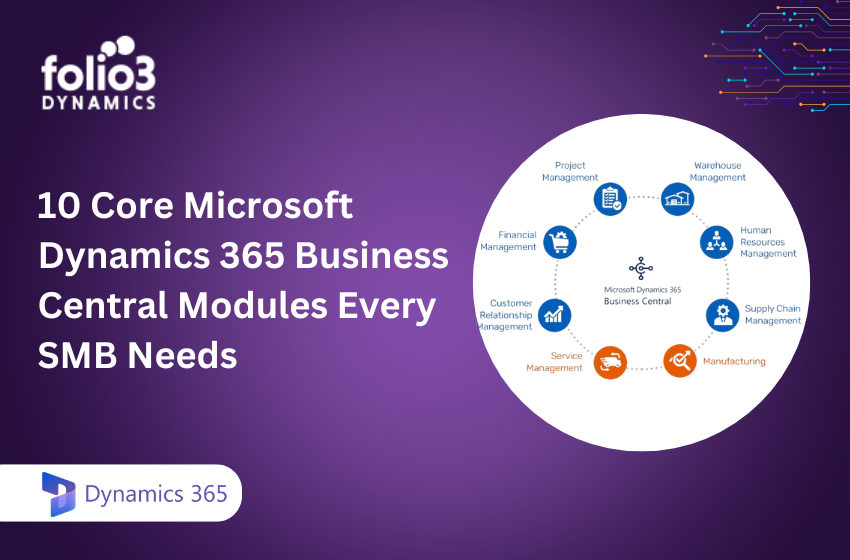
Microsoft Dynamics 365 Business Central brings finance, operations, sales, and service onto one modern platform that connects seamlessly with Microsoft 365, Power Platform, and embedded AI.
For SMB leaders, understanding the core modules is the fastest way to modernize processes, eliminate manual work, and unlock data-driven decisions. In fact, a Microsoft-commissioned Forrester study reports up to 265% ROI with payback in under six months, citing gains from process automation, integrated analytics, and productivity improvements across teams, all within the Microsoft ecosystem Microsoft Business Central overview.
This guide walks through the 10 core Business Central modules every SMB should consider, with practical guidance on deployment, licensing, and extensibility to help you build a scalable, future-ready ERP foundation.
Folio3 Dynamics and Microsoft Dynamics 365 Business Central Partnership
Folio3 Dynamics is a certified Microsoft Solutions Partner with over 20 years of experience delivering end-to-end ERP and CRM transformations. Our team implements secure, scalable Business Central architectures that unify data, embed AI-driven insights, and meet compliance needs across industries.
From strategy and migration to implementation, integrations, training, and managed support, we provide a full lifecycle approach that de-risks modernization and accelerates time to value.
If you need a partner to optimize modules, refine licensing, and ensure a smooth rollout, our consultants are ready to assist from initial assessment through ongoing optimization and support.
Financial Management
A financial management module centralizes accounting, reporting, and compliance processes across the organization, driving visibility and efficiency into real-time business performance. In Business Central, finance anchors the system with general ledger, subledgers, multi-currency, bank reconciliation, automated reporting, consolidations, tax management, and more. Recent platform updates, like the ability to edit posted General Ledger entries, streamline period-end reviews and corrections, improving clarity and auditability Top Business Central features.
Example capabilities at a glance:
- General ledger, chart of accounts, dimensions
- Accounts receivable/payable integration and cash management
- Multi-entity consolidations and intercompany
- Fixed assets and depreciation
- Budgeting and automated financial statements
- Tax and compliance reporting
Feature summary:
|
Capability |
What it enables |
|
General Ledger |
Centralized accounting with dimensions for real-time, granular analysis |
| AR/AP Integration |
End-to-end cash cycle visibility, faster close, fewer errors |
|
Multi-Currency & Tax |
Global operations support with automated currency and tax handling |
| Bank Reconciliation |
Faster period-end close and improved cash accuracy |
|
Fixed Assets |
Asset lifecycle management and depreciation tracking |
| Consolidations/Interco |
Multi-company rollups and intercompany eliminations |
|
Budgeting & Reporting |
Structured planning and automated financial statements |
Accounts Payable and Receivable
Accounts Payable (AP) manages all outgoing payments and obligations to vendors, while Accounts Receivable (AR) tracks incoming payments from customers. In Business Central, AP/AR automation strengthens cash flow and accuracy with invoice processing, credit control, vendor payments, automated reconciliation, and integrated cash management. Copilot helps automate reconciliation and reduce manual entry, accelerating month-end and shrinking exceptions through AI-driven suggestions Business Central release plan 2025 Wave.
Inventory Management
This module provides real-time item tracking, cost visibility, stock valuation, and cycle counts across warehouses, crucial for preventing stockouts and overstock. Core features include item tracking with barcodes, lots, and serials; standard and advanced costing methods; reorder points; cycle counting; and valuation tools. Because Inventory integrates tightly with Sales, Purchasing, and Supply Chain, teams see the same on-hand, on-order, and reserved quantities. They can act decisively to meet demand and control costs.
Sales and Order Management
Sales and Order Management handles quote-to-cash, customer management, sales order processing, and integrated pricing workflows. Teams create quotes, convert them to orders, fulfill, and invoice in one flow, with CRM-style customer touchpoints and performance tracking. With native integration to Outlook and Teams, sellers can view customer data, create documents, and collaborate without switching tools, making revenue operations faster and more consistent.
Purchasing and Procurement
Purchasing and procurement covers purchase orders, supplier relationship management, and demand-driven buying with approval workflows. Vendor catalogs, automated PO creation, approval hierarchies, and supplier evaluations help buyers standardize spend and raise on-time delivery. Because procurement integrates with Inventory and Supply Chain, you maintain optimal stock levels, curb rush orders, and reduce over-purchasing as demand changes.
Supply Chain Planning
Supply Chain Planning uses demand forecasting, replenishment automation, and vendor collaboration to optimize material and product flow. Forecast-driven planning and automatic reorder suggestions stabilize supply while minimizing carrying costs. With embedded analytics and Power Platform integration, planners gain real-time insights and can trigger workflows that adapt quickly to exceptions and supplier constraints Business Central release plan 2025 Wave.
Warehouse Management
Warehouse Management enables multi-location control, pick-pack-ship operations, and barcode scanning, so you fulfill accurately and fast, even with complex inventory. Features include bins, directed put-away, wave and batch picking, handheld device support, job queues, and priority management to optimize throughput.
How it compares:
- Basic inventory
- Single-location or simple bin tracking
- Manual picks and put-aways
- Basic item ledger updates
- Advanced warehouse
- Multi-warehouse, zones, and bins with directed put-away
- Wave, batch, and zone picking; packing stations and shipping integrations
- Barcode scanning, device workflows, and real-time task management
Project and Job Costing
This module tracks project timelines, budgets, resource allocation, and profitability—connecting billable work to accounting and payroll. Capabilities include timesheets, budget-to-actuals, WIP and revenue recognition, advanced cost breakdowns, and milestone billing. Integration with financials and resource planning ensures you manage scope and margin effectively. Custom Power BI dashboards can surface utilization, cost variance, and forecasted profitability to project leaders Business Central module overview (independent review).
Service Management
Service Management handles service orders, contract billing, SLAs, and maintenance schedules for post-sale customer care. Features include customer service requests, field service dispatch, contract management, and recurring invoicing, ideal for after-sales revenue and renewals. Note: Service Management requires the Premium license.
Manufacturing Module
The Manufacturing module covers Bills of Materials (BOM), production orders, shop-floor scheduling, and capacity/resource planning, unlocking discrete and light process manufacturing scenarios. It requires a Premium license and adds production-specific automation and analytics not available in Essentials Business Central pricing.
What’s included where:
|
Area |
Essentials (common) |
Premium – Manufacturing (adds) |
|
Item & Inventory |
Core items, variants, locations, costing | Advanced reservations, consumption posting |
| Assembly vs. Production | Assembly (light kitting) |
Full production orders (planned/firmed/released), subcontracting |
|
BOM & Routings |
Basic BOM | Multi-level BOMs, versions, routings, scrap, and setup/run times |
| Planning | Reorder policies, demand forecasting |
MRP/MPS-style planning suggestions, capacity-constrained planning |
|
Shop Floor & Capacity |
N/A | Work centers, machine centers, finite capacity, load balancing |
| Quality & Compliance | N/A |
Inspection steps and production reporting for traceability |
For a deeper dive into when Premium Manufacturing makes sense, see our guide to agile manufacturing in Business Central from Folio3’s experts: Business Central Manufacturing Module for Agile Organizations.
Choosing the Right Modules for Your SMB
Most SMBs start with core modules, Financials, AP/AR, Inventory, Sales, and Purchasing, to establish a solid operational baseline. As complexity grows, add Warehouse, Supply Chain Planning, Projects, Service, or Manufacturing to match process maturity and industry needs.
Key considerations:
- Current pain points: close speed, stockouts, fulfillment errors, margin leakage
- Growth plans: multi-entity expansion, new channels, product lines, or geographies
- Automation goals: approvals, reconciliation, forecasting, and AI-assisted workflows
- Compliance and audit needs: tax, revenue recognition, traceability
- IT readiness: integrations, data migration, user training, and change management
Use a sandbox and Feature Management to pilot modules and preview new features safely before company-wide rollout.
Licensing Options and Cost Considerations
Essentials covers accounting, sales, inventory, purchasing, and basic projects. Premium adds manufacturing and service management. Team Member licenses suit light users who need to read data, run reports, or perform limited tasks. As of November 2025, pricing is:
Essentials $80/user/month, Premium $110/user/month, Device $45/device/month, Team Member $8/user/month. Business Central pricing is effective November 2025.
Some Copilot agents (for example, sales order or reconciliation accelerators) may require separate entitlements or credits. Budget for implementation factors such as data migration, integrations, partner services, user training, and ongoing support.
Maximizing Business Central with AI and Microsoft 365 Integration
Copilot is Microsoft’s AI assistant embedded in Business Central, automating tasks like bank reconciliation, cash flow projections, content generation, and analytics. Native integrations with Teams, Outlook, Excel, Power BI, and Power Automate enable collaborative workflows, real-time reporting, and low-code automation, amplifying the ROI from unified data and AI-driven insights. We recommend piloting new Copilot features and extending Business Central with vetted AppSource apps or custom Power Apps to address industry-specific needs without heavy customization.
Getting Started with Folio3 Dynamics for Business Central Implementation
Folio3 acts as a consultative partner to align Business Central with your goals covering requirements analysis, module selection, licensing strategy, solution architecture, and technical rollout. A typical engagement looks like this:
- Discovery call to map objectives, scope, and success metrics
- Solution blueprint with module recommendations and a licensing plan
- Pilot/sandbox to validate processes and integrations
- Phased rollout with data migration, testing, and user enablement
- Training, go-live support, and 24/7 managed services
- Ongoing optimization, governance, and cost control
Conclusion
Microsoft Dynamics 365 Business Central provides SMBs with a complete ERP foundation by combining financial management, inventory, sales, purchasing, projects, service, and manufacturing into one connected platform. By selecting the right modules and licensing plan, organizations can streamline operations, improve financial visibility, and scale efficiently as they grow. With built-in AI, Microsoft 365 integration, and flexible extensibility, Business Central empowers businesses to modernize processes and make faster, data-driven decisions.
Ready to modernize operations with a trusted Microsoft partner? Explore our Business Central services and book a consultation: Folio3 Dynamics 365 Business Central Services.
Frequently asked questions
Who should use Microsoft Dynamics 365 Business Central?
Business Central fits small and mid-sized organizations that need robust ERP across finance, inventory, sales, and projects without the overhead of enterprise suites.
What is the difference between Essentials and Premium licenses?
Essentials includes finance, sales, purchasing, inventory, and basic projects; Premium adds manufacturing and service management for more complex operations.
How does Business Central integrate with Microsoft 365 products?
It connects natively with Outlook, Teams, Excel, and Power BI to streamline workflows, reporting, and collaboration.
What AI capabilities are available in Business Central?
Embedded Copilot assists with reconciliation, cash-flow forecasting, content generation, and analytics to reduce manual work and speed decisions.
What are typical implementation costs for SMBs?
Budgets commonly range from $50,000 to $150,000 depending on modules, data migration, integrations, and customization.