In today’s digital era, organizations are constantly looking to streamline financial processes with modern ERP solutions like Microsoft Dynamics 365 Business Central. Accounts Payable (AP) is one area ripe for automation, entering vendor invoices manually is time-consuming and error-prone. Microsoft’s new Payables Agent for Business Central addresses this challenge by leveraging AI to automate accounts payable workflows end-to-end. It minimizes manual data entry, reduces errors, and frees AP staff to focus on higher-value tasks. In this blog, we’ll explore Dynamics Business Central’s Payables Agent, what it is, and the key features that make it a game-changer for AP automation.
What is a Payables Agent in Dynamics 365 Business Central?
The Payables Agent is an AI-powered assistant built into Dynamics 365 Business Central that automates vendor invoice processing from receipt to posting. It saves time and reduces errors by automatically collecting vendor invoice attachments from email and creating purchase invoice documents for review in Business Central. The agent connects to a designated Office 365 email inbox to fetch incoming vendor bills (typically PDF invoices), uses AI (Azure Document Intelligence) to extract invoice details, and then drafts a purchase invoice within Business Central for the AP team to approve and post. The agent applies your company’s accounting policies and learns from historical purchase data to correctly categorize expenses and record them in the ledger. Essentially, Payables Agent acts as an intelligent AP clerk: it monitors incoming invoices, interprets them, and prepares transactions in Business Central, with minimal manual intervention. This Dynamics Business Central AI capability allows AP professionals, clerks, and accountants to focus on more strategic work instead of tedious data entry, boosting productivity and efficiency.
Note: In its initial release, Payables Agent is focused on overhead or non-PO invoices (e.g. utilities, rent, subscriptions) rather than inventory or purchase-order based bills. Support for more complex scenarios like matching invoices to open purchase orders and processing electronic invoices from networks is planned in future updates.
Key Features of the Payables Agent
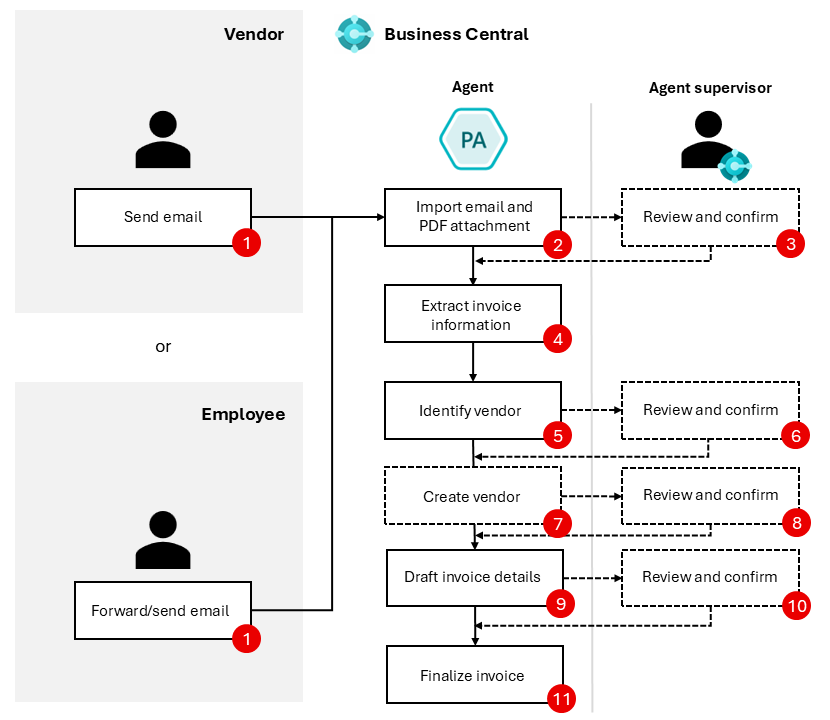
Figure: Payables Agent end-to-end workflow. Source: Microsoft
The agent (middle column) handles each step from receiving an invoice email to finalizing a purchase invoice, while an AP supervisor can review and confirm at key points (dotted boxes) as needed.
The Payables Agent in Business Central packs a range of intelligent features that enable a fully automated AP workflow. Below we break down its key capabilities:
Automated Invoice Capture from Email
One of the Payables Agent’s core features is its ability to continuously monitor an email inbox and ingest vendor invoices automatically. You can designate a shared mailbox in Microsoft 365 where vendors send their invoice emails (or where employees forward invoices). The Payables Agent connects to this mailbox, detects unread emails, and imports any PDF invoice attachments directly into Business Central’s Inbound E-Documents queue for processing. Each PDF attachment becomes an electronic document record ready for the agent to act on, ensuring no invoice falls through the cracks. Using a dedicated inbox (ideally internal-only) for invoices is recommended so that all incoming bills are captured with minimal noise or interference. This hands-free invoice capture means AP staff no longer need to manually open emails or download attachments – the agent takes care of it, kicking off the payables process the moment an invoice is received.
AI-Powered OCR and Data Extraction
Once an invoice PDF is imported, the Payables Agent automatically extracts all relevant data from the document using Azure Document Intelligence, a cutting-edge Optical Character Recognition (OCR) and AI service. The agent sends the PDF for analysis, and the extracted text (vendor details, invoice number, dates, line items, amounts, etc.) is stored in the corresponding e-document record in Business Central. Business Central provides tools for the AP supervisor to validate this OCR output easily. In fact, an enhanced attachment viewer allows the invoice PDF to be displayed almost full-screen alongside the extracted data, so you can verify that the AI correctly interpreted the document. The Payables Agent is even smart enough to flag documents that might not actually be invoices, such files are marked as “Unknown Document Type” so you can review or remove them as needed. By leveraging AI to perform data entry, the agent dramatically reduces human effort and transcription errors in the invoice capture stage.
Intelligent Vendor Identification & Creation
Identifying the correct vendor for each invoice is critical. Payables Agent uses the extracted invoice data to automatically match the invoice to an existing vendor in Business Central whenever possible. It considers details like vendor name, address, and invoice origin to find the best match. If the agent cannot confidently identify an existing vendor (for example, a new vendor not yet in your system), it can even create a new vendor record on the fly based on the invoice information. An AP supervisor can instruct the agent to create the vendor, and the agent will pre-fill the vendor card with details parsed from the invoice (such as name, address, tax registration number, etc.). For control, any vendor the agent creates is initially marked as blocked to prevent transactions until an authorized user reviews and approves the vendor in accordance with your company’s vendor onboarding policies. This intelligent vendor identification and creation capability means even invoices from first-time vendors can be processed seamlessly without delaying your AP workflow.
AI-Driven Invoice Drafting & Coding
With the vendor confirmed, the Payables Agent proceeds to draft a purchase invoice in Business Central, populated with all the necessary details, and it does so intelligently. The agent leverages a variety of AI models, predictors, and business logic to suggest how the invoice should be recorded. It uses your company’s purchase history, accounting rules, and even patterns learned from prior invoices processed by the agent to determine the optimal coding for each invoice line. For example, the agent will map line descriptions or item numbers on the invoice to the correct G/L accounts, items, or expense categories in Business Central. It might recognize a vendor’s invoice as a utility bill and automatically propose booking it to the Utilities expense account with the proper dimensions. Essentially, Payables Agent attempts to fill in the entire purchase invoice line items, amounts, dimensions, and accounting distributions as accurately as possible, just as an experienced accounting clerk would. All these draft details are compiled into a Purchase Invoice Draft linked to the inbound document. By intelligently pre-populating the invoice data, the agent streamlines the AP coding process that normally would require manually keying in lines and assigning accounts.
User Review with Transparent AI Suggestions
Before any invoice gets finalized, Payables Agent ensures a human expert can review and adjust the details as needed. The drafted purchase invoice is presented to an AP supervisor in Business Central for review and approval. Crucially, the agent doesn’t just dump data into the system, it provides explanations and confidence indicators for its suggestions to make the review process easier. Within the draft, fields that the agent populated will often include tooltips or hints explaining why a certain value was chosen. For instance, if the agent selected a deferral template for a prepaid expense line, it might include a note that “this invoice line appears to be a 12-month prepaid lease, so a 1Y deferral template was suggested.” Such reasoning is displayed in-context to help the supervisor understand the AI’s logic. The interface also clearly highlights any fields that require review or confirmation – for example, showing a count of Fields for review so the supervisor knows what to double-check. This transparent approach builds user trust in the AI’s output. The AP reviewer can accept the suggested entries or make edits if something looks incorrect, just as they would with a manually entered invoice, but with far less effort involved in reaching that stage.
Quick Finalization to Posted Invoice
After the supervisor is satisfied with the draft, finalizing the invoice is as simple as a click. The Payables Agent will finalize the purchase document draft into a new purchase invoice record in Business Central once approved. At this point, the invoice is fully created in the system (with the draft preserved as a non-editable log attached to it), and it can follow the normal workflow, for example, moving on to an approval workflow or being posted to update accounts and pay the vendor. By automating everything up to this point, Payables Agent drastically compresses the cycle time for invoice processing. What used to take days, receiving an invoice, inputting data, coding, and routing for approval can now often be done within minutes, with the agent handling the heavy lifting. Keep in mind that standard Business Central controls can still apply after the draft is finalized, but the agent’s job of getting the invoice into the system correctly is complete. The result is a faster AP process with fewer bottlenecks, allowing your finance team to scale efficiently without increasing headcount.
Autonomous Operation & Adaptive Learning
The Payables Agent is designed to run autonomously in the background, continuously handling incoming invoices with minimal manual triggers. Once activated and configured, it works like a “digital AP clerk” that never sleeps – always listening for new emails and processing documents. Importantly, the agent operates within your Business Central environment like a regular user would, respecting all your configured business rules, permissions, and even customizations. It uses Business Central’s standard pages and actions (via an internal Copilot/agent framework) to perform tasks, rather than any hardcoded shortcuts, which makes it very flexible. This means the agent can adapt to changes or custom fields in your system and even attempt to resolve validation errors on its own by interpreting system messages and adjusting inputs. In short, Payables Agent “learns” and improves over time – the more invoices it processes (and the more corrections your team provides during review), the smarter its predictions get for future invoices. Your AP process thus becomes progressively more efficient as the agent adapts to your data patterns. And because the AI is backed by Microsoft’s ongoing enhancements, you can expect its capabilities to expand with each Business Central update.
Folio3 – Your Dynamics 365 Business Central Implementation Partner
Implementing advanced features like the Payables Agent is easier with the guidance of an experienced partner. Folio3 is a certified Business Central partner with years of expertise in Dynamics Business Central consulting and solution delivery. We follow a structured methodology that ensures your Dynamics 365 Business Central projects are successful from start to finish. Whether you are looking at a new Business Central implementation or optimizing an existing system with AI-driven capabilities, our team can help tailor the solution to your business needs. From initial setup and customization to user training and ongoing support, Folio3’s Dynamics experts will ensure you maximize the value of Business Central’s latest features.
As a leading Microsoft Dynamics implementation partner, Folio3 has a proven track record of helping companies streamline their ERP processes and adopt best practices. If you’re ready to automate your accounts payable and accelerate your financial operations, our team is here to assist. Contact our Dynamics 365 Business Central support team to learn how we can help you leverage tools like the Payables Agent and achieve greater efficiency in your Business Central deployment.
FAQs
1. What types of invoices can the Payables Agent process in Dynamics 365 Business Central?
The Payables Agent is designed to process non–purchase order (non-PO) vendor invoices, such as utilities, rent, subscriptions, and other overhead expenses. It does not currently support PO-matched or inventory-based invoices.
2. How does the Payables Agent receive vendor invoices?
The Payables Agent connects to a designated Microsoft 365 shared mailbox and automatically retrieves unread emails with PDF invoice attachments. These invoices are imported into Business Central as inbound electronic documents for processing.
3. Does the Payables Agent automatically post vendor invoices?
No. The Payables Agent creates a draft purchase invoice and submits it for review. A user must review, confirm, and finalize the invoice before it is posted, ensuring financial control and compliance.
4. How does the Payables Agent identify vendors from invoices?
The agent uses extracted invoice data to match invoices with existing vendor records in Business Central. If no match is found, it can create a new vendor record, which is initially blocked until reviewed and approved by a user.
5. Can users see or understand how the Payables Agent made its decisions?
Yes. The Payables Agent provides contextual explanations and confidence indicators within the invoice draft, helping users understand why specific accounts, dimensions, or values were suggested.
6. Does the Payables Agent work with customizations in Business Central?
Yes. The Payables Agent operates using standard Business Central pages and validation rules, which allows it to function within environments that include extensions or custom fields, as long as standard system behavior is respected.