Imagine cutting weeks off hiring, greeting new employees with personalized welcome packs and freeing your HR team to focus on people instead of paperwork. In today’s competitive talent market, every extra day in the onboarding cycle erodes productivity and morale. Vacancies linger and administrative tasks distract HR from strategy. The good news is that artificial intelligence (AI) is rapidly transforming HR. Microsoft’s Dynamics 365 Copilot for HR and Microsoft Copilot for Onboarding integrate with your company’s data through Microsoft Graph and Dataverse, automating routine tasks and generating insights while keeping your data secure.
In this blog, we’ll explore how Dynamics 365 Copilot accelerates onboarding, transforms HR beyond recruitment and performance management, and provides a roadmap for responsible AI adoption.
The Current State of Employee Onboarding: Challenges HR Teams Face
Even without AI, HR professionals know that onboarding can be a minefield of manual processes, outdated tools and compliance headaches. A typical large organisation uses dozens of disconnected systems; before its AI transformation, Microsoft’s HR team relied on 108 tools and 50 shadow applications, creating duplication and confusion. Industry benchmarks show that the average time to fill a position is 42 days, and delays hurt productivity and revenue. Here are the common pain points:
- Manual, time‑consuming processes. Weeks are lost assembling materials, sending emails and following up in spreadsheets.
- Fragmented systems and shadow IT. Dozens of disconnected tools obscure data and increase risk.
- Poor new‑hire experience and early turnover. Slow equipment, benefits and training frustrate newcomers.
- Administrative overload. Time spent on paperwork leaves little room for strategic HR.
- Compliance and documentation. Contracts and visas require manual effort across roles and jurisdictions.
- Lack of personalisation. One‑size‑fits‑all programmes ignore individual roles, languages and aspirations.
- Limited visibility. Without dashboards, HR can’t track completion rates or ROI.
These challenges create an opportunity for AI‑powered solutions that streamline workflows and enhance employee experiences.
Understanding Dynamics 365 Copilot for HR: Architecture and Capabilities
What is Dynamics 365 Copilot for HR?
Dynamics 365 Copilot for HR is an AI‑powered assistant built into Dynamics 365 Human Resources. It connects large language models (GPT‑5) with your HR data through Microsoft Graph and Dataverse. By understanding context from emails, chats, documents and records, Copilot generates drafts, guides processes and surfaces insights within your HR system. This is different from the Microsoft 365 Copilot productivity assistant, which focuses on documents, meetings and general office tasks; Dynamics 365 Copilot is designed for domain‑specific HR workflows and integrates deeply with business applications.
How is it different from Microsoft 365 Copilot?
Microsoft 365 Copilot works across Word, Excel, PowerPoint, Outlook and Teams to create content and summarise information. Dynamics 365 Copilot for HR sits inside business applications, Human Resources, Finance, Customer Service and others, where it understands structured data, roles and workflows. It automates HR‑specific tasks (onboarding checklists, performance reviews, case management) rather than general productivity tasks. Both use the same Azure OpenAI foundation models and Microsoft Graph, but Dynamics 365 Copilot grounds the model in your HR data and security policies.
Key capabilities of Dynamics 365 Copilot for HR
- Task management and checklist automation. HR managers can create reusable checklists for onboarding, off‑boarding or role transitions and apply them to employees. The task management workspace lists tasks for each individual, allows due‑date adjustments and supports assigning tasks to HR staff, managers or new hires.
- Employee self‑service workspace integration. A one‑stop portal lets employees manage time off, benefits, learning and assigned tasks.
- Integration with Microsoft Teams, Outlook and Excel. HR staff can call Copilot directly from Teams, email or spreadsheets to request checklists or summaries.
- Real‑time data analysis and insights. Microsoft Graph surfaces key metrics like attrition trends and onboarding completion.
- Compliance and documentation management. Copilot drafts contracts and policy letters and supports multi‑language document generation.
Security and data privacy features
Unlike consumer AI chatbots, Dynamics 365 Copilot is built for enterprise security. It inherits existing Microsoft 365 security and compliance settings, including multi‑factor authentication and data classification. Key protections include:
- Role‑based data access. Copilot retrieves only the data a user is authorized to see.
- Data stays in your tenant. Prompts and responses aren’t used to train foundation models.
- Compliance and harmful‑content filtering. Copilot aligns with GDPR and other standards and filters out harmful content.
- Secure hosting. Runs on Azure OpenAI Service with encryption in transit and at rest.
Feature comparison table
|
Feature |
Dynamics 365 Copilot for HR | Traditional HR Systems |
| Automation Level | High – AI‑driven checklists, document generation, chatbots |
Low – manual spreadsheets and email reminders |
|
Personalization |
Dynamic and role‑based onboarding plans | Static, generic templates |
|
Integration |
Seamless with Microsoft ecosystem (Teams, Outlook, Excel) |
Fragmented systems and shadow IT |
| Real‑time Insights | Yes – dashboards and predictive analytics |
Limited or none |
|
Employee Self‑Service |
Advanced AI chatbot and portal |
Basic portals without AI |
How Microsoft Copilot for Onboarding Transforms the New Hire Experience
Automated Onboarding Checklist Generation and Task Management
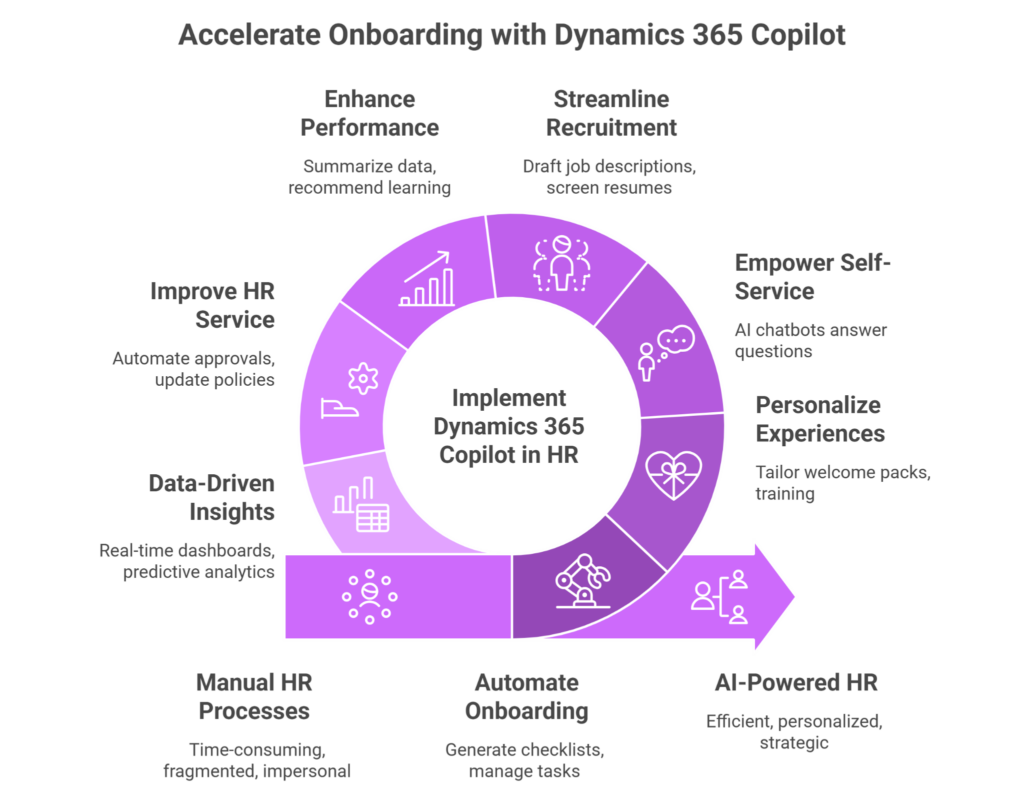
With Microsoft Copilot for Onboarding, HR managers simply describe the onboarding plan in natural language (e.g., “Create an onboarding plan for a new marketing manager in APAC”) and Copilot generates a role‑specific checklist with tasks for HR, the hiring manager and the employee. The task management workspace in Dynamics 365 Human Resources allows checklists to be reused across hires, shows pending and overdue tasks, and lets users adjust due dates or reassign tasks. Tasks can be grouped to run in parallel, IT account setup, benefits enrollment and team introductions, accelerating readiness. HR teams receive progress notifications, and new hires can tick off items from their self‑service portal.
Personalized Welcome Materials and Documentation
Copilot drafts welcome emails, orientation agendas and policy summaries tailored to the employee’s role and location. It can generate department‑specific training materials, summarize policies and compile compliance documents. Third‑party customizations extend this capability. Dynamics 365 solution enables HR teams to generate employment contracts, salary certificates and visa documents in multiple languages. The system stores templates and automatically populates them with data from employee records, reducing manual errors. Optical character recognition (OCR) verifies identity documents or bank details, while multi‑language support helps global organisations deliver a consistent experience across regions.
Employee Self‑Service Capabilities with AI Chatbots
Copilot Studio lets HR teams build conversational agents that answer onboarding questions 24/7. New hires can ask, “Where do I find the benefits enrollment form?” or “When is my first performance review?” and receive immediate answers. The employee self‑service portal already centralises work items, questionnaires, company directory and team calendars. AI chatbots extend this by integrating policy documents and knowledge articles. When the question exceeds the bot’s scope, it passes the conversation to a human HR advisor. Microsoft reports that its own HR service organization achieved a 20 % increase in case throughput using Copilot, illustrating how AI chat reduces ticket volumes and accelerates service.
Accelerating HR Transformation Beyond Onboarding with Dynamics 365 Copilot
Recruitment and Talent Acquisition Optimization
Copilot streamlines the early stages of hiring. It uses natural language prompts to draft inclusive job descriptions, screen resumes, rank candidates against required skills and generate interview questions and correspondence. Automated scheduling and integration with LinkedIn help recruiters engage candidates faster. By reducing repetitive tasks, Copilot shortens the average 42‑day time‑to‑fill and frees recruiters to build relationships.
Performance Management and Employee Development
Once employees are hired, Copilot continues to assist managers. It summarizes performance data and peer feedback, recommends learning resources from Microsoft Viva and suggests career paths based on skills and aspirations. Betterworks’ research finds that AI boosts managers’ ability to track goals and provide real‑time feedback, and two‑thirds of employees want AI to map career paths. Copilot delivers these insights directly in the flow of work.
HR Service Delivery and Case Management
Copilot transforms HR support centres by summarizing employee inquiries, drafting responses and surfacing relevant knowledge articles. In Microsoft’s own HR deployment, Copilot increased case throughput by 20 % and achieved 72 % adoption. Automated workflows manage leave approvals, benefits enrolment and policy updates, allowing agents to focus on complex cases.
Data Analytics and Strategic Workforce Planning
With Dynamics 365, HR leaders gain real‑time dashboards on headcount, attrition and compensation. Predictive analytics identify high‑risk turnover and model hiring scenarios. Integration with Power BI enables advanced reporting on diversity and compensation. Because Copilot grounds its answers in secure Graph data, analyses remain trustworthy and compliant.
Real‑World Impact: Microsoft’s Internal HR Transformation Journey
Microsoft’s HR organisation provides a proof point for Copilot’s impact. Before adopting AI, the team relied on 108 tools and 50 shadow applications, causing duplication and inefficiency. The journey towards a unified Copilot‑enabled environment delivered measurable results:
Unified knowledge base. In just four months, HR built a unified knowledge base in Dynamics 365 that feeds Copilot, ensuring consistent answers for employees.
- 20 % faster case throughput. Copilot summarises employee inquiries and suggests responses, increasing service centre throughput by 20 %.
- 72 % monthly active user adoption. Most HR agents embraced Copilot within weeks, reflecting strong user acceptance.
- Elimination of shadow IT. Consolidating from 108 tools to a single system improved data integrity and security.
- Empowered HR advisors. With routine tasks automated, HR professionals shifted focus to strategic workforce planning and employee experience.
These outcomes demonstrate that AI‑assisted HR isn’t a future concept, it’s delivering value today.
Copilot Adoption in HR: Implementation Roadmap
Successful adoption of Dynamics 365 Copilot for HR requires more than enabling a feature. A structured roadmap ensures you maximise value while safeguarding data and change management.
- Clean and organise your data: Consolidate documents and review permissions across SharePoint, OneDrive and Teams to ensure Copilot only accesses trusted sources.
- Harden identity and security: Even though Copilot uses enterprise‑grade protections, you still need to audit roles, enforce multi‑factor authentication and train employees on data privacy.
- Prioritize high‑impact scenarios: Start with a handful of repetitive HR tasks, such as drafting offers or summarizing interviews so you can pilot Copilot, collect feedback and refine prompts.
- Plan change management: Communicate early, establish champions and provide training so HR teams understand that Copilot augments, rather than replaces, their roles.
- Iterate and govern: Monitor adoption, review outputs for accuracy and update templates. A small centre of excellence can manage updates and governance.
Overcoming Common Challenges in Copilot Adoption
Adopting AI in HR isn’t without hurdles. To overcome them:
- Data privacy: Use role‑based access and audits to ensure Copilot only sees authorised data.
- Change resistance: Communicate benefits, run pilots and involve sceptics early.
- Accuracy and bias: Keep humans in the loop for critical decisions and provide feedback to improve the model.
- Legacy integration: Migrate in phases and leverage connectors to existing HR systems.
- Measuring value: Track KPIs like time to fill and case resolution to demonstrate ROI.
- Keeping pace: Establish a centre of excellence to stay current with feature updates and governance.
The Future of HR: What’s Next for Dynamics 365 Copilot?
As adoption grows, Dynamics 365 Copilot will evolve from an assistant to a strategic partner. Here are trends to watch:
- Agentic AI and autonomous workflows: Microsoft and industry analysts predict a move from narrow AI to agentic AI-autonomous agents that manage multi‑step HR processes such as recruiting, onboarding and performance reviews. These agents will proactively suggest next steps and orchestrate cross‑system tasks.
- Personalized performance feedback: Future releases will leverage generative AI to deliver personalised feedback and career recommendations at scale. This includes AI‑generated performance review drafts with context from goals, skills and peer feedback.
- Ethical AI and transparency: As AI becomes embedded in workforce monitoring, expect increased focus on ethical use, bias mitigation and transparency. HR leaders must be stewards of responsible AI.
- Deeper integration: Copilot will connect HR data with finance, supply chain and project management, enabling holistic workforce planning. This integration will deliver continuous learning recommendations and engagement insights.
Why Partner with Folio3 Dynamics for Your Copilot Journey
Embarking on a Copilot journey requires technical expertise, organisational change and a keen understanding of Microsoft’s evolving AI landscape. Folio3 Dynamics is a certified Microsoft partner with deep experience in Dynamics 365 Copilot for HR and the broader Microsoft stack. Folio3 delivers end‑to‑end consulting, implementation and support for mid‑size and enterprise customers. We can help you:
- Assess readiness: Folio3 evaluates your existing HR processes, data architecture and permissions to identify gaps before Copilot deployment.
- Configure and implement: We set up Copilot within Dynamics 365 Human Resources, integrate it with Teams, Outlook and other apps, and configure security roles.
- Develop custom solutions: From multi‑language document generation to tailored chatbots, Folio3 builds extensions that meet your unique HR needs.
- Change management and training: We provide user training, create adoption plans and ensure your HR teams understand the new workflows. This human‑centred approach drives high adoption and realises ROI quickly.
- Ongoing support: Copilot features evolve rapidly; partnering with Folio3 ensures you stay current with updates, governance and best practices.
- Industry expertise and scalability: Folio3 has delivered Dynamics 365 solutions for finance, manufacturing, retail, and can tailor Copilot to your specific workforce needs.
- Ongoing support: Copilot features evolve rapidly; partnering with Folio3 ensures you stay current with updates, governance and best practices.
Conclusion: Transform Your HR Function with Dynamics 365 Copilot
The HR landscape is changing. Manual onboarding processes, fragmented systems and generic experiences no longer suffice. By adopting Dynamics 365 Copilot for HR and Microsoft Copilot for Onboarding, you can automate tasks, generate personalized welcome materials, empower employees with self‑service chatbots and gain data‑driven insights. Generative AI already delivers tangible benefits: higher productivity, personalized development and predictive planning. A structured adoption roadmap and the right partner will help you realise this potential.
Ready to Build a Future-Ready HR Function with Folio3 Dynamics? Partner with us to streamline onboarding, personalize employee journeys, and deploy secure Copilot in HR capabilities at scale.
FAQs
Why does onboarding slow down even with HR software?
Many HR systems still require manual data entry, disconnected tools, and repetitive steps. Dynamics 365 Copilot removes these blockers by generating tasks, documents, and summaries automatically so HR teams can focus on people, not paperwork.
How does a Copilot personalize onboarding?
Copilot generates role-based checklists, localized documents, and tailored welcome materials using your HR data. This ensures each new hire gets a customized experience without HR manually recreating content.
How does Copilot prevent onboarding delays?
Copilot assigns tasks to IT, managers, and HR with due dates and reminders. Parallel workflows ensure accounts, devices, and system access are prepared before day one.
How does Copilot reduce HR workload?
Copilot consolidates tasks inside Dynamics 365 and Teams, drafting emails, summarizing cases, and automating checklists. It removes repetitive work instead of adding extra steps, especially when implemented by partners like Folio3 Dynamics.
How does Copilot help teams using fragmented systems?
Copilot integrates data across Microsoft Graph, Teams, and Dataverse, eliminating shadow systems. It centralizes knowledge, documents, and workflows so HR has one trusted source instead of managing multiple tools.
Is Copilot safe for sensitive HR data?
Yes. Data stays in your Microsoft tenant, and Copilot follows role-based access, encryption, and enterprise compliance standards. Folio3 Dynamics helps configure these controls to ensure secure and compliant deployment.